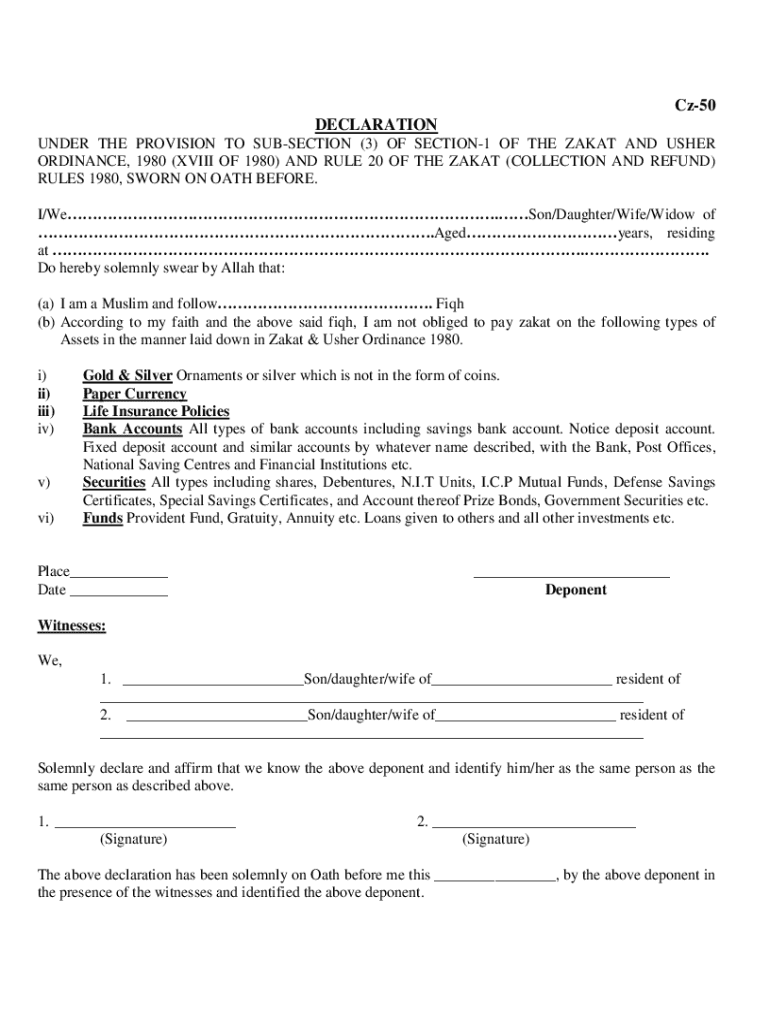
This tendency on the part of branch officials of such banks/DFIs has been viewed seriously as the acknowledgement receipt is considered prime evidence whenever any dispute on Zakat deduction subsequently arises between the parties the circular said. In order to address these complaints the State Bank has advised all banks/DFIs to invariably provide acknowledgement to their customers on submission of Zakat Declaration Form CZ-50 by properly affixing branch stamp date and signature on its photocopy. Submission of Zakat Declaration Form SBP asks banks/DFIs to provide acknowledge. Page 1 of 2 SBP asks banks/DFIs to provide acknowledgement receipts May 22 2013 RECORDER REPORT 0 Comments The State Bank of Pakistan on Tuesday advised banks/ DFIs to always provide Form. According to CPD circular No 03 issues on May 21 2013 State Bank has been receiving complaints from financial consumers that banks/DFIs generally do not provide them acknowledgement receipts while depositing a copy of Zakat Dec....
Loading

Open form follow the instructions

Easily sign the form with your finger

Send filled & signed form or save
How to fill out the Zakat Declaration Form Meezan Bank online
This guide provides a clear and supportive overview of filling out the Zakat Declaration Form Meezan Bank online. Follow the steps outlined below to ensure that you complete the form accurately and comprehensively.
Follow the steps to fill out the Zakat Declaration Form.
- Click ‘Get Form’ button to obtain the Zakat Declaration Form and open it for editing.
- Begin by entering your personal information in the designated fields. This may include your full name, identification number, and contact details. Ensure that all provided information is accurate and up-to-date.
- Next, provide details regarding your financial status. This section typically requires you to disclose your total assets, liabilities, and other relevant financial information. Be thorough to ensure compliance.
- You may need to declare your Zakat eligibility, specifying whether you are liable for Zakat payments based on the criteria outlined in the form. Review the criteria carefully to complete this section.
- Once all sections are completed, review your entries for accuracy. Ensure that you have not missed any required fields and that all information is correct.
- After ensuring the form is complete and accurate, you may have the option to save your changes, download the form for your records, print it out, or share it as needed.
Start filling out your Zakat Declaration Form online today to fulfill your obligations.
Experience a faster way to fill out and sign forms on the web. Access the most extensive library of templates available.
Related content
by S Leins · Cited by 7 — The other two criteria are normative criteria, namely the...
Get answers to your most pressing questions about US Legal Forms API.
How to get Zakat declaration form?
You can easily obtain the Zakat Declaration Form Meezan Bank by visiting any branch or downloading it from their website. The online process is user-friendly, allowing you to fill it out from the comfort of your home. Alternatively, you can contact customer support for assistance in acquiring the form.
How to avoid Zakat deduction from bank?
To avoid Zakat deduction from your accounts, you should submit a Zakat exemption form to Meezan Bank. This will indicate that you do not wish to have Zakat deducted from your finances. Ensure you submit this form on time to prevent any automatic deductions and remain in alignment with your charitable intentions.
How does Meezan Bank deduct Zakat?
Meezan Bank deducts Zakat based on the guidelines specified in the Zakat Declaration Form. Once you submit the form and declare your Zakat status, the bank will calculate the amount according to your eligible deposits and investments. This ensures a transparent and compliant method of Zakat deduction.
How to submit Zakat declaration form?
Submitting your Zakat declaration form is straightforward. You can download the Zakat Declaration Form Meezan Bank from their official website or request a copy at any branch. After filling it out, choose to submit it in person or upload it via online banking for a quick and easy process.
How to submit Zakat declaration form in Meezan Bank?
To submit the Zakat Declaration Form Meezan Bank, you can either visit a branch or use their online banking platform. Simply fill out the form with accurate information regarding your assets and charitable intentions. Once you have completed the form, submit it through your selected method to ensure your Zakat preferences are recognized.
When to submit Zakat exemption form?
You should submit the Zakat exemption form when you believe you qualify for non-deduction. This typically applies if you do not want Zakat deducted from your accounts at Meezan Bank. It's best to submit the exemption form before the Zakat assessment period to ensure your financial management aligns with your intentions.
What is the purpose of the Zakat declaration form?
The Zakat Declaration Form Meezan Bank is designed to help customers declare their Zakat status. This form ensures that your accounts are handled according to Islamic principles regarding charity. By submitting this form, you signify your preference for Zakat deductions on your deposits and investments, aligning with your beliefs.
Is Zakat declaration yes or no?
When submitting the Zakat Declaration Form Meezan Bank, your answer will depend on your personal circumstances and beliefs regarding Zakat. If you want Zakat to be deducted, your declaration will be 'yes'; if not, indicate 'no'. This form enables the bank to proceed per your preferences regarding Zakat.
How to fill Zakat declaration form?
Filling out the Zakat Declaration Form Meezan Bank is straightforward. You will need to provide your personal details, account number, and specify your Zakat preferences, such as whether you wish for Zakat to be deducted automatically. Ensure that you double-check your entries to avoid any issues.
Is Pakistan banks to close on March 3rd 2025 for Zakat deduction?
As of now, there is no official announcement regarding a nationwide bank closure for Zakat deduction on March 3rd, 2025. However, banks may undertake certain procedures during Ramadhan for Zakat collection. It's wise to stay updated with official communications from the bank, especially concerning Zakat Declaration Form Meezan Bank.
Use professional pre-built templates to fill in and sign documents online faster. Get access to thousands of forms.
If you believe that this page should be taken down, please follow our DMCA take down process here.