Loading
Get Eci Epic 001 Online
How it works
-

Open form follow the instructions
-

Easily sign the form with your finger
-

Send filled & signed form or save
How to fill out the Eci Epic 001 Online
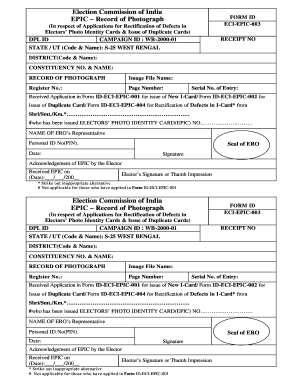
Completing the Eci Epic 001 Online form is an essential process for individuals seeking to rectify defects in their electors' photo identity cards or to request duplicate cards. This guide provides clear instructions to help users navigate the form efficiently.
Follow the steps to complete the Eci Epic 001 Online form.
- To begin, press the ‘Get Form’ button to access the form and open it in your chosen digital editor.
- Fill in the Receipt Number as required. This number serves as a reference for your application.
- Enter your DPL ID, which is essential for processing your application.
- Indicate the Campaign ID relevant to your application (e.g., WB-2000-01), ensuring that it corresponds to the appropriate region.
- Complete the fields for State/UT by entering the code and name (e.g., S-25 WEST BENGAL) accurately.
- Provide the District code and name as it pertains to your application.
- Insert your Constituency Number and Name, which are critical in identifying your geographical eligibility.
- Upload the Image File Name associated with your application, ensuring it is clear and adheres to format specifications.
- Input your Register Number, Page Number, and Serial Number of Entry as prompted.
- Specify which Form ID you are referencing, choosing from Form ID-ECI-EPIC-001 for a New I-Card, Form ID-ECI-EPIC-002 for Duplicate Cards, or Form ID-ECI-EPIC-004 for Rectification of Defects.
- Provide the name of the applicant who has been issued the Electors’ Photo Identity Card, ensuring accuracy.
- Affix the Seal of ERO where indicated.
- Include the date of form submission.
- Sign the form to confirm your acknowledgment of the application.
- Lastly, acknowledge receipt of the EPIC by adding the date received and the elector’s signature or thumb impression.
- Once all fields are complete, make sure to save your changes. You can then download, print, or share the form as needed.
Get started on completing the required documents online today.
Related links form
Key criteria include a recent photo (taken within the last month) sized 2x2inch, a light and plain background, a neutral expression, and an unobstructed, full-face view, background color - Light Gray. Refrain from wearing glasses, headgear, or casting shadows, except for religious reasons.