Loading

Open form follow the instructions

Easily sign the form with your finger

Send filled & signed form or save
How to fill out the Idg Njapp 051719 V1 online
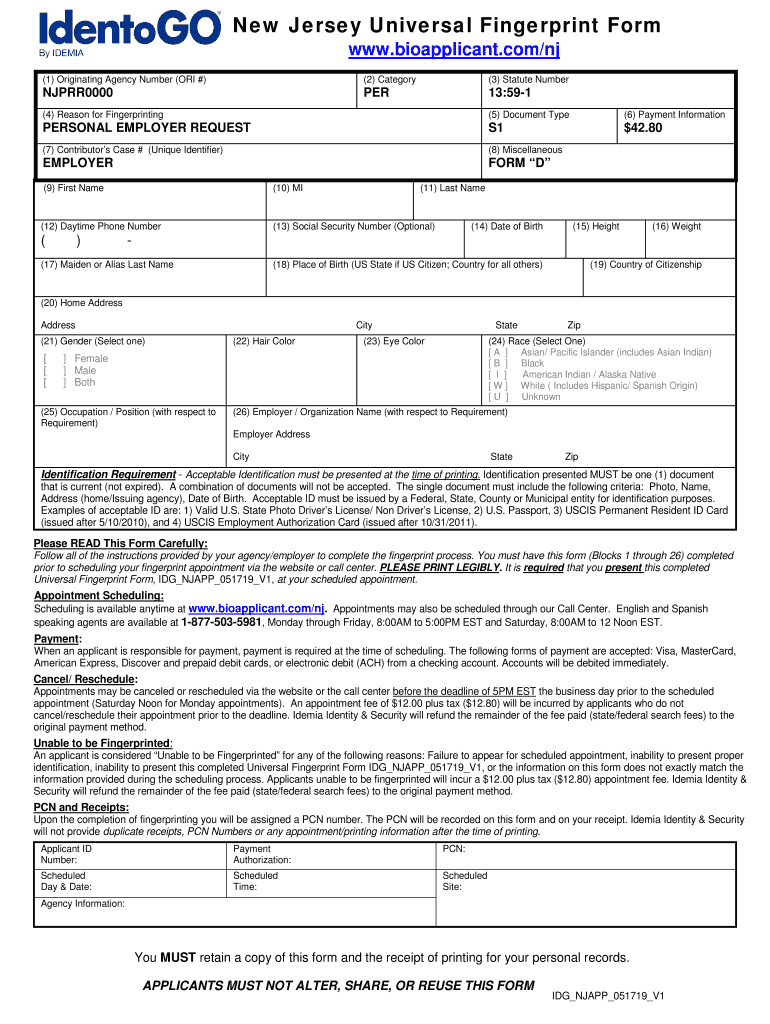
This guide provides clear and supportive instructions on how to fill out the Idg Njapp 051719 V1 form online. Following these steps will help ensure that all necessary information is accurately provided for your fingerprinting process.
Follow the steps to complete the Idg Njapp 051719 V1 form.
- Click the ‘Get Form’ button to obtain the form and open it in your preferred editing software or browser.
- Begin by filling out the Originating Agency Number (ORI #) in the designated field.
- Select the appropriate category from the options available.
- Input the statute number in the designated field (for example: NJPRR0000).
- Provide the reason for fingerprinting as per the requirements of your agency or employer.
- Indicate the document type for which you are being fingerprinted.
- Fill in the payment information, including the amount (e.g., $42.80) that is due.
- Enter your Contributor’s Case number if applicable, which serves as your unique identifier.
- Record your personal information, starting with your first name, middle initial, and last name.
- Enter your daytime phone number in the specified format.
- Fill in your optional Social Security number and your date of birth.
- Provide details such as your height and weight.
- If applicable, include your maiden or alias last name.
- Indicate your place of birth and your country of citizenship.
- Complete your home address, including street address, city, state, and zip code.
- Select your gender from the provided options.
- Choose your hair color from the available selections.
- Select your eye color from the options given.
- Identify your race by selecting one of the available categories.
- Provide your employer or organization name related to the requirement.
- Include the employer address (street, city, state, and zip).
- Review all entered information to ensure accuracy before finalizing.
- Once all fields are complete, save your changes, and you may download, print, or share the completed form.
Complete your forms with ease and confidence online!
Experience a faster way to fill out and sign forms on the web. Access the most extensive library of templates available.
Related content
Jun 1, 2019 — (1) a copy of the individual's completed Universal Form...
Identification presented MUST be one (1) document that is current (not expired). A...
Get answers to your most pressing questions about US Legal Forms API.
How to fill out forms on Drive?
To fill out forms on Google Drive, locate the form you need and open it in the appropriate application like Google Docs or Google Forms. If it is a PDF, use a compatible editor to fill in your details. Always ensure to save your changes before sharing or submitting, and remember that the Idg Njapp 051719 V1 can help streamline form-filling tasks for you.
Can I write on a PDF in Google Drive?
Yes, you can write on a PDF in Google Drive using compatible editing tools. Open the PDF and use an editor to add text, annotate, or highlight sections. This functionality is useful for forms and documents where additional input is necessary, and tools like Idg Njapp 051719 V1 can assist in managing these tasks.
How to do a fillable form in Google Docs?
To create a fillable form in Google Docs, you can use tables or text boxes to format areas where users can input their information. Additionally, consider using Google Forms, which is specifically designed for creating interactive forms. It makes data collection easy and can integrate with tools like Idg Njapp 051719 V1 for enhanced usability.
How to fill out a US customs declaration form?
Filling out a US customs declaration form requires clear and accurate information about your trip and items you're bringing into the country. Carefully read each section and provide truthful details about your purchases and any items you are declaring. If you're unsure about any section, you can consult resources provided by platforms like Idg Njapp 051719 V1 for guidance.
How do I convert a PDF to a fillable form on Google?
To convert a PDF into a fillable form on Google, upload your PDF to Google Drive. Then, use a conversion tool or an add-on that supports PDF editing to create fillable fields. Once done, you can share your fillable form with others, ensuring they can easily input their information. The Idg Njapp 051719 V1 might include features that simplify this process.
How do I fill out a form that was emailed to me?
To fill out a form emailed to you, first download the attached form file. Open it using a compatible PDF reader or an editor that allows form filling. After filling in your information, save the document and send it back as required. If you're using the Idg Njapp 051719 V1, refer to its user guide for specific instructions.
How long does it take to get fingerprints back from IdentoGO NJ?
Speed – Our enrollment agents are trained to ensure your paperwork is in order and fingerprints are captured quickly so that you can get on your way. All IdentoGO Centers are equipped with Live Scan systems to ensure quality fingerprints. Results are returned in a matter of days rather than weeks.
Where do I find my service code for IdentoGO NJ?
Please contact your employer, potential employer, agency contact, or licensing agency to find out how to obtain your Service Code.
How do I get fingerprinted for my NJ nursing license?
Applicants that are required to submit fingerprint images are provided a fingerprint form by the program that requires the fingerprint submission. The applicant makes an appointment with the vendor designated by the New Jersey State Police to capture the fingerprint images.
How long do fingerprints take to process in NJ?
The process should take approximately two weeks from when the applicant is fingerprinted unless follow-up investigation is required.
Use professional pre-built templates to fill in and sign documents online faster. Get access to thousands of forms.
If you believe that this page should be taken down, please follow our DMCA take down process here.