Loading
Form preview
  • US Legal Forms
  • Other Templates
  • More Forms
  • More Multi-State Forms
  • Adt Quickconnect Consumer Agreement - Its Home Security - Its-home-security Co 2020

Get Adt Quickconnect Consumer Agreement - Its Home Security - Its-home-security Co 2020-2026

How it works

  1. Open form

    Open form follow the instructions

  2. Easily sign form

    Easily sign the form with your finger

  3. Share form

    Send filled & signed form or save

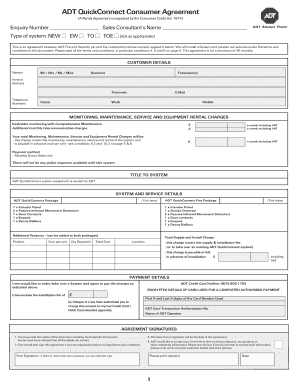
How to fill out the ADT QuickConnect Consumer Agreement - ITS Home Security - Its-home-security Co online

Filling out the ADT QuickConnect Consumer Agreement is an essential step for users wanting to secure their premises with ADT Home Security services. This guide provides clear and supportive instructions to help users navigate the agreement efficiently.

Follow the steps to effectively complete the ADT QuickConnect Consumer Agreement.

  1. Use the ‘Get Form’ button to access the agreement and open it in your selected document editor.
  2. Fill out the customer details section with accurate information. Include full names, the invoice address, email, postcode, and telephone numbers (work, home, and mobile).
  3. In the monitoring, maintenance, service and equipment rental charges section, indicate the type of system you are selecting by ticking the appropriate box and enter the monthly charges as specified.
  4. Provide the payment method, which is only through monthly direct debit, and ensure to fill or authorize the details for the card used for payment.
  5. Under the system and service details section, select the packages you would like to order. Indicate the quantity required for each specific item.
  6. Check and confirm the installation address. If different from the invoice address, provide the complete installation address and any notes applicable.
  7. Designate at least two keyholders by providing their complete names, addresses, and contact numbers, ensuring that each keyholder is above a certain age and can respond promptly to any alarm activation.
  8. Review the important information and agreement signatures section to confirm all information is correct before signing. Ensure that all customers sign if there is more than one.
  9. After reviewing and ensuring all details are filled correctly, save changes, download, print, or share the completed form as per your needs.

Complete your ADT QuickConnect Consumer Agreement online today to secure your home effectively.

Get form

Experience a faster way to fill out and sign forms on the web. Access the most extensive library of templates available.
Get form

Related content

Leading with purpose, innovating with passion.
Apr 5, 2024 — Our TELUS Health business is enhancing 76 million lives worldwide through...
Learn more
Crossroads 2000 Proceedings - Institute for...
Crossroads 2000 was the second biennial transportation research conference cospon- sored...
Learn more
Building Design & Processes Manual
1.1.1 General Information. The City encourages owners of building projects in early stages...
Learn more

Related links form

Texas Application For A Temporary License To Conduct - Txlottery PDF CFW08 Manual Do Usuario Micro Line P3 - LOG Automa O E ... - Log Ind Form 788 Revised 9-2014 MVC Oklahoma Tax Commission - Motor Vehicle Division Affidavit For Issuance Notification Of RCRA Subtitle C Activity: Instructions And Form: EPA ...

Questions & Answers

Get answers to your most pressing questions about US Legal Forms API.

Contact support

The keyholding service offered by ADT provides you with an added layer of security by ensuring that a trusted individual can access your property if you are away. This service is particularly beneficial during emergencies where prompt access is necessary. Learn more about incorporating this offer into your ADT QuickConnect Consumer Agreement - ITS Home Security - Its-home-security Co. for peace of mind.

To set up your ADT security system, start by selecting a suitable location for all devices. Follow the installation instructions provided in your kit to ensure proper placement and connectivity. After physical setup, configure your system through the ADT mobile app or web portal, which will guide you through the final steps of activating services. Don't hesitate to get in touch with ADT support if you face any challenges.

An ADT security system typically requires a subscription for full functionality, including professional monitoring and alerts. However, you can utilize some features on a self-monitored basis without a subscription. To get more details about your ADT QuickConnect Consumer Agreement - ITS Home Security - Its-home-security Co., consider reviewing your contract or contacting ADT customer service for clarification.

While many modern ADT systems can connect to Wi-Fi for enhanced features, it is not always a requirement for basic functionality. Wired systems can still operate effectively without Wi-Fi. However, to take full advantage of your ADT QuickConnect Consumer Agreement - ITS Home Security - Its-home-security Co. and any smart devices, having a stable internet connection is recommended.

Setting up an ADT home security system involves a few straightforward steps. First, unpack your equipment and follow the installation guide provided in your package. Next, connect the devices according to the instructions and ensure they communicate with the central system. If you encounter any issues during setup, reaching out to ADT support will help you resolve them quickly.

The standard contract for ADT typically includes a commitment of 24 to 36 months. This contract outlines the services provided as well as the monthly fees associated with your ADT QuickConnect Consumer Agreement - ITS Home Security - Its-home-security Co. Make sure to read through your contract carefully for details on cancellation policies and other terms.

To find your ADT contract, start by checking your email for the initial agreement or confirmation sent upon activation. You may also find a copy in your ADT account under the documents section. If you still cannot locate it, contact ADT customer support for direct assistance in retrieving your ADT QuickConnect Consumer Agreement - ITS Home Security - Its-home-security Co.

Generally, ADT requires a contract to take advantage of their complete service offerings. The ADT QuickConnect Consumer Agreement - ITS Home Security - Its-home-security Co. provides essential monitoring and protection features that depend on a contractual agreement. If you are looking for flexibility, inquire about various contract lengths or options that might suit your needs.

Resetting your ADT security system can be done by accessing the control panel interface and selecting the reset option. After following the prompts, the system will refresh any settings. Make sure to consult the ADT QuickConnect Consumer Agreement - ITS Home Security - Its-home-security Co. for any model-specific instructions.

To turn your ADT system back on, begin by ensuring your control panel is plugged in and powered. Then, simply arm the system using the control panel or mobile app. If you need guidance, the ADT QuickConnect Consumer Agreement - ITS Home Security - Its-home-security Co. provides detailed steps for reactivating your system.

Get This Form Now!

Use professional pre-built templates to fill in and sign documents online faster. Get access to thousands of forms.
Get form
If you believe that this page should be taken down, please follow our DMCA take down processhere.
Get ADT QuickConnect Consumer Agreement - ITS Home Security - Its-home-security Co
Get form
  • Adoption
  • Bankruptcy
  • Contractors
  • Divorce
  • Home Sales
  • Employment
  • Identity Theft
  • Incorporation
  • Landlord Tenant
  • Living Trust
  • Name Change
  • Personal Planning
  • Small Business
  • Wills & Estates
  • Packages A-Z
  • Affidavits
  • Bankruptcy
  • Bill of Sale
  • Corporate - LLC
  • Divorce
  • Employment
  • Identity Theft
  • Internet Technology
  • Landlord Tenant
  • Living Wills
  • Name Change
  • Power of Attorney
  • Real Estate
  • Small Estates
  • Wills
  • All Forms
  • Forms A-Z
  • Other Templates
  • Legal Hub
  • About Us
  • Help Portal
  • Legal Resources
  • Blog
  • Affiliates
  • Contact Us
  • Delete My Account
  • Site Map
  • Industries
  • Forms in Spanish
  • Localized Forms
  • State-specific Forms
  • Forms Kit
  • Real Estate Handbook
  • All Guides
  • Notarize
  • Incorporation services
  • For Consumers
  • For Small Business
  • For Attorneys
  • USLegal
  • FormsPass
  • pdfFiller
  • signNow
  • altaFlow
  • DocHub
  • Instapage
Form Packages
  • Adoption
  • Bankruptcy
  • Contractors
  • Divorce
  • Home Sales
  • Employment
  • Identity Theft
  • Incorporation
  • Landlord Tenant
  • Living Trust
  • Name Change
  • Personal Planning
  • Small Business
  • Wills & Estates
  • Packages A-Z
Form Categories
  • Affidavits
  • Bankruptcy
  • Bill of Sale
  • Corporate - LLC
  • Divorce
  • Employment
  • Identity Theft
  • Internet Technology
  • Landlord Tenant
  • Living Wills
  • Name Change
  • Power of Attorney
  • Real Estate
  • Small Estates
  • Wills
  • All Forms
  • Forms A-Z
  • Other Templates
Customer Service
  • Legal Hub
  • About Us
  • Help Portal
  • Legal Resources
  • Blog
  • Affiliates
  • Contact Us
  • Delete My Account
  • Site Map
  • Industries
  • Forms in Spanish
  • Localized Forms
  • State-specific Forms
  • Forms Kit
Legal Guides
  • Real Estate Handbook
  • All Guides
Prepared for you
  • Notarize
  • Incorporation services
Our Customers
  • For Consumers
  • For Small Business
  • For Attorneys
Our Sites
  • USLegal
  • FormsPass
  • pdfFiller
  • signNow
  • altaFlow
  • DocHub
  • Instapage
Social Media
Call us now toll free:
+1 833 426 79 33
As seen in:
© Copyright 1999-2026 airSlate Legal Forms, Inc. 17 Station Street, Ste. 203, Brookline, MA 02445
  • Your Privacy Choices
  • Terms of Service
  • Privacy Notice
  • Content Takedown Policy
  • Bug Bounty Program