Loading
Get Millbrae School District 2020-2026
How it works
-

Open form follow the instructions
-

Easily sign the form with your finger
-

Send filled & signed form or save
How to fill out the Millbrae School District online
This guide provides clear and detailed instructions on how to effectively fill out the Millbrae School District document online. By following these steps, users can ensure they complete the form accurately and efficiently.
Follow the steps to complete the form correctly.
- Click ‘Get Form’ button to access the document and open it for completion.
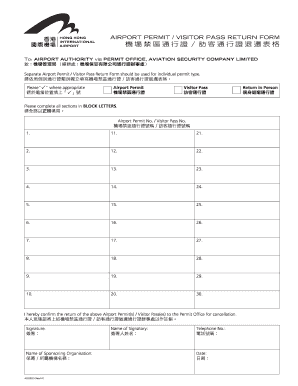
- Identify the type of permit you are returning: Airport Permit or Visitor Pass, and mark 'P' in the designated area.
- Complete all sections in BLOCK LETTERS. Begin by entering the Airport Permit No. or Visitor Pass No. as required.
- For each permit or pass, fill out the corresponding number line, ensuring no information is left blank.
- Once all permit numbers are entered, confirm by signing in the signature area provided.
- Enter the name of the sponsoring organization in the designated field clearly.
- Write down the name of the signatory in the appropriate section.
- Provide a valid telephone number for contact purposes.
- Finally, include the date of completion in the specified area.
- After completing the form, review all entries for accuracy, then save your changes, and prepare to download, print, or share the form as needed.
Ensure your documents are submitted correctly by following this guide online.
The San Mateo School District is well-regarded and offers a variety of educational programs and initiatives. However, many families also explore alternatives like the Millbrae School District for its strong academic performance and community focus. The choice between these districts often comes down to specific student needs and preferences. It's worth evaluating both districts to determine which aligns better with your family's goals.