Loading
Get Borang Endosmen Motor Motor Endorsement Form - E-ikhlas 2020-2026
How it works
-

Open form follow the instructions
-

Easily sign the form with your finger
-

Send filled & signed form or save
How to fill out the Borang Endosmen Motor Motor Endorsement Form - E-IKHLAS online
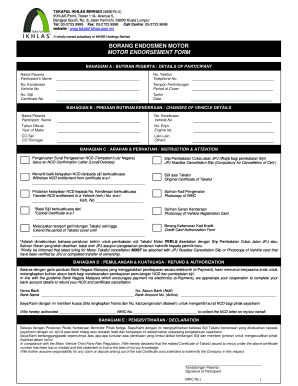
Filling out the Borang Endosmen Motor Motor Endorsement Form - E-IKHLAS online is a straightforward process that requires careful attention to detail. This guide will provide you with step-by-step instructions to ensure that you complete the form accurately and efficiently.
Follow the steps to complete your form with confidence.
- Click ‘Get Form’ button to obtain the document and open it in your preferred editing tool.
- In Section A, enter the participant's name and telephone number. Ensure that the details are accurate to avoid any confusion later.
- Move to Section B where you will provide changes related to vehicle details. Input the vehicle number, year of make, engine number, and the appropriate CC or tonnage as required.
- In Section C, follow the instructions and attention guidelines. Indicate if you need to issue an NCD confirmation letter or wish to withdraw NCD entitlement.
- Proceed to Section D for your declaration. Fill in your name, vehicle number, and certificate number. You must sign and date this section, acknowledging your responsibility regarding the lost certificate.
- In Section E, complete your bank account details for the electronic payment process. This ensures that you can receive any applicable refunds smoothly.
- Review all entered information for accuracy and completeness. Ensure any required supporting documents are ready for submission.
- Save your changes, and then download, print, or share the completed form as necessary based on your submission needs.
Begin your document completion process online today.