Loading
Get Sf 181 2020-2026
How it works
-

Open form follow the instructions
-

Easily sign the form with your finger
-

Send filled & signed form or save
How to fill out the Sf 181 online
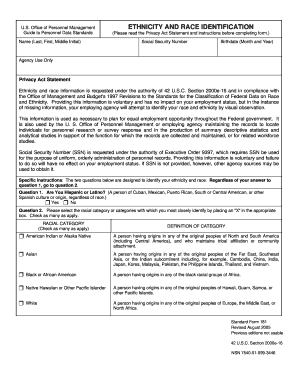
The Standard Form 181 (Sf 181) is a vital document used to collect data on ethnicity and race identification for federal personnel records. This guide aims to provide a clear and concise walkthrough for completing the form online, ensuring users can confidently fill it out.
Follow the steps to complete the Sf 181 online effectively.
- Press the ‘Get Form’ button to access and open the Sf 181 in your preferred digital environment.
- Begin by entering your name in the designated fields: 'Last', 'First', and 'Middle Initial'. Ensure that each name component is clearly written to avoid any confusion.
- Provide your Social Security Number (SSN). This information is voluntary but assists in orderly administration of personnel records. You may leave this blank if you prefer.
- Enter your birthdate by selecting the month and year from the respective fields. Accurate information is crucial for record-keeping.
- Read the Privacy Act Statement and instructions carefully before proceeding. This information outlines the importance of ethnicity and race data and its uses within federal agencies.
- Answer the first question regarding whether you identify as Hispanic or Latino by selecting 'Yes' or 'No'. Your response will inform subsequent questions.
- For the second question, indicate your racial category or categories by placing an 'X' in the box next to the options that apply to you. You may select multiple categories if you identify with more than one.
- Once all fields are completed, review your entries for accuracy. It's important to ensure that all information is correct and clearly legible.
- Finally, you can save your changes, download the form, print it, or share it as needed. Make sure to keep a copy for your records.
Complete your Sf 181 online today for efficient management of your personnel data.
To fax your SF 181 form, you need to locate the appropriate fax number provided by the agency or organization requesting the form. This number is often listed in the instruction booklet or on their official website. Double-check to ensure your information is securely transmitted.