Loading
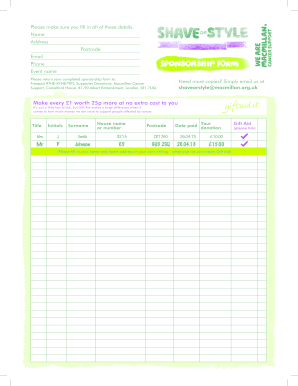
Get Brave The Shave Sponsor Form 2020-2026
How it works
-

Open form follow the instructions
-

Easily sign the form with your finger
-

Send filled & signed form or save
How to fill out the Brave The Shave Sponsor Form online
Filling out the Brave The Shave Sponsor Form online is a straightforward process that allows you to support a meaningful cause. This guide will walk you through each section of the form to ensure your submission is accurate and effective.
Follow the steps to complete your sponsorship form online
- Click ‘Get Form’ button to obtain the form and open it in your preferred editor.
- Begin by entering your personal details in the appropriate fields. Include your full name, address, postcode, email, and phone number. Ensure that your information is correct and clearly written.
- In the 'Event Name' section, specify the name of the event you are sponsoring. This helps connect your donation to the correct initiative.
- For each donation, fill in the details including the date paid, the amount of your donation, and whether you want to claim Gift Aid by ticking the corresponding box. This step is crucial, as it maximizes the value of your contribution.
- If you're submitting multiple donations, repeat the previous step for each one, ensuring that each entry is sequential and complete.
- Review your entries for accuracy. Ensure all required fields are filled out and that your handwriting (if applicable) is legible.
- Once you have completed the form, you may save your changes, download a copy for your records, print the form, or share it as needed.
Complete your Brave The Shave Sponsor Form online to make a difference today!
To get the closest shave, use a sharp blade and apply a rich lather of shaving cream. Shave in the direction of hair growth first, then reapply cream and shave against the grain for maximum closeness. Remember to rinse your razor frequently and finish with a soothing aftershave to prevent irritation.