Opal Refund and Balance Transfer Policy Electronic Ticketing System Opal Refund and Balance Transfer Policy This Opal Refund and Balance Transfer Policy sets out the terms upon which TfNSW will provide.

Open form follow the instructions

Easily sign the form with your finger

Send filled & signed form or save
How to fill out the Opal Card Refund online
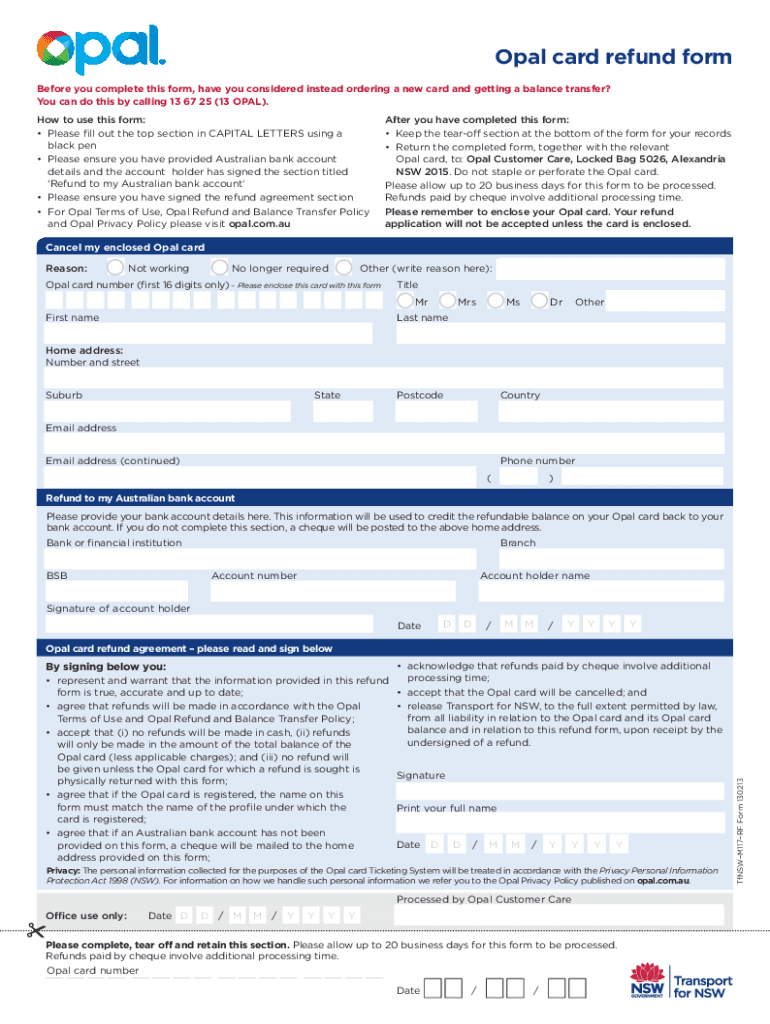
The Opal Card Refund Form is essential for users who wish to claim a refund for their Opal Card balance. This guide provides clear and detailed instructions on how to complete the form online, ensuring you understand each section and requirement for a successful refund process.
Follow the steps to complete your Opal Card Refund Form online.
- Click ‘Get Form’ button to obtain the Opal Card Refund Form and open it in the editor.
- Fill out the top section of the form in capital letters using a black pen. Ensure that your details are clear and legible.
- Provide your Opal Card number (first 16 digits only) in the designated field to identify which card you want to refund.
- Include your personal details, such as title, first name, last name, home address, email address, and phone number. Make sure all information is accurate and up to date.
- Select the reason for canceling your Opal Card from the options provided: 'Not working', 'No longer required', or specify another reason.
- Complete the 'Refund to my Australian bank account' section by providing your bank or financial institution's details, BSB, and account number. Ensure the account holder's name matches the signature provided.
- Sign and date the 'Refund agreement' section, confirming that you understand the terms and conditions related to the refund process.
- Attach the physical Opal Card to the completed form and avoid stapling or perforating the card.
- Submit the completed form and enclosed Opal Card to the Opal Customer Care address provided, ensuring you keep the tear-off section for your records.
- Please allow up to 20 business days for the processing of your refund.
Complete your Opal Card Refund Form online today to ensure a prompt refund!
Experience a faster way to fill out and sign forms on the web. Access the most extensive library of templates available.
Related content
... OPAL you are not entitled to any refunds. NAC 391.045. Discounts Available. $25.00 –...
... card to arrive. Getting a refund. If you no longer need your ISTP card, you can get a...
Nov 8, 2025 — ... card, but it is not refundable even at the end of the trip, which is a...
Get answers to your most pressing questions about US Legal Forms API.
How do I transfer my card balance to my bank account?
You cannot transfer your card balance directly to your bank account. Instead, you can opt for an Opal Card Refund to access your funds. This process ensures that your balance is refunded promptly and securely to your specified payment method.
How to get a refund on your card?
To get a refund on your card, visit the Opal website or the nearest Opal retailer. Provide the necessary card details and identification to initiate the Opal Card Refund process. The funds will then be processed back to your payment method.
Can I transfer my wallet balance to my bank account?
Transferring your wallet balance to your bank account is not supported directly. However, you can use the Opal Card Refund process to obtain a refund. This allows you to access funds from your wallet in a secure manner every time.
How do I transfer my Opal card balance?
To transfer your Opal card balance, you need to log into your Opal account online or use the Opal app. Follow the prompts to request a balance transfer, ensuring that you have another Opal card ready to receive the balance. This process is quick and easy, making managing your funds straightforward.
Can I get a refund on my Opal card?
Yes, you can get a refund on your Opal card. To initiate the Opal Card Refund process, visit an Opal retailer or use the Opal website. Provide necessary details like your card number and personal information to help facilitate the refund smoothly.
What happens if you don't tap on Opal?
If you don't tap on your Opal card when using public transport, you may not be charged accurately for your journey. This oversight can lead to potential fines or difficulties when determining travel costs. To avoid these situations, ensure that you always tap your Opal card, and if you do encounter any issues, consider reaching out for an Opal Card refund to manage any excess charges.
What is the minimum balance for the Opal card?
The minimum balance required on the Opal card depends on the type of fare you plan to use. Generally, it's advisable to maintain a balance of at least $10 to ensure you can travel without interruptions. Always check your balance regularly to avoid running into issues when using your card and to enjoy a seamless experience.
Can Opal cards be refunded?
Yes, you can obtain an Opal Card refund under specific conditions. If you have remaining balance on your Opal card and you decide not to use it, you can apply for a refund through the official channels. This process allows you to recover your unused funds efficiently, ensuring you get your Opal Card refund without any hassle.
How do I cancel my Opal subscription?
To cancel your Opal subscription, access your account dashboard on the Opal website. Locate the subscriptions tab, where you can find the cancellation option. After cancellation, you may be eligible for an Opal Card Refund if there is a remaining balance on your account.
How do I delete my Opal account online?
To delete your Opal account online, you need to log in to your account and navigate to the account settings. From there, you will find the option to delete your account. If you have any remaining balance, make sure to request an Opal Card Refund before proceeding with the deletion.
Use professional pre-built templates to fill in and sign documents online faster. Get access to thousands of forms.
If you believe that this page should be taken down, please follow our DMCA take down process here.
This form is available in several versions. Select the version you need from the drop-down list below.