Loading
Form preview
  • US Legal Forms
  • Other Templates
  • More Forms
  • More Multi-State Forms
  • 2016 Fitness Challenge Registration Form - Aims 2020

Get 2016 Fitness Challenge Registration Form - Aims 2020-2026

How it works

  1. Open form

    Open form follow the instructions

  2. Easily sign form

    Easily sign the form with your finger

  3. Share form

    Send filled & signed form or save

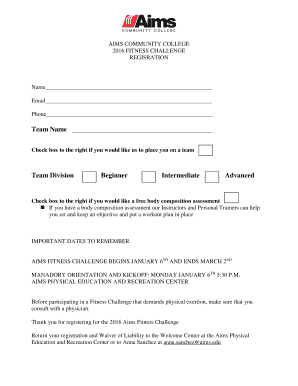
How to fill out the 2016 Fitness Challenge Registration Form - Aims online

Completing the 2016 Fitness Challenge Registration Form is an important step in participating in the Aims Fitness Challenge. This guide provides clear, step-by-step instructions to help you fill out the form accurately and efficiently.

Follow the steps to successfully complete your registration.

  1. Press the ‘Get Form’ button to acquire the form and open it for editing.
  2. Enter your name in the designated field. Ensure that your name is written clearly and accurately, as it will be used for identification throughout the challenge.
  3. Provide your email address in the appropriate field. This information is essential for communication regarding the challenge updates and any additional information.
  4. Input your phone number. Make sure to format it correctly to ensure proper contact.
  5. Fill in your team name in the specified box. If you do not have a team name, leave this section empty.
  6. If you would like to be placed on a team, check the corresponding box to the right.
  7. Choose your team division by indicating your level of experience: beginner, intermediate, or advanced. Select the option that best represents your fitness level.
  8. If you wish to receive a complimentary body composition assessment, indicate this by checking the box provided.
  9. Review all entered information for accuracy. Ensure that your details are correct to avoid any issues during the challenge.
  10. Save your changes, and then proceed to download, print, or share the form as needed. If you need to submit it, remember to return it to the Welcome Center at the Aims Physical Education and Recreation Center or email it to Anna Sanchez at anna.sanchez@aims.edu.

Take the first step toward your fitness journey and compete by completing your registration online today.

Get form

Experience a faster way to fill out and sign forms on the web. Access the most extensive library of templates available.
Get form

Related content

Assemblyman Cusick's 2016 Total Fitness Challenge
When you have marked 40 days of reading and exercise on this calendar, you have earned a...
Learn more
Spring Fitness Challenge Information Packet
Feb 2, 2016 — The 2016 Challenge starts on March 14th, and ends on April 24th...
Learn more
Owner's Manual
Consult a physician before beginning any exercise program with this equipment. If you feel...
Learn more

Related links form

Wic Formula Colorado F3 Mine Detector Operations Manualpdf - Minelab Dr Wendy Vogel Enrollment Agreement Europe - Schiller International University

Questions & Answers

Get answers to your most pressing questions about US Legal Forms API.

Contact support

Writing a fitness assessment involves evaluating current fitness levels and setting benchmarks for improvement. Start by selecting key areas to assess, such as cardiovascular endurance or flexibility. Provide a clear format for recording results to ensure consistency. The 2016 Fitness Challenge Registration Form - Aims can offer a structured way to gather this information, making it easier to track progress over time.

When writing a fitness challenge, clearly define the purpose and goals to ensure participants understand what to expect. Use simple language to describe the rules, activities, and points system for tracking progress. Highlight any benefits participants can gain, such as improved health or community bonding. The 2016 Fitness Challenge Registration Form - Aims can facilitate easy registration and help maintain participant engagement.

Writing a fitness program involves outlining your fitness objectives and determining the exercises that will help you achieve them. Break the program down into manageable sections, including warm-up, workout, and cool-down phases. Incorporate variations to keep the routine interesting and effective. Using tools like the 2016 Fitness Challenge Registration Form - Aims can help you communicate this program clearly to others.

To create your own challenge, start by identifying a specific area of fitness you want to focus on, such as endurance or strength. Consider structuring the challenge with a time frame and rules that make it engaging. You can use the 2016 Fitness Challenge Registration Form - Aims to outline your challenge and encourage others to join in. Make sure to promote it effectively to attract participants.

Filling out a fitness log involves recording the activities you complete each day, including exercise types and durations. Make sure to note how you felt during each session, as this helps track your progress over time. Using the 2016 Fitness Challenge Registration Form - Aims can simplify this process by providing a structured format for logging your workouts. Consistency is key, so aim to log your activities daily.

To create a fitness challenge, start by defining clear goals and objectives that participants can strive for. Next, select activities that align with these goals and make them interesting to encourage participation. Utilize the 2016 Fitness Challenge Registration Form - Aims to effectively manage sign-ups and keep track of progress. Engaging participants with reminders and updates can significantly enhance their commitment.

Whether you're a gym newbie or a seasoned athlete looking to shake up your routine, a 30-day gym challenge can be a fun and effective way to achieve your fitness goals.

5 Easy Steps To Create a Social Fitness Challenge Identify The Challenge. The first step to creating an online fitness challenge is coming up with the contest itself! ... Invite Your Friends and Family. Ask your friends and family to join you in the challenge. ... Set a Deadline. ... Connect on inKin. ... Celebrate Your Success.

10 Steps to Build a Challenge Choose a title or theme. ... Choose a duration. ... Choose your start and end dates. ... Determine how you'll structure your workouts. ... Select your prizes. ... Outline the rules. ... Create an entry method for participants. ... Prepare and film your workouts.

How to implement a workplace fitness challenge Survey your staff. ... Form a wellness committee. ... Define your goals and objectives. ... Choose the type of challenge. ... Set a timeline and schedule. ... Develop rules and guidelines. ... Make it easy to join but don't force it. ... Promote the challenge.

Get This Form Now!

Use professional pre-built templates to fill in and sign documents online faster. Get access to thousands of forms.
Get form
If you believe that this page should be taken down, please follow our DMCA take down processhere.
Get 2016 Fitness Challenge Registration Form - Aims
Get form
  • Adoption
  • Bankruptcy
  • Contractors
  • Divorce
  • Home Sales
  • Employment
  • Identity Theft
  • Incorporation
  • Landlord Tenant
  • Living Trust
  • Name Change
  • Personal Planning
  • Small Business
  • Wills & Estates
  • Packages A-Z
  • Affidavits
  • Bankruptcy
  • Bill of Sale
  • Corporate - LLC
  • Divorce
  • Employment
  • Identity Theft
  • Internet Technology
  • Landlord Tenant
  • Living Wills
  • Name Change
  • Power of Attorney
  • Real Estate
  • Small Estates
  • Wills
  • All Forms
  • Forms A-Z
  • Other Templates
  • Legal Hub
  • About Us
  • Help Portal
  • Legal Resources
  • Blog
  • Affiliates
  • Contact Us
  • Delete My Account
  • Site Map
  • Industries
  • Forms in Spanish
  • Localized Forms
  • State-specific Forms
  • Forms Kit
  • Real Estate Handbook
  • All Guides
  • Notarize
  • Incorporation services
  • For Consumers
  • For Small Business
  • For Attorneys
  • USLegal
  • FormsPass
  • pdfFiller
  • signNow
  • altaFlow
  • DocHub
  • Instapage
Form Packages
  • Adoption
  • Bankruptcy
  • Contractors
  • Divorce
  • Home Sales
  • Employment
  • Identity Theft
  • Incorporation
  • Landlord Tenant
  • Living Trust
  • Name Change
  • Personal Planning
  • Small Business
  • Wills & Estates
  • Packages A-Z
Form Categories
  • Affidavits
  • Bankruptcy
  • Bill of Sale
  • Corporate - LLC
  • Divorce
  • Employment
  • Identity Theft
  • Internet Technology
  • Landlord Tenant
  • Living Wills
  • Name Change
  • Power of Attorney
  • Real Estate
  • Small Estates
  • Wills
  • All Forms
  • Forms A-Z
  • Other Templates
Customer Service
  • Legal Hub
  • About Us
  • Help Portal
  • Legal Resources
  • Blog
  • Affiliates
  • Contact Us
  • Delete My Account
  • Site Map
  • Industries
  • Forms in Spanish
  • Localized Forms
  • State-specific Forms
  • Forms Kit
Legal Guides
  • Real Estate Handbook
  • All Guides
Prepared for you
  • Notarize
  • Incorporation services
Our Customers
  • For Consumers
  • For Small Business
  • For Attorneys
Our Sites
  • USLegal
  • FormsPass
  • pdfFiller
  • signNow
  • altaFlow
  • DocHub
  • Instapage
Social Media
Call us now toll free:
+1 833 426 79 33
As seen in:
© Copyright 1999-2026 airSlate Legal Forms, Inc. 17 Station Street, Ste. 203, Brookline, MA 02445
  • Your Privacy Choices
  • Terms of Service
  • Privacy Notice
  • Content Takedown Policy
  • Bug Bounty Program