We use cookies to improve security, personalize the user experience, enhance our marketing activities (including cooperating with our marketing partners) and for other business use.
Click "here" to read our Cookie Policy. By clicking "Accept" you agree to the use of cookies. Read less
Read more
Accept
Loading
Form preview
  • US Legal Forms
  • Form Library
  • More Forms
  • More Uncategorized Forms
  • Miss Punch Application

Get Miss Punch Application

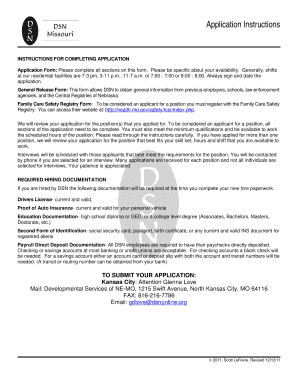
L facilities are 7-3 pm, 3-11 p.m., 11-7 a.m. or 7:00 - 7:00 or 8:00 - 8:00. Always sign and date the application. General Release Form: This form allows DSN to obtain general information from previous employers, schools, law enforcement agencies, and the Central Registries of Nebraska. Family Care Safety Registry Form: To be considered an applicant for a position you must register with the Family Care Safety Registry. You can access their website at: http://health.mo.gov/safety/fcsr/index.php.

How it works

  1. Open form

    Open form follow the instructions

  2. Easily sign form

    Easily sign the form with your finger

  3. Share form

    Send filled & signed form or save

How to fill out the Miss Punch Application online

Completing the Miss Punch Application online is a straightforward process that requires attention to detail. This guide offers step-by-step instructions to help you successfully fill out the application and submit it efficiently.

Follow the steps to complete the Miss Punch Application effectively.

  1. Press the ‘Get Form’ button to obtain the application form and open it in your preferred editing software.
  2. Begin filling in your personal details, including your full name, contact information, and the position you are applying for. Be sure to provide an accurate phone number and email address for communication.
  3. Specify your availability for shifts, detailing the hours you are willing to work. Ensure this information is clear to avoid any misunderstandings.
  4. Complete the General Release Form section, which authorizes the organization to obtain background information from your previous employers and educational institutions.
  5. Provide all required identification and eligibility information, such as your Social Security Number, whether you have a valid driver's license, and proof of auto insurance.
  6. List your previous employment history, detailing each job held, including company name, address, title, start and end dates, and reason for leaving.
  7. If applicable, provide educational background information. Include details about any degrees or certifications earned.
  8. Complete the references section by listing at least two individuals who can vouch for your character and experience, ensuring they are not relatives or former employers.
  9. Read through your application carefully, ensuring all sections are completed accurately.
  10. After verifying all information is correct, you can save changes, download the form, print it, or share it as necessary.

Start filling out your Miss Punch Application online today!

Get form

Experience a faster way to fill out and sign forms on the web. Access the most extensive library of templates available.
Get form

Related content

Cook County Time
Cook County Time (CCT) is a system for employees to check time, request time off, view...
Learn more
Missed Punch Form
Employee Approval. I certify that the punches reported above represent the punches missed...
Learn more
Kronos InTouch® DX User Guide
The host application downloads this information to the timeclock, which uses it to accept...
Learn more

Related links form

C Coding Standard - Validated Software Building Simulated Aircraft Instrumentation Illinois Oper 993 ISSUE 91 SPRING 2004 - Wleonline

Questions & Answers

Get answers to your most pressing questions about US Legal Forms API.

Contact support

The term miss punch defines the failure to properly record entry or exit times in a workplace attendance system. It highlights a gap in accurate time tracking, which can affect payroll and attendance management. Addressing missed punches with an appropriate Miss Punch Application helps ensure clarity.

Missed punches refer to instances when an employee fails to log their work hours by not clocking in or out. These occurrences can create challenges in tracking hours worked for accurate payroll calculations. Keeping track of these incidents is essential for maintaining good attendance records.

The term 'missing out punch' refers to a situation where an employee does not record their entry or exit time using the timekeeping system. This can lead to confusion and discrepancies in attendance records. Addressing this promptly with a Miss Punch Application is vital for accuracy.

Missed punches may occur due to various reasons such as forgetfulness, equipment malfunction, or an unexpected situation. These occurrences can disrupt accurate timekeeping, which is essential for payroll. Understanding the cause can help in preventing future issues.

A missed punch occurs when an employee fails to clock in or out during their work shift. This can lead to inaccuracies in attendance records, affecting payroll and monitoring work hours. Recognizing this issue early is crucial for maintaining accurate timekeeping.

To write an application for a mistake in a form, start by clearly stating your intention to correct the error. Specify the details of the mistake, including the correct information that should replace it. Be sure to mention your employee ID and any relevant dates, which helps in processing your Miss Punch Application efficiently.

To submit a missed punch in isolved, log into your account and navigate to the attendance section. Locate the option for 'Missed Punch' applications and follow the prompts to enter the necessary information. Ensure that you provide all required details, and submit the application for review, allowing for a seamless correction in your attendance records.

A miss punch application is necessary when an employee fails to punch in or out as scheduled. Reasons may include forgetting to punch, technical difficulties, or personal emergencies. Submitting this application helps ensure accurate attendance records and supports payroll processing on platforms like US Legal Forms.

For an application regarding a forgotten punch out, start by clearly stating 'Application for Forgot Punch Out' at the top. Provide the date and time you were supposed to punch out, and briefly explain why this occurred. Request confirmation of your end time and thank them for their help in adjusting your records.

To write an application addressing a punching problem, open with a clear subject line such as 'Application for Punching Problem.' Describe the issue you faced, whether it's a technical glitch or personal issue that affected your punches. Politely request their support in resolving this problem for accurate timekeeping.

Get This Form Now!

Use professional pre-built templates to fill in and sign documents online faster. Get access to thousands of forms.
Get form
If you believe that this page should be taken down, please follow our DMCA take down processhere.

Industry-leading security and compliance

US Legal Forms protects your data by complying with industry-specific security standards.
  • In businnes since 1997
    25+ years providing professional legal documents.
  • Accredited business
    Guarantees that a business meets BBB accreditation standards in the US and Canada.
  • Secured by Braintree
    Validated Level 1 PCI DSS compliant payment gateway that accepts most major credit and debit card brands from across the globe.
Get Miss Punch Application
Get form
Form Packages
Adoption
Bankruptcy
Contractors
Divorce
Home Sales
Employment
Identity Theft
Incorporation
Landlord Tenant
Living Trust
Name Change
Personal Planning
Small Business
Wills & Estates
Packages A-Z
Form Categories
Affidavits
Bankruptcy
Bill of Sale
Corporate - LLC
Divorce
Employment
Identity Theft
Internet Technology
Landlord Tenant
Living Wills
Name Change
Power of Attorney
Real Estate
Small Estates
Wills
All Forms
Forms A-Z
Form Library
Customer Service
Terms of Service
Privacy Notice
Legal Hub
Content Takedown Policy
Bug Bounty Program
About Us
Help Portal
Legal Resources
Blog
Affiliates
Contact Us
Delete My Account
Site Map
Industries
Forms in Spanish
Localized Forms
State-specific Forms
Forms Kit
Legal Guides
Real Estate Handbook
All Guides
Prepared for You
Notarize
Incorporation services
Our Customers
For Consumers
For Small Business
For Attorneys
Our Sites
US Legal Forms
USLegal
FormsPass
pdfFiller
signNow
airSlate WorkFlow
DocHub
Instapage
Social Media
Call us now toll free:
+1 833 426 79 33
As seen in:
  • USA Today logo picture
  • CBC News logo picture
  • LA Times logo picture
  • The Washington Post logo picture
  • AP logo picture
  • Forbes logo picture
© Copyright 1997-2025
airSlate Legal Forms, Inc.
3720 Flowood Dr, Flowood, Mississippi 39232
Form Packages
Adoption
Bankruptcy
Contractors
Divorce
Home Sales
Employment
Identity Theft
Incorporation
Landlord Tenant
Living Trust
Name Change
Personal Planning
Small Business
Wills & Estates
Packages A-Z
Form Categories
Affidavits
Bankruptcy
Bill of Sale
Corporate - LLC
Divorce
Employment
Identity Theft
Internet Technology
Landlord Tenant
Living Wills
Name Change
Power of Attorney
Real Estate
Small Estates
Wills
All Forms
Forms A-Z
Form Library
Customer Service
Terms of Service
Privacy Notice
Legal Hub
Content Takedown Policy
Bug Bounty Program
About Us
Help Portal
Legal Resources
Blog
Affiliates
Contact Us
Delete My Account
Site Map
Industries
Forms in Spanish
Localized Forms
State-specific Forms
Forms Kit
Legal Guides
Real Estate Handbook
All Guides
Prepared for You
Notarize
Incorporation services
Our Customers
For Consumers
For Small Business
For Attorneys
Our Sites
US Legal Forms
USLegal
FormsPass
pdfFiller
signNow
airSlate WorkFlow
DocHub
Instapage
Social Media
Call us now toll free:
+1 833 426 79 33
As seen in:
  • USA Today logo picture
  • CBC News logo picture
  • LA Times logo picture
  • The Washington Post logo picture
  • AP logo picture
  • Forbes logo picture
© Copyright 1997-2025
airSlate Legal Forms, Inc.
3720 Flowood Dr, Flowood, Mississippi 39232