Loading
Get Securus Video Visitation Coupons 2020-2026
How it works
-

Open form follow the instructions
-

Easily sign the form with your finger
-

Send filled & signed form or save
How to fill out the Securus Video Visitation Coupons online
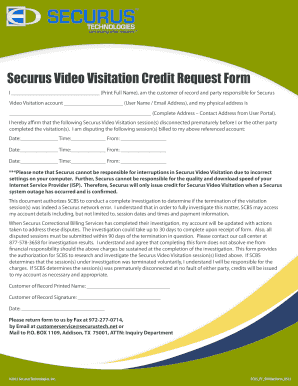
This guide provides clear and supportive instructions for completing the Securus Video Visitation Coupons form. By following these steps, users can accurately fill out the form to request visitation credits for sessions that were prematurely disconnected.
Follow the steps to complete the form effectively.
- Press the ‘Get Form’ button to access the Securus Video Visitation Coupons form and open it for editing.
- In the first section, enter your full name in the provided space labeled ‘Print Full Name.’ Ensure this is accurate, as it identifies you as the customer of record.
- Affirm the disconnected sessions by listing the relevant details. For each session, provide the date, time, and the other party's name in the specified fields. Repeat this for each session you are disputing.
- Sign the form in the section labeled ‘Customer of Record Signature,’ ensuring your signature matches the name you provided at the beginning.
- Choose your preferred method to submit the completed form: fax it to 972-277-0714, email it to customerservice@securustech.net, or mail it to P.O. BOX 1109, Addison, TX 75001, ATTN: Inquiry Department.
Complete your Securus Video Visitation Coupons form online today to initiate your credit request.
Yes, Securus offers various monthly plans to fit different needs. These plans can include options for video visitation, phone calls, and messaging services. Make sure to look for available Securus Video Visitation Coupons as they may provide discounts on these plans, helping you stay connected affordably.