Loading
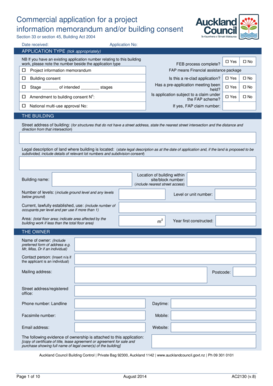
Get Ac2130
How it works
-

Open form follow the instructions
-

Easily sign the form with your finger
-

Send filled & signed form or save
How to fill out the Ac2130 online
Filling out the Ac2130 form online is a straightforward process designed to facilitate your project application. This guide provides clear, step-by-step instructions to help you complete the form accurately and efficiently.
Follow the steps to successfully complete your Ac2130 application.
- Press the ‘Get Form’ button to access the Ac2130 form and open it in the online editor.
- Fill in the date received and application number at the top of the form. These details help in tracking your submission.
- Select the appropriate application type by ticking the boxes under APPLICATION TYPE. If you have a previous application number related to the building work, note it in the indicated field.
- Indicate if the FEB process has been completed by selecting 'Yes' or 'No.'
- Provide project-specific information. Complete the fields for the project information memorandum and building consent, including whether it is a re-clad application and if a pre-application meeting was held.
- Specify the number of stages for your project and describe the building work.
- Supply the street address of the building and legal description of the land where the building is located. Include details required for any proposed subdivision if applicable.
- Enter the building name, number of levels, current lawful use, total area of the building, and the year it was first constructed.
- Provide the owner's name and preferred form of address, along with their mailing address and contact details including phone and email.
- If applicable, fill out the agent's details, including the name, contact information, and relationship to the owner.
- Complete the applicant’s section if they are different from the owner. Include all necessary contact information.
- Designate the first point of contact for communications with the building consent authority and their preferred method of correspondence.
- Indicate the method for billing and ensure to select the preferred method of correspondence for invoices and refunds.
- Sign and date the form as the owner, agent, or applicant. If not signed by the owner, provide a letter of authorization.
- Fill out the development contributions information detailing gross development area and impervious surface area. Clearly state whether they will increase due to the development.
- Describe the building work and indicate if it will result in a change of use, providing details if applicable.
- Attach any necessary documentation, including plans and specifications, development contribution notice, and relevant checklists.
- Finally, review the completed form for accuracy, save your changes, and proceed to download, print, or share the Ac2130 form as required.
Complete your Ac2130 application online today for a smoother application process.
Storing client files requires a secure and organized system to preserve confidentiality and easy access. Choose a method that suits your needs, whether it's physical storage in file cabinets or digital storage on secure cloud platforms. Ac2130 offers robust solutions for storing client files securely and conveniently.