How it works
  • Open form

    Open form follow the instructions

  • Easily sign form

    Easily sign the form with your finger

  • Share form

    Send filled & signed form or save

How to fill out the Florida Temporary Tag Template online

Completing the Florida Temporary Tag Template online is a straightforward process that helps users obtain a temporary license plate. This guide provides clear, step-by-step instructions to ensure users can accurately fill out the form with confidence.

Follow the steps to successfully complete the Florida Temporary Tag Template.

  1. Click the ‘Get Form’ button to access the Florida Temporary Tag Template and open it in your preferred online editor.
  2. Begin by entering the vehicle information. This includes the Vehicle Identification Number (VIN), make, model, and year. Ensure that the details match those in your vehicle documents.
  3. Provide the owner's information. Include the name, address, and phone number of the person who owns the vehicle. This should be accurate to avoid any issues with registration.
  4. Input the insurance details. You must provide the name of the insurance company and the policy number. This information verifies that the vehicle is covered as required by Florida law.
  5. Select the reason for requesting the temporary tag. This could range from awaiting title transfer to operating a vehicle purchased without a tag.
  6. Review all the entered information for accuracy. It’s important to ensure there are no typos or incorrect details, as this could delay the processing of your temporary tag.
  7. Once all information is verified, save your changes. You can then choose to download, print, or share the completed form for submission.

Complete your Florida Temporary Tag Template online today for a quick and efficient registration process.

Get form

Experience a faster way to fill out and sign forms on the web. Access the most extensive library of templates available.

Related content

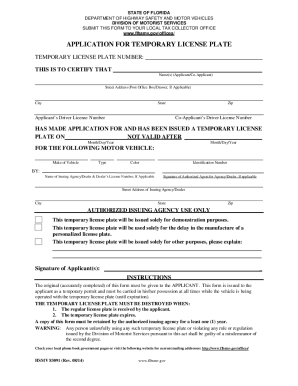
Application for Temporary License Plate

This temporary license plate will be issued solely for demonstration purposes. This...

Learn more
30 Day Tag Template

Temporary tags cannot be ordered by telephone. Edit your free temporary tag generator...

Learn more
Medicare

... temporary weighted adjustments for FTE residents that were displaced by program or...

Learn more
Questions & Answers

Get answers to your most pressing questions about US Legal Forms API.

Contact support

Can I print a temporary license plate in Florida?

You cannot print a temporary license plate yourself, as it must be issued by the state. However, you can utilize the Florida Temporary Tag Template to prepare for your appointment to obtain one. It is crucial to visit the appropriate Florida authority to receive a legitimate temporary license plate. This adherence to state regulations ensures that you remain compliant while driving your vehicle.

The Florida license plate format includes a mix of numbers and letters, designed to ensure uniqueness. Standard plates generally feature four characters followed by three numbers. Understanding this format is essential when utilizing the Florida Temporary Tag Template, as it ensures consistency across all vehicle registrations. Familiarizing yourself with this format can help avoid registration issues.

A Florida temporary tag typically consists of a combination of letters and numbers, which identify the vehicle and its registration period. The format must align with the requirements specified in the Florida Temporary Tag Template. This ensures clarity and compliance with state laws. Always verify that you are using the correct template for accurate details.

In Florida, you can request a temporary tag that lasts up to 90 days. This option is beneficial for individuals who are waiting for permanent registration or title transfer. Always refer to the Florida Temporary Tag Template guidelines to ensure you follow the appropriate steps. You can easily complete your request through the correct channels, including online platforms.

To obtain a temporary tag in Florida, you must have proof of ownership and a valid identification. You will also need to fill out the Florida Temporary Tag Template accurately. Ensure that you comply with the state's regulations for temporary registrations, which may vary by county or vehicle type. Gathering these documents will streamline the application process.

Yes, you can print out a temporary tag from Florida. Make sure to have the correct Florida Temporary Tag Template ready for printing. This template includes all necessary information and is available through various online resources. It is important to follow the state guidelines to ensure that the temporary tag is valid during its use.

To obtain a paper plate in Florida, you need to visit your local tax collector's office or utilize the online platform provided by the state. You may need to submit certain documents for verification. The Florida Temporary Tag Template can assist in gathering the required paperwork.

Customizing a Florida tag requires initiating the process through the Florida Department of Highway Safety and Motor Vehicles. You can select from various designs and options during registration. The Florida Temporary Tag Template provides essential information to ensure you complete your customization accurately.

Printing a temporary license plate in Florida involves accessing the official Florida DMV website. After completing your vehicle registration application, you will see the option to print your temporary tag. The Florida Temporary Tag Template streamlines this process by providing a clear format and steps.

To print a copy of your Florida vehicle registration, visit the Florida Department of Highway Safety and Motor Vehicles website. Enter your vehicle details as prompted, and find the option to print your registration. Using the Florida Temporary Tag Template helps you gather all needed information efficiently.

Get This Form Now!

Use professional pre-built templates to fill in and sign documents online faster. Get access to thousands of forms.

If you believe that this page should be taken down, please follow our DMCA take down process here.

Get Florida Temporary Tag Template