Loading
Get Da 1156 2020-2026
How it works
-

Open form follow the instructions
-

Easily sign the form with your finger
-

Send filled & signed form or save
How to fill out the DA 1156 online
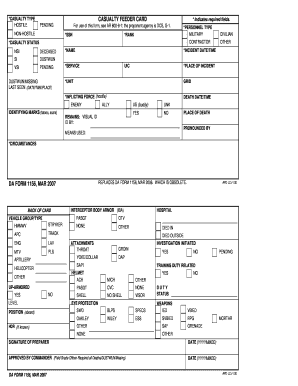
The DA 1156 form is essential for documenting casualty incidents within military operations. This guide provides a clear, step-by-step approach for users to complete the form accurately and effectively online.
Follow the steps to fill out the DA 1156 form online with ease.
- Press the ‘Get Form’ button to access the DA 1156 form and open it for editing.
- In the required fields section, begin by entering the social security number (SSN) to identify the individual in question.
- Next, fill in the rank of the individual, ensuring it is accurate and reflects their current status.
- Select the personnel type from the options provided: Military or Contractor, based on the individual's affiliation.
- Indicate the casualty status by choosing one of the following options: Deceased, DUSTWUN (Duty Status—Whereabouts Unknown), or SI (Serious Injury).
- Complete the name field with the full name of the individual involved in the incident.
- Specify the service branch (Army, Navy, etc.) to which the individual belongs.
- Input the incident date, time, and location in the designated fields to record when and where the event occurred.
- In the place of incident section, provide the exact location where the casualty event took place.
- Fill in the unit information to delineate the group the individual is attached to.
- Indicate the inflicting force, identifying whether it was hostile (Enemy) or non-hostile (Civilian, Ally).
- Document any identifying marks on the individual, such as tattoos or scars, if applicable.
- Provide details regarding the circumstances of the incident in the means used section.
- Complete attachments as required, ensuring all relevant information is included and accurate.
- Finally, review for accuracy, and save changes, download, print, or share the completed DA 1156 form as needed.
Complete your DA 1156 form online to ensure proper documentation of casualty incidents.
Para fatorar 1156, você deve dividir o número em fatores primos. Isso inclui descobrir números que multiplicados resultem em 1156, como 2 e 577. A fatoração pode ajudá-lo a entender melhor as correspondências numéricas, especialmente quando você integra projetos com a Da 1156, tornando a análise de dados mais simples.