Open form follow the instructions
Easily sign the form with your finger
Send filled & signed form or save
How to fill out the Progressive Insurance Card online
Filling out the Progressive Insurance Card online is a straightforward process that requires attention to several essential details. This guide will walk you through each section of the form to ensure accuracy and compliance.
Follow the steps to accurately complete your insurance card online.
- Click ‘Get Form’ button to obtain the Progressive Insurance Card and open it in the editor.
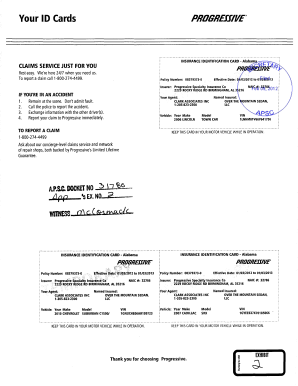
- Begin by entering your policy number in the designated field. This is often found at the top of your insurance documents.
- Next, input the effective dates of your policy. Ensure that the start and end dates are clearly listed and formatted correctly.
- Fill in the name of the insurer, which in this case is Progressive Specialty Insurance Co. Be attentive to detail to avoid any discrepancies.
- Enter the address of the insurer provided on your card. Ensure that it is accurate, as this information is crucial.
- Identify the named insured, typically the individual or entity that holds the policy, and input their details in the expected format.
- For the vehicle section, make sure to accurately record the year, make, model, and VIN of your vehicle. Double-check for any typographical errors.
- Once all information is complete, review the entire form for accuracy. This ensures that all fields have been properly filled out.
- Finally, save your changes. You may have options to download, print, or share the completed form as needed.
Complete your Progressive Insurance Card online today for a smooth and efficient experience.
Experience a faster way to fill out and sign forms on the web. Access the most extensive library of templates available.
Related content
Progressive Insurance Card Template is an essential tool for policyholders who want to...
Progressive Insurance Card Template progressive insurance card template: Your Ultimate...
Mar 1, 2021 — Our insurance subsidiaries provide personal and commercial auto insurance...
Get answers to your most pressing questions about US Legal Forms API.
How to fill out an insurance quotation form?
Filling out an insurance quotation form is an essential step in receiving an accurate quote. Start by gathering your personal information, vehicle details, and any prior insurance information. Once ready, visit the Progressive website or use the US Legal Forms platform to access a simplified quoting tool that guides you through entering your details accurately for the best Progressive Insurance Card rates.
What are the payment methods for Progressive?
Progressive offers various payment methods to accommodate your preferences. You can use a credit card, debit card, electronic check, or even set up automatic payments. By managing your Progressive Insurance Card effectively, you can choose the payment option that works best for you and simplifies your billing process.
How do I add a credit card to Progressive?
Adding a credit card to your Progressive account is straightforward. Log in to your account on the website or app, navigate to the billing section, and select the option to add a new payment method. Enter your credit card details, such as the card number and expiration date, to ensure that your Progressive Insurance Card payments process smoothly.
What is the 5 digit code for Progressive insurance?
The 5-digit code for Progressive insurance typically refers to the agent number or a specific code required for filing claims. If you’re searching for your specific code, check your policy documents or contact Progressive's customer service. They can quickly provide you with the accurate information needed to assist with your Progressive Insurance Card.
How to add insurance card to Apple Wallet Progressive Insurance?
To add your Progressive Insurance Card to Apple Wallet, start by accessing the Progressive app and locating your insurance card. Tap the option to add to Apple Wallet and follow the on-screen prompts. This integration allows quick access to your insurance information right from your phone, making it convenient wherever you go.
How to update debit card on Progressive app?
Updating your debit card on the Progressive app is simple. Open the app and go to your account settings, then choose the payment methods section. From here, you can select the existing debit card and enter the new details for your Progressive Insurance Card, ensuring your payments stay up-to-date and uninterrupted.
How do I add a card on Progressive?
To add a card on Progressive, start by logging into your account on the official website or mobile app. Navigate to the payment section, where you can choose to add a new payment method. Here, you can enter your Progressive Insurance Card details, including card number, expiration date, and security code, to ensure smooth processing for future payments.
What is the golden rule at Progressive?
The golden rule at Progressive is to treat others how you want to be treated. This principle guides their customer service and overall approach to providing clients with a Progressive Insurance Card and other services. By prioritizing empathy and support, they aim to ensure a positive experience for all their customers.
Does Progressive send physical cards?
Yes, Progressive does send physical insurance cards. Once your policy is finalized, you'll receive your Progressive Insurance Card in the mail. This card serves as proof of coverage and can be used when you need to provide evidence of insurance.
Can I request physical cards from Progressive?
Yes, you can request physical cards from Progressive if needed. This option is available through their online platform or by contacting customer service. Having a physical Progressive Insurance Card can be helpful for convenient access in your vehicle or wallet.
Use professional pre-built templates to fill in and sign documents online faster. Get access to thousands of forms.
If you believe that this page should be taken down, please follow our DMCA take down process here.