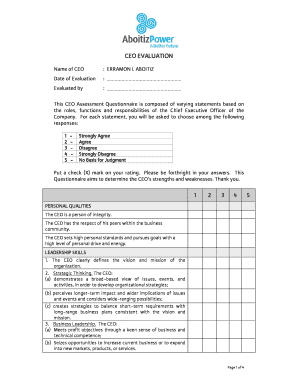
Get Annual Board Assessment Formceo Evaluation Form (ap). Optimum Process Control The Pcs 7 Library
How it works
-

Open form follow the instructions
-

Easily sign the form with your finger
-

Send filled & signed form or save
How to fill out the Annual Board Assessment Form & CEO Evaluation Form (AP) online
The Annual Board Assessment Form and CEO Evaluation Form (AP) are essential tools for evaluating the performance of a Chief Executive Officer. This guide provides clear steps to assist you in completing the form efficiently and effectively, ensuring that your feedback is constructive and valuable.
Follow the steps to successfully complete the evaluation form.
- Click ‘Get Form’ button to access the document and open it for editing.
- Begin by entering the name of the CEO being evaluated in the designated field. Ensure the name is spelled correctly for accuracy.
- Provide the date of evaluation in the space provided. This information is crucial for setting the context of the assessment.
- Fill in the evaluator's name in the specified section. This identifies who is providing the feedback and helps maintain accountability.
- Carefully review each statement related to the CEO's personal qualities and leadership skills. For each statement, choose a rating from 1 to 5 based on your assessment, placing an 'X' in the appropriate box.
- In the managerial skills sections, evaluate the CEO on their ability to catalyze teams, develop people, and communicate effectively. Again, respond with scores from 1 to 5.
- Examine the questions regarding the CEO's board relations, financial management, and overall performance. For each section, provide scores to reflect your perceptions.
- In the open-ended questions at the end of the form, provide detailed comments about the CEO’s major accomplishments, areas for improvement, necessary resources for development, and any additional thoughts you may have.
- Once all sections are completed, review the entire form for accuracy and completeness. Make any necessary edits before finalizing your response.
- After ensuring all information is correct, save the changes. You can also download, print, or share the completed form as needed.
Complete your evaluation form online today to contribute to effective leadership assessment.
Related links form
APL in PCS7 stands for Application Library. This feature provides ready-to-use templates and components, streamlining the development process in automation. By using APL, you can speed up project timelines and enhance functionality within the system. When integrated with performance assessments like the Annual Board Assessment Form and CEO Evaluation Form (AP), APL contributes to improved operational evaluations.
Industry-leading security and compliance
-
In businnes since 199725+ years providing professional legal documents.
-
Accredited businessGuarantees that a business meets BBB accreditation standards in the US and Canada.
-
Secured by BraintreeValidated Level 1 PCI DSS compliant payment gateway that accepts most major credit and debit card brands from across the globe.