Loading
Form preview
  • US Legal Forms
  • Other Templates
  • More Forms
  • More Uncategorized Forms
  • Bank Of Maharashtra Dsa Application Form

Get Bank Of Maharashtra Dsa Application Form

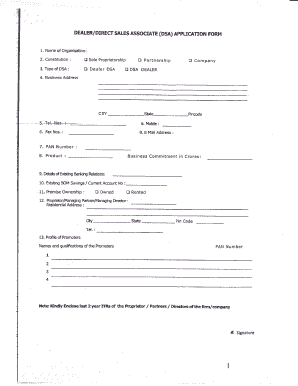
Dress crr $ate-Pincode ,-- " -.5.-Tel,-Nss-:---,6. Fax Nos. : 7- PAN 6. l'lobih: Number 8. E Mait Address : ; 8. Froduct l Business Commitment in Crores: 9. Detailsof Exi$trg Bankirg Rdatiors: 10. Eristing BOM Savings 11. Premise Ownership / Current Aaount No : : tr Owned O Rented 12. Proprietor/ManagingParher/ManagingDre r::' Residential Address -.. : gtv Pin Code Sbate Tel. 13. Prufile of Promoters Names and qualiftcations of the Promoters PAN Number 1 2 3 4.

How it works

  1. Open form

    Open form follow the instructions

  2. Easily sign form

    Easily sign the form with your finger

  3. Share form

    Send filled & signed form or save

How to fill out the Bank Of Maharashtra Dsa Application Form online

Filling out the Bank Of Maharashtra Direct Sales Associate (DSA) application form online can seem daunting, but with the right guidance, the process can be straightforward. This guide provides clear, step-by-step instructions to help users navigate and complete the form effectively.

Follow the steps to complete the application accurately.

  1. Click ‘Get Form’ button to obtain the form and open it in your preferred editor.
  2. Begin by filling out the name of the organization in the first field. Indicate the constitution type by selecting either sole proprietorship, partnership, or company.
  3. Next, specify the type of DSA you are applying for by selecting the appropriate option: Dealer DSA, DSA Dealer, or other.
  4. Enter your complete business address including city, state, and postal code.
  5. Provide your telephone number and fax number in the designated fields.
  6. Fill in your Permanent Account Number (PAN) and email address for correspondence.
  7. Indicate your business commitment in crores and provide details of your existing banking relationships, including any existing Bank Of Maharashtra savings accounts.
  8. State whether the premises are owned or rented and provide the current account number.
  9. Fill in the details of the proprietor, managing partner, or director, including their residential address and contact details.
  10. Provide a profile of the promoters, including their names and qualifications, and also include their PAN numbers.
  11. Attach the last two years of Income Tax Returns for the proprietor, partners, or directors of the firm/company.
  12. Describe your financial standing by including profit & loss statements and balance sheets for the previous two years.
  13. Outline your experience as a DSA with other banks, providing references as necessary.
  14. Gather and provide details of employees, if applicable, including their qualifications, residential addresses, and reasons for leaving any previous employers.
  15. Review all the information you have provided to ensure accuracy.
  16. Finally, save your changes, download, print, or share the form as needed.

Complete your application online and take the first step towards becoming a Direct Sales Associate with Bank Of Maharashtra.

Get form

Experience a faster way to fill out and sign forms on the web. Access the most extensive library of templates available.
Get form

Related content

FORM ADV
Sep 11, 2025 — Office Registration Form (Form BR), please provide the CRD Branch Number...
Learn more
Post Graduate Degree/ Diploma Programmes
At the time of applying candidates studying in 3-year degree programmes should have passed...
Learn more

Related links form

2015 Offering Memorandum - Trez Capital Yield Trust US (00295528.DOC;8). 00295528;8/Font 8 Local Agency Membership Application/Renewal Request For Transfer Of Property Seized/Forfeited By A Treasury ... - Treasury Tceq 20683

Questions & Answers

Get answers to your most pressing questions about US Legal Forms API.

Contact support

The DSA folder typically refers to the directory where Direct Selling Agent documentation and applications are stored. This folder may contain essential files such as the Bank Of Maharashtra Dsa Application Form, client records, and other marketing materials. Organizing these files systematically can streamline your DSA operations.

To open a domain controller, you start by installing the necessary server software on a computer designated for this role. Once installed, you can configure Active Directory settings to manage user identities and access permissions. Follow specific instructions based on your operating system for effective setup and functionality.

Opening a Direct Selling Agent (DSA) requires a few key steps. First, ensure you meet the eligibility criteria and gather the necessary documents. You then need to complete the Bank Of Maharashtra Dsa Application Form and submit it to the bank for review. Upon approval, you can officially start your DSA journey.

To open a DSA Managed Service Channel (MSC), you must first be registered as a DSA. Begin by submitting the Bank Of Maharashtra Dsa Application Form, ensuring that you meet all requirements for MSC services. Once your application is approved, you will gain access to resources that support your DSA operations, including training and marketing materials.

The commission structure for a DSA can vary significantly based on the bank and the type of financial products sold. Typically, DSAs earn a percentage of the business they generate, often ranging from 0.5% to 3% for loans. Be sure to check specific terms with the Bank Of Maharashtra when you fill out the Dsa Application Form.

Forming a Direct Selling Agent (DSA) involves several steps. Start by outlining your business plan, and then fill out the Bank Of Maharashtra Dsa Application Form, which will collect essential information about you and your business model. Once submitted, the bank will review your application, and if approved, you can officially begin your DSA operations.

To acquire DSA registration, you should first meet the eligibility criteria set by the Bank Of Maharashtra. After gathering the necessary documents, fill out the Bank Of Maharashtra Dsa Application Form, and submit it to the designated bank representative. They will guide you through the registration process, ensuring that you meet all requirements.

To open Active Directory Users and Computers (ADUC), you need to have administrative privileges on your computer. Go to the Start menu and type 'dsa.msc' in the Run dialog box. Upon hitting Enter, the ADUC interface will open up, allowing you to manage user accounts and groups efficiently.

Yes, you can complete your KYC online for Bank of Maharashtra. The bank provides the option for customers to submit their KYC through its digital platform. Simply access the official website, complete the required E-KYC form, and ensure to include your Bank Of Maharashtra Dsa Application Form to finalize the process.

Filling the KYC bank form involves providing your personal information, such as your name, address, and identification details. Ensure you have your ID proof and address proof ready. After completing the KYC form, remember to submit the Bank Of Maharashtra Dsa Application Form simultaneously for optimal processing.

Get This Form Now!

Use professional pre-built templates to fill in and sign documents online faster. Get access to thousands of forms.
Get form
If you believe that this page should be taken down, please follow our DMCA take down processhere.
Get Bank Of Maharashtra Dsa Application Form
Get form
  • Adoption
  • Bankruptcy
  • Contractors
  • Divorce
  • Home Sales
  • Employment
  • Identity Theft
  • Incorporation
  • Landlord Tenant
  • Living Trust
  • Name Change
  • Personal Planning
  • Small Business
  • Wills & Estates
  • Packages A-Z
  • Affidavits
  • Bankruptcy
  • Bill of Sale
  • Corporate - LLC
  • Divorce
  • Employment
  • Identity Theft
  • Internet Technology
  • Landlord Tenant
  • Living Wills
  • Name Change
  • Power of Attorney
  • Real Estate
  • Small Estates
  • Wills
  • All Forms
  • Forms A-Z
  • Other Templates
  • Legal Hub
  • About Us
  • Help Portal
  • Legal Resources
  • Blog
  • Affiliates
  • Contact Us
  • Delete My Account
  • Site Map
  • Industries
  • Forms in Spanish
  • Localized Forms
  • State-specific Forms
  • Forms Kit
  • Real Estate Handbook
  • All Guides
  • Notarize
  • Incorporation services
  • For Consumers
  • For Small Business
  • For Attorneys
  • USLegal
  • FormsPass
  • pdfFiller
  • signNow
  • altaFlow
  • DocHub
  • Instapage
Form Packages
  • Adoption
  • Bankruptcy
  • Contractors
  • Divorce
  • Home Sales
  • Employment
  • Identity Theft
  • Incorporation
  • Landlord Tenant
  • Living Trust
  • Name Change
  • Personal Planning
  • Small Business
  • Wills & Estates
  • Packages A-Z
Form Categories
  • Affidavits
  • Bankruptcy
  • Bill of Sale
  • Corporate - LLC
  • Divorce
  • Employment
  • Identity Theft
  • Internet Technology
  • Landlord Tenant
  • Living Wills
  • Name Change
  • Power of Attorney
  • Real Estate
  • Small Estates
  • Wills
  • All Forms
  • Forms A-Z
  • Other Templates
Customer Service
  • Legal Hub
  • About Us
  • Help Portal
  • Legal Resources
  • Blog
  • Affiliates
  • Contact Us
  • Delete My Account
  • Site Map
  • Industries
  • Forms in Spanish
  • Localized Forms
  • State-specific Forms
  • Forms Kit
Legal Guides
  • Real Estate Handbook
  • All Guides
Prepared for you
  • Notarize
  • Incorporation services
Our Customers
  • For Consumers
  • For Small Business
  • For Attorneys
Our Sites
  • USLegal
  • FormsPass
  • pdfFiller
  • signNow
  • altaFlow
  • DocHub
  • Instapage
Social Media
Call us now toll free:
+1 833 426 79 33
As seen in:
© Copyright 1999-2026 airSlate Legal Forms, Inc. 17 Station Street, Ste. 203, Brookline, MA 02445
  • Your Privacy Choices
  • Terms of Service
  • Privacy Notice
  • Content Takedown Policy
  • Bug Bounty Program