Loading
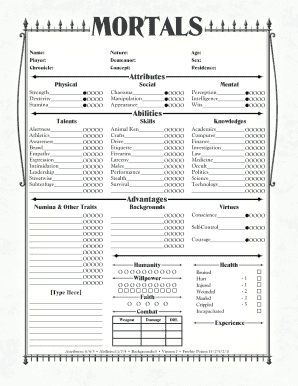
Get Mortals Character Sheet 2020-2026
How it works
-

Open form follow the instructions
-

Easily sign the form with your finger
-

Send filled & signed form or save
How to fill out the Mortals Character Sheet online
Filling out the Mortals Character Sheet online is a straightforward process that helps you create a detailed character profile. This guide provides comprehensive instructions on each component of the form to ensure a seamless experience.
Follow the steps to complete your character sheet effectively.
- Click ‘Get Form’ button to obtain the form and open it in the editor.
- Begin with the basic information at the top of the form. Fill out your name, the name of the player, and the chronicle associated with your character.
- Next, specify your character's nature, demeanor, and overall concept. These sections help define your character's personality and role in the game.
- In the physical attributes section, you will need to input values for strength, dexterity, and stamina. Use the appropriate scale provided to indicate your character's capabilities.
- Move on to the talents section. Fill out the boxes for each talent you wish to assign, such as alertness, athletics, and empathy. Remember to distribute points based on your character's strengths.
- Complete the numina & other traits section as needed. Provide any additional information that characterizes your character further.
- Proceed to fill out the social attributes, including charisma, manipulation, and appearance. Again, make sure to allocate points that reflect your character's persona.
- In the abilities section, focus on skills. Assign points to various skills such as animal ken, crafts, and firearms, ensuring they match your character's background and experiences.
- Review the advantages and backgrounds section to capture any pertinent details about your character's history and resources.
- Fill in the mental attributes of perception, intelligence, and wits with the appropriate point values.
- Next, complete the knowledges section by assigning points to fields like academics, computer skills, and investigation.
- Document your character's virtues and humanity by filling in the respective sections with points that represent moral and ethical values.
- Fill out the health and willpower sections accurately, reflecting your character's resilience and mental strength.
- In the combat section, note any weapons and respective stats like damage and concealment. Ensure these align properly with your character's background.
- Use the expanded backgrounds section to note any allies, mentors, or key relationships in your character's story.
- Complete the possessions section with items your character carries and owns, providing a full picture of their gear.
- Lastly, fill in the history and goals sections, detailing your character's past experiences and aspirations.
- Once all sections are thoroughly completed, review your inputs for accuracy. You can save changes, download, print, or share the form as needed.
Start filling out your Mortals Character Sheet online today.
Filling out a Roll20 character sheet starts by selecting your character’s type and adding details such as stats, skills, and equipment from your Mortals Character Sheet. Use the digital tools available on Roll20 to organize your character neatly. This will not only keep your game on track but also streamline your gameplay.