How it works
  • Open form

    Open form follow the instructions

  • Easily sign form

    Easily sign the form with your finger

  • Share form

    Send filled & signed form or save

How to fill out the Radiance Character Sheet - Inklikeurine.com online

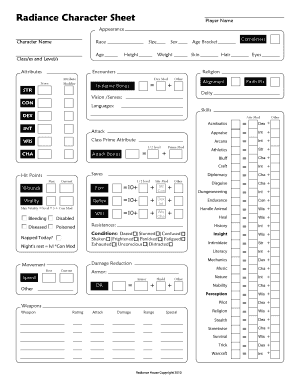
Filling out the Radiance Character Sheet is essential for capturing your character's attributes and abilities in your gameplay. This guide provides easy-to-follow instructions to help you accurately complete the character sheet online, ensuring you have all the necessary information at your fingertips.

Follow the steps to fill out your character sheet effectively.

  1. Press the ‘Get Form’ button to access the Radiance Character Sheet and open it in your chosen editor.
  2. Begin with the 'Player Name' field; enter your name to identify the owner of the character sheet.
  3. In the 'Appearance' section, record your character's visible traits, including size, height, weight, skin color, hair, and eye color.
  4. Fill out the 'Character Name' and 'Age' fields to establish your character's identity.
  5. Specify the 'Class/es and Level/s' of your character, ensuring you include all relevant information.
  6. Move to the 'Alignment' section to determine your character's ethical and moral perspectives.
  7. List the languages your character can communicate in, based on their race and background.
  8. In the 'Skills' section, record each skill your character possesses and their corresponding attributes.
  9. Complete the 'Saves' and 'Hit Points' sections by entering the maximum and current values for each attribute.
  10. Define the character's 'Armor' information, including type and damage reduction factors.
  11. Fill in 'Current Situation,' 'Wealth,' and 'Encumbrance' sections accurately to maintain an overview of your resources and limitations.
  12. Once all fields are completed, you can save changes, download, print, or share your character sheet as needed.

Start filling out your character sheets online today!

Get form

Experience a faster way to fill out and sign forms on the web. Access the most extensive library of templates available.

Questions & Answers

Get answers to your most pressing questions about US Legal Forms API.

Contact support

How to fill in initiative DnD character sheet?

To fill in the initiative on a DnD character sheet, record your Dexterity modifier and any other relevant bonuses. The Radiance Character Sheet available on Inklikeurine provides a clear section for initiative, allowing you to calculate it effortlessly. This preparation helps in quick responses during combat, enhancing the overall flow of the game.

Filling out a character sheet is straightforward; begin with your character's basic details and progress to more specific attributes. The Radiance Character Sheet on Inklikeurine makes it simple to gather and enter information, ensuring you don't miss vital components. Use the structured format provided to enhance clarity, enabling a better role-playing experience.

Filling out saving throws on your character sheet involves noting down the bonuses associated with each type of saving throw: Fortitude, Reflex, and Will. The Radiance Character Sheet on Inklikeurine simplifies this process by providing dedicated areas for each type. Make sure to factor in your classes and abilities when calculating these bonuses to keep your character competitive and ready for challenges.

A character sheet should include critical information such as character name, class, race, ability scores, skills, equipment, and backstory. For a comprehensive experience, the Radiance Character Sheet on Inklikeurine offers pre-defined sections that capture all these elements effectively. Organizing this information helps streamline gameplay and ensures all players have easy access to character details during sessions.

Adding a custom character sheet to Roll20 requires uploading your personalized design. With the Radiance Character Sheet on Inklikeurine, you can create a character sheet that meets your specific needs and then follow Roll20's guidelines for implementation. This allows you to enhance your gameplay by tailoring resources just for you. Detailed instructions are typically available in the Roll20 documentation.

To open your character sheet, navigate to the character management section on Inklikeurine. You will usually find an option to create or access existing sheets. Once open, you can view and edit all the information about your character seamlessly. With the Radiance Character Sheet, everything you need is easily accessible for an enhanced role-playing experience.

To fill out a 3.5 character sheet, start by selecting your character's race and class, then record ability scores and bonuses. The Radiance Character Sheet on Inklikeurine offers specific sections tailored for Dungeons and Dragons 3.5, which makes the process easier. Don't forget to add your skills, feats, and other characteristics, as each detail enriches your gameplay experience.

Filling in a character sheet involves entering key details about your character, such as name, race, class, and abilities. For the Radiance Character Sheet on Inklikeurine, it's important to follow the provided templates to ensure all essential information is included. You can also take advantage of the guidance provided on the site for a smooth experience. After you complete the initial sections, you can refine skills and spells as your character develops.

Get This Form Now!

Use professional pre-built templates to fill in and sign documents online faster. Get access to thousands of forms.

If you believe that this page should be taken down, please follow our DMCA take down process here.

Get Radiance Character Sheet - Inklikeurine.com