How it works
  • Open form

    Open form follow the instructions

  • Easily sign form

    Easily sign the form with your finger

  • Share form

    Send filled & signed form or save

How to fill out the Xadate online

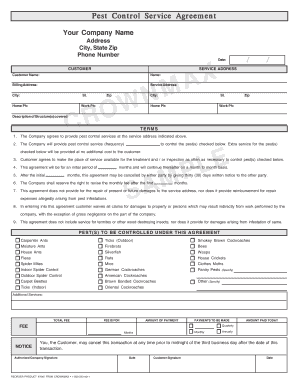
Filling out the Xadate form online is a straightforward process designed to facilitate your pest control service agreement. This guide will provide clear, step-by-step instructions to ensure that you can complete the form accurately and efficiently.

Follow the steps to successfully complete the Xadate form.

  1. Click the ‘Get Form’ button to obtain the Xadate and open it in your preferred document editor.
  2. Begin by entering your company name, address, city, state, and zip code at the top of the form. This ensures that the service agreement is officially recorded with your business information.
  3. Fill in your phone number in the designated field. This allows customers to contact you easily for any inquiries regarding the pest control services.
  4. Input the date when the agreement is being filled out, ensuring that it corresponds with the current month, day, and year.
  5. Next, provide the customer's name and their service address. This is crucial for identifying the location where services will be performed.
  6. Complete the billing address and additional phone numbers under the customer section to facilitate invoicing and communication.
  7. In the description section, describe the structure(s) covered under this agreement, which helps in defining the scope of pest control services.
  8. Fill in the frequency of the pest control services that your company will provide. This clarifies how often services will be administered, whether monthly, quarterly, or annually.
  9. Check all the specific pests to be controlled under the agreement. This section indicates which pests your service will specifically address.
  10. Specify any additional services requested by the customer, allowing for customized pest control solutions.
  11. Input the total fee structure, including payment amounts and the schedule (monthly, quarterly, or annually). This section provides clarity on financial obligations.
  12. Sign the agreement along with the customer. Both parties’ signatures are required to validate the agreement.
  13. Finally, save your changes, and ensure that the document is downloaded, printed, or shared as required.

Complete your pest control service agreement online today to ensure a hassle-free experience!

Get form

Experience a faster way to fill out and sign forms on the web. Access the most extensive library of templates available.

Related content

Statement of Deficiences and Plan of Correction

Jun 14, 2022 — (Xa) DATE SURVEY. AHD PLAN OF CD RRECTION. IDENTIFICATION NUMBER;...

Learn more
Horse Sale Home Page

2025 FRC Annual Production Horse Sale! View Horse List. When: May 17th, 2025. Preview: May...

Learn more
Questions & Answers

Get answers to your most pressing questions about US Legal Forms API.

Contact support

How to display date in dd mm yyyy in SQL?

To display dates in the dd mm yyyy format, apply the DATE_FORMAT function in your SQL command: SELECT DATE_FORMAT(your_date_column, '%d %m %Y') AS formatted_date FROM your_table. This expands your date presentation options. By integrating Xadate, you reinforce your date manipulation capabilities, making presentations more user-friendly.

To format dates as mmm yyyy in SQL, you can use the DATE_FORMAT function similarly: SELECT DATE_FORMAT(your_date_column, '%b %Y') AS formatted_date FROM your_table. This method provides month abbreviations alongside the year. Xadate can support this need efficiently, allowing for dynamic date outputs.

Obtaining a date easily often requires using straightforward functions available in your programming language or database. For instance, SELECT CURDATE() can quickly provide the current date in SQL. With Xadate, you’re equipped with powerful tools that make managing and retrieving dates smoother, providing essential clarity in your applications.

If you want to extract just the yyyy-mm-dd format without any time component, you can use SELECT DATE_FORMAT(your_date_column, '%Y-%m-%d') AS formatted_date FROM your_table. This cleans up your results. Leveraging Xadate enhances your SQL queries, ensuring efficient date encapsulation and presentation.

In JavaScript, you can obtain the current date by using the Date object, like this: const currentDate = new Date();. This method gives you a wealth of date-related functionalities. Using Xadate simplifies working with dates in JavaScript, providing consistent and reliable formatting options.

To retrieve the current system date, you can use the SYSDATE() function in SQL. This function returns the current date and time to the exact second. Using Xadate, you can enhance this functionality to manage your dates efficiently and effectively across your applications.

You can achieve the yyyy-mm-dd format by utilizing the DATE_FORMAT function again. The SQL statement will appear as follows: SELECT DATE_FORMAT(your_date_column, '%Y-%m-%d') AS formatted_date FROM your_table. Integrating Xadate into your project can keep your date formatting organized and consistent.

To extract the year and month in the format yyyy-mm, you can use the DATE_FORMAT function in SQL. The query might look like this: SELECT DATE_FORMAT(your_date_column, '%Y-%m') AS formatted_date FROM your_table. This approach cleanly retrieves the data you need, and with Xadate’s features, you can streamline your date handling process further.

To create mex-files, ensure you have your C/C++ source code ready, then use the 'mex' command in MATLAB's command window. This command compiles and links your code, resulting in a mex-file that can be executed in MATLAB like any other function. With Xadate, the integration of these files can be achieved effortlessly, providing enhanced functionality for your projects.

Creating a new .mat file is straightforward in MATLAB. Use the 'save' function within your script, specifying the file name you desire. The .mat file format efficiently stores data for future use, letting you manage your data seamlessly, especially when paired with the powerful features of Xadate.

Get This Form Now!

Use professional pre-built templates to fill in and sign documents online faster. Get access to thousands of forms.

If you believe that this page should be taken down, please follow our DMCA take down process here.

Get Xadate