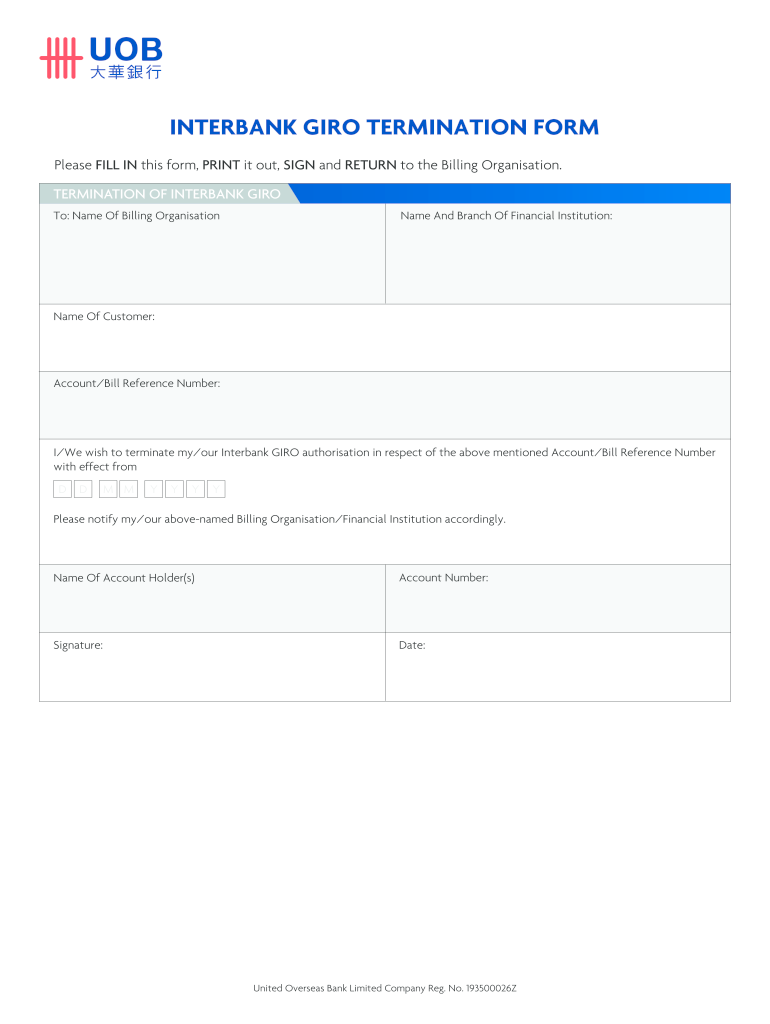
Of Financial Institution Name Of Customer Account/Bill Reference Number I/We wish to terminate my/our Interbank GIRO authorisation in respect of the abovementioned Account/Bill Reference Number with effect from 01 January Please notify my/our above-named Billing Organisation/Financial Institution accordingly. Name Of Account Holder(s) Account Number Signature Date 01 United Overseas Bank Ltd. Company Reg No. 193500026Z January.

Open form follow the instructions

Easily sign the form with your finger

Send filled & signed form or save
How to fill out the Uob Corporate Giro Termination Form online
This guide provides comprehensive instructions for completing the Uob Corporate Giro Termination Form online. Clear, step-by-step guidance ensures that users can efficiently navigate the form and submit it without confusion.
Follow the steps to effectively complete the termination form
- Click ‘Get Form’ button to obtain the form and open it in the editor.
- Once the form is open, locate the section labeled 'To'. Here, input the name of the billing organization and the name and branch of the financial institution associated with your Giro account.
- In the 'Name of Customer' field, provide your name as it appears on the account. This ensures the termination request is correctly identified.
- Next, enter your account or bill reference number in the designated field. This number is critical for processing your termination request.
- Indicate the date of termination by filling in the 'effective from' date. Be sure to use the correct format, starting with the day, followed by the month and year.
- In the section for notification, ensure the billing organization and financial institution are informed of your termination request by checking the appropriate box or including a note if necessary.
- Provide the name of the account holder(s) in the specified area. This should match the account holder’s official records.
- Enter your account number accurately to avoid processing delays.
- Lastly, sign and date the form in the spaces provided. This signature is necessary to validate your request.
- Review all entries for accuracy. Once confirmed, you can save any changes, download the completed form, print it out, or share it as necessary to ensure it reaches the appropriate billing organization.
Complete your Uob Corporate Giro Termination Form online today for a smooth termination process.
Experience a faster way to fill out and sign forms on the web. Access the most extensive library of templates available.
Related content
2. The Tenant hereby agrees with the Landlord as follows: (a), To pay the said rent at the...
by RK Heong Lian · 2004 — Statistical methods such as regression and survival analysis...
Get answers to your most pressing questions about US Legal Forms API.
Can a GIRO transfer be cancelled?
Yes, you can cancel a GIRO transfer, provided that you act quickly. Reach out to your bank as soon as possible and follow their procedure for cancellations. This often involves submitting the UOB Corporate GIRO Termination Form to stop any pending transactions effectively.
How do I cancel my GIRO account?
To cancel your GIRO account, identify the cancellation procedure for your bank. This typically involves completing a GIRO termination form, like the UOB Corporate GIRO Termination Form, and submitting it by mail or online. Ensure you check any outstanding obligations before finalizing the cancellation.
How to terminate a GIRO account?
Terminating a GIRO account involves filling out a termination form specific to your bank. After completing the UOB Corporate GIRO Termination Form, follow the instructions to submit it. This will initiate the process to discontinue your GIRO arrangements effectively.
How to cancel a standard chartered GIRO?
To cancel your Standard Chartered GIRO, obtain and fill out the cancellation form provided by the bank. You will need to submit this form either online or through one of their branches. Make sure you initiate the cancellation process well in advance to avoid any unnecessary charges.
How to terminate GIRO UOB business?
To terminate your GIRO with UOB for business, complete the UOB Corporate GIRO Termination Form and submit it as instructed. You can usually do this through your UOB business account online. Confirm with UOB directly if you have any specific questions regarding the termination party.
Where do I mail my UOB GIRO form?
You should mail your UOB GIRO form to the address specified on the form itself. Typically, this is the UOB processing center. Ensure you check the details on the form to prevent any delays in processing your UOB Corporate GIRO Termination Form.
How to terminate GIRO arrangement POSB?
To terminate a GIRO arrangement with POSB, you need to fill out the relevant termination form. This is usually available on the POSB website or at their branches. Once completed, submit the form as instructed, ensuring that you follow the necessary steps to ensure proper processing.
Can I apply for a GIRO online at UOB?
Yes, you can apply for a GIRO online at UOB through their official website. Simply navigate to the UOB Corporate GIRO section and fill out the application form. Once you complete the online application, you will receive confirmation of your application status.
How to cancel GIRO payment DBS corporate account?
To cancel a GIRO payment from a DBS corporate account, log into your DBS Internet Banking account. Navigate to the payments section and find the specific GIRO payment you need to cancel. Always remember that using the UOB Corporate Giro Termination Form can help you manage your financial obligations effectively.
How to do GIRO for UOB?
To set up GIRO for UOB, visit the UOB website and access the GIRO application section. Fill in the necessary details and submit your application either online or at your nearest UOB branch. If you need any assistance, the UOB Corporate Giro Termination Form can also provide clarity on maintaining your payment arrangements.
Use professional pre-built templates to fill in and sign documents online faster. Get access to thousands of forms.
If you believe that this page should be taken down, please follow our DMCA take down process here.