Loading
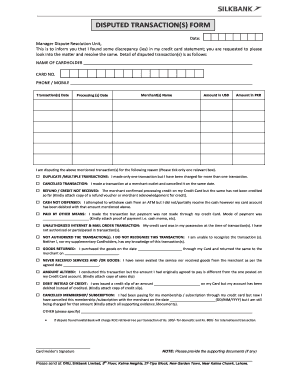
Get Pk Silkbank Disputed Transaction(s) Form
How it works
-

Open form follow the instructions
-

Easily sign the form with your finger
-

Send filled & signed form or save
How to fill out the PK Silkbank Disputed Transaction(s) Form online
This guide provides a comprehensive overview of how to complete the PK Silkbank Disputed Transaction(s) Form online. By following these steps, you will be able to address discrepancies in your credit card statement effectively.
Follow the steps to fill out the form correctly.
- Click ‘Get Form’ button to obtain the form and open it in the editor.
- Fill in the date at the top of the form, which indicates when you are completing the form.
- Enter your name as the cardholder, followed by your credit card number in the designated fields.
- Provide your phone or mobile number for contact regarding the disputed transaction.
- List the transaction date of the disputed charges in the appropriate field.
- Enter the processing date for the transaction, which is often the date the merchant processed the payment.
- Indicate the merchant's name where the transaction took place.
- Input the amount of the disputed transaction in both USD and PKR in their respective fields.
- Select the reason for the dispute by ticking only one relevant box from the provided options.
- If required, attach any supporting documentation that corresponds to your selected reason for the dispute.
- Sign the form where indicated as the cardholder to validate your request.
- Once completed, you can save changes, download, print, or share the form as needed.
Take action now and complete your PK Silkbank Disputed Transaction(s) Form online.
Indeed, Silkbank has transitioned into UBL after the acquisition. This allows customers to benefit from enhanced services and resources. If you encounter any issues with your transactions, the PK Silkbank Disputed Transaction(s) Form is a comprehensive solution to seek redress.