Get To Download E-payment Form - Takaful Malaysia 2020-2026
How it works
-

Open form follow the instructions
-

Easily sign the form with your finger
-

Send filled & signed form or save
How to fill out the To Download E-Payment Form - Takaful Malaysia online
Filling out the To Download E-Payment Form - Takaful Malaysia online is an important step for users wanting to manage their financial transactions effectively. This guide provides a structured approach to ensure that users complete the form accurately and efficiently, addressing essential fields and steps.
Follow the steps to complete the e-payment form accurately.
- Click ‘Get Form’ button to obtain the e-payment form and open it in your preferred document editor.
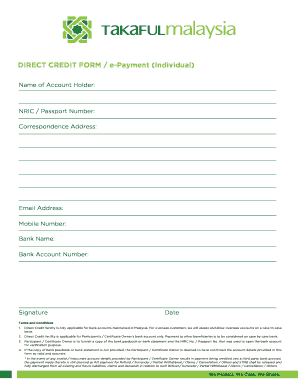
- Input your name as the account holder in the designated field.
- Enter your NRIC or passport number in the appropriate section for identification.
- Provide your correspondence address, ensuring that all details are accurate.
- Input your email address for communication purposes.
- Fill in your mobile number to facilitate further contact.
- Select the name of your bank from the dropdown list.
- Enter your bank account number carefully to avoid errors.
- Sign the form electronically or physically, as required.
- Input the current date to finalize the submission.
- Review all the information provided to ensure accuracy.
- Save the document with your updates, then download, print, or share the completed form as needed.
Complete your e-payment form online today for a streamlined financial process.
To claim your takaful insurance, you typically need to fill out a claims form and provide the necessary documents to support your claim. It is beneficial to follow the guidelines provided by your takaful provider to ensure a smooth process. For those using the Takaful Malaysia platform, you can conveniently submit your claim online. Don’t forget, you can also Download E-Payment Form - Takaful Malaysia through the portal during this process.