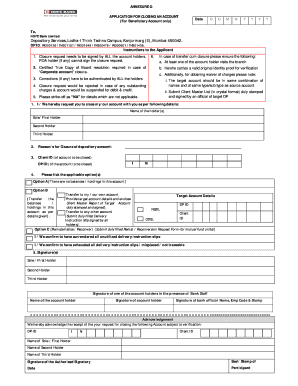
Bai 400042. DP ID: IN300126 / IN301151 / IN301549 / IN300476 / IN300601 / IN301436. Instructions to the Applicant 1. Closure request needs to be signed by ALL the account holders. POA holder (if any) cannot sign the closure request. 2. Certified True Copy of Board resolution required in case of Corporate account closure. 6. In case of transfer cum closure please ensure the following: a. At least one of the account holder visits the branch b. He/she carries a valid original identity proof.
Loading
Open form follow the instructions
Easily sign the form with your finger
Send filled & signed form or save
How to fill out the How To Close Hdfc Demat Account online
Closing your HDFC demat account is a straightforward process that can be completed online. This guide will walk you through each step to ensure a smooth account closure experience.
Follow the steps to close your HDFC demat account online.
- Click ‘Get Form’ button to obtain the form and open it in the editor.
- Begin by entering the date of your request in the specified format (DD/MM/YYYY). This date should reflect when you are submitting the form.
- In the addressed section, ensure the details reflect 'HDFC Bank Limited', Depository Services, and the correct address provided.
- Fill in your DP ID, which identifies your demat account. You can find this on your account statements.
- List all account holders' names accurately. Identify the sole or first holder, second holder, and third holder as applicable.
- Specify the reason for closure, which helps the bank understand your request.
- Provide your Client ID and ensure it matches the account you wish to close.
- Tick one of the applicable options regarding account status: Option A for no balances, Option B for transfer to your own account, or Option C for rematerialization.
- If transferring, include target account details and ensure to attach the necessary Client Master Report for verification.
- Finally, collect signatures from all account holders in the designated area and ensure that an authorized bank official also signs the form.
- After completing all fields, double-check for accuracy and then save your changes. You can proceed to download, print or share the completed form as required.
Complete your document submission online for a hassle-free account closure.
Experience a faster way to fill out and sign forms on the web. Access the most extensive library of templates available.
Related content
ICICI 3 in 1 Account seamlessly integrates a Savings Account Demat Account and Trading...
Sep 3, 2020 — The SCAC is currently undergoing restructuring and has paused updates to...
You should strongly consider consulting a registered fee-only financial advisor before...
Get answers to your most pressing questions about US Legal Forms API.
How can I close my demat account online in HDFC Bank?
To close your demat account online in HDFC Bank, log onto your online banking portal. Navigate to the Demat services menu, select account closure, and fill out the required forms. Adhering to these steps will guide you smoothly through the closure process.
Will a Demat account close automatically?
No, a Demat account will not close automatically. You must initiate the closure process explicitly through your HDFC account. If you need assistance, consider visiting HDFC’s customer service for detailed instructions on how to close HDFC demat account.
Can I close my HDFC Demat account online?
Absolutely, closing your HDFC demat account online is straightforward. Simply log in to your HDFC Bank account, locate the closure option under the demat services, and follow the provided guidelines. Ensure all necessary information is complete for a smooth process.
How can I close my demat account online?
You can close your demat account online by logging into your HDFC account. Navigate to the Demat services section, follow the closure procedure, and fill out the necessary forms. It's essential to ensure that all conditions for closure are met.
How to close HDFC account permanently online?
To close your HDFC account permanently online, access the HDFC Bank portal. You need to enter your login credentials, locate the account closure option, and follow the instructions provided. Make sure to clear any pending transactions before proceeding.
Can I close my Demat account online?
Yes, you can close your Demat account online with HDFC. You should visit the HDFC Bank website and access your Demat account. Follow the specific steps for account closure and be prepared to upload any required forms.
Can I close my HDFC account online?
Yes, you can close your HDFC account online. To do this, visit the HDFC Bank website and log in to your account. Follow the instructions provided for account closure, ensuring you have any necessary documents ready.
How to fill dhan account closure form?
Filling a dhan account closure form requires entering your account details and confirming your intention to close it. Be sure to follow any additional instructions included in the form. Properly completing this form is just as important as understanding how to close HDFC demat account smoothly.
How do I close my demat account?
To close your demat account, you need to submit a closure request either online or via a physical form. Ensure you provide accurate details, such as your account number and personal information. Once your request is processed, you'll receive a confirmation. This overview is crucial for understanding how to close HDFC demat account properly.
Can we close an HDFC securities account online?
Yes, you can close your HDFC securities account online by logging into your account on the HDFC platform. After that, follow the prompts to access the account closure section. This method offers convenience and a straightforward way to learn how to close HDFC demat account right from home.
Use professional pre-built templates to fill in and sign documents online faster. Get access to thousands of forms.
If you believe that this page should be taken down, please follow our DMCA take down process here.