Loading

Open form follow the instructions

Easily sign the form with your finger

Send filled & signed form or save
How to fill out the Healthwise Blood Pressure Log online
The Healthwise Blood Pressure Log is a useful tool for individuals looking to monitor their blood pressure readings effectively. This guide will provide you with step-by-step instructions on how to accurately fill out the form online, ensuring you have a comprehensive record of your blood pressure data.
Follow the steps to complete the Healthwise Blood Pressure Log online.
- Press the ‘Get Form’ button to access the Healthwise Blood Pressure Log and open it in your preferred editing interface.
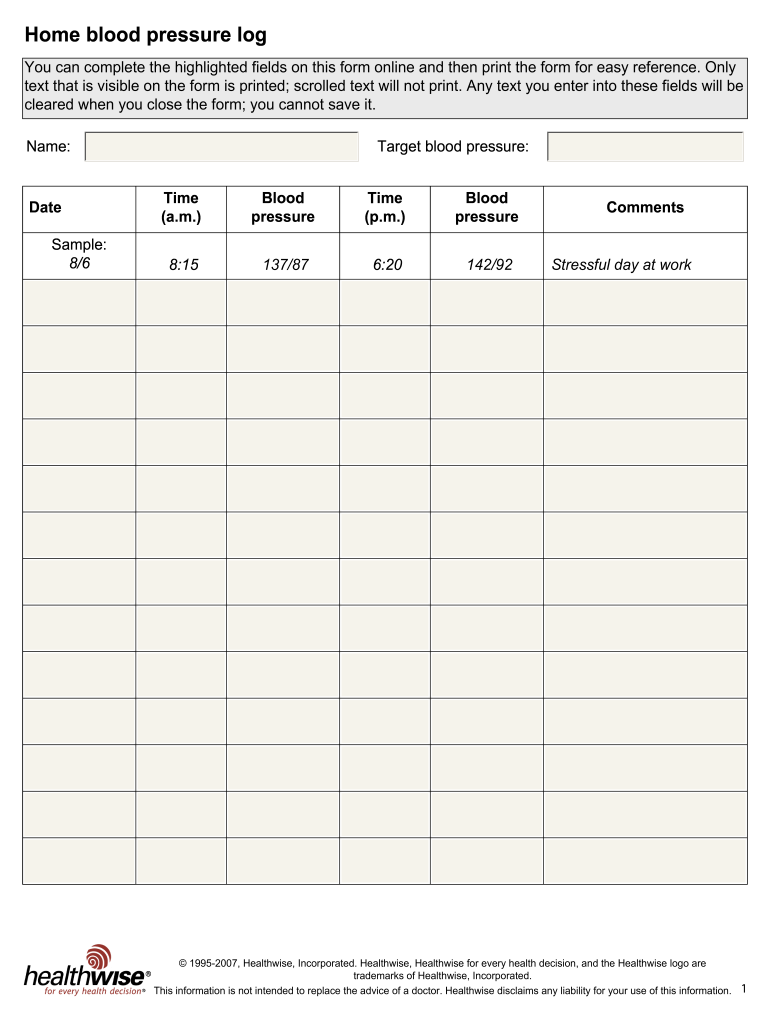
- Begin by entering your name in the designated field. This personalizes the log and helps in tracking your records.
- Next, fill in the date of your blood pressure readings. Use the format MM/DD, for example, 8/6 for August 6th.
- In the 'Target blood pressure' section, indicate your ideal blood pressure readings, if known. This serves as a benchmark for monitoring your health.
- Record your blood pressure readings in both the a.m. and p.m. sections. For each time slot, input the time of the reading followed by the blood pressure value, formatted as systolic/diastolic (e.g., 137/87).
- In the comments section, you may note any relevant observations related to your health or circumstances affecting your blood pressure. For example: 'Stressful day at work.'
- Once you have filled out all the necessary fields, you can then save your changes, download a copy of your form, print it for reference, or share it as needed.
Start filling out the Healthwise Blood Pressure Log online today to keep track of your health.
Experience a faster way to fill out and sign forms on the web. Access the most extensive library of templates available.
Related content
by BB Green · 2007 · Cited by 80 — The Electronic Communications and Home Blood...
Blood Pressure. Blood pressure log · High blood pressure. Cancer Screening. Cancer...
• Blood pressure, weight, uterine size, fetal heart rate, presence of any edema, and...
Get answers to your most pressing questions about US Legal Forms API.
How do you document blood pressure readings?
To document blood pressure readings, write down your measurements along with the date and time you took them. Make sure to note the conditions under which you took the reading, such as your physical state or any activities prior. A Healthwise Blood Pressure Log makes it easy to keep this documentation organized, allowing for better monitoring of your health trends.
How do you record blood pressure logs?
Recording blood pressure logs involves systematically documenting each reading along with the date and time. This can be done manually in a notebook or by using a digital tool. The Healthwise Blood Pressure Log provides a convenient way to track this important health metric, ensuring you have comprehensive records for your healthcare team.
How to keep a log of your blood pressure?
To keep a log of your blood pressure, consistently record your readings at the same times each day. Include relevant details, such as the date, time, and any notes about your condition. A Healthwise Blood Pressure Log can help you maintain this information in a structured format, making it easier to share with your healthcare provider.
How do I record blood pressure in my chart?
Recording blood pressure in your chart involves entering your measurements in the appropriate section, ensuring you provide the date and time of each reading. Regular updates enable better tracking and analysis of your health data. To stay organized, consider using the Healthwise Blood Pressure Log for easy reference.
How do I record blood pressure on mychart?
To record blood pressure on MyChart, start by logging into your account. Navigate to the 'Health' section and select 'Blood Pressure' to enter your readings. It’s essential to keep a detailed record to manage your health efficiently, and a Healthwise Blood Pressure Log can serve as an excellent reference when updating MyChart.
How is blood pressure documented on a patient's chart?
Blood pressure is documented on a patient's chart by recording the exact readings along with the date, time, and the patient's position during measurement. This data helps healthcare providers monitor changes over time. Utilizing a Healthwise Blood Pressure Log can simplify your documentation and ensure accuracy.
How do you write blood pressure on a chart?
When writing blood pressure on a chart, include the systolic reading over the diastolic reading, typically written as '120/80'. It's important to also include the date and time of each reading. Using a clear format ensures better tracking of your health over time, and a Healthwise Blood Pressure Log can assist you in this process.
How do you record blood pressure readings?
To record blood pressure readings, first ensure you have a reliable blood pressure monitor. Sit in a comfortable position, rest for a few minutes, and then take your reading. Write down the systolic and diastolic numbers, along with the date and time. Using a Healthwise Blood Pressure Log can help keep your readings organized.
How to write a BP chart?
Creating a BP chart involves systematically organizing your blood pressure readings from your Healthwise Blood Pressure Log. You can use graphing tools or even simple tables, plotting the systolic and diastolic values over time. This visual representation allows for easier trend analysis and better understanding of your blood pressure fluctuations.
How do you write out blood pressure readings?
Writing out blood pressure readings can be done easily with your Healthwise Blood Pressure Log. Start with the date, followed by the reading in standard format, such as 135/90 mmHg. Including notes about any factors, such as stress or medication taken, offers further insight into your blood pressure trends, assisting in better health assessments.
Use professional pre-built templates to fill in and sign documents online faster. Get access to thousands of forms.
If you believe that this page should be taken down, please follow our DMCA take down process here.