Loading
Form preview
  • US Legal Forms
  • Form Library
  • More Forms
  • More Uncategorized Forms
  • Dti Registration Form

Get Dti Registration Form

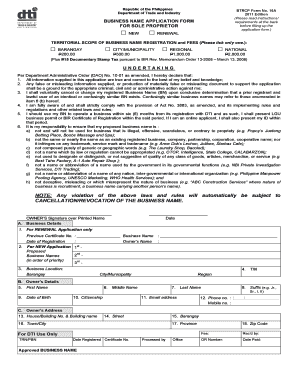
Republic of the Philippines Department of Trade and Industry BTRCP Form No. 16A 2011 Edition (Please read instructions/ requirements at the back before filling up the application form.) BUSINESS NAME.

How it works

  1. Open form

    Open form follow the instructions

  2. Easily sign form

    Easily sign the form with your finger

  3. Share form

    Send filled & signed form or save

How to fill out the Dti Registration Form online

Completing the Dti Registration Form online is a crucial step for anyone looking to establish a business in the Philippines. This guide provides clear instructions and support to help you navigate through the process effectively.

Follow the steps to fill out the Dti Registration Form online

  1. Press the ‘Get Form’ button to acquire the form and open it in your preferred editor.
  2. Determine whether you are applying for a new business name or renewing an existing one by checking the appropriate box in the form.
  3. For renewal applications only, include your previous certificate number and the date of registration.
  4. For new applications, list your proposed business names in order of preference, ensuring they comply with the naming guidelines provided.
  5. Fill in your business location, specifying the Barangay, City/Municipality, and Region where your business will operate.
  6. Enter your Tax Identification Number (TIN) as issued by the Bureau of Internal Revenue.
  7. Provide your personal details including first name, middle name, last name, and suffix, ensuring accuracy and legibility as this information will appear on your registration certificate.
  8. Input your date of birth, and ensure that it indicates you are at least eighteen years of age, and state your citizenship.
  9. Include your email address and active landline and/or mobile numbers for communication purposes.
  10. Complete your address details, including house number, street, Barangay, town/city, province, and zip code.
  11. Read and acknowledge the undertaking section, confirming that all provided information is correct and in compliance with relevant laws and guidelines.
  12. Sign and date the form at the bottom, ensuring it is completed in uppercase letters and printed clearly.
  13. Once completed, you can save, download, print, or share the form as needed.

Complete your Dti Registration Form online today to start your business journey.

Get form

Experience a faster way to fill out and sign forms on the web. Access the most extensive library of templates available.
Get form

Related content

Register for Your “Delaware ID” on the...
This first set of registration steps will allow you to reset, unlock, or update a password...
Learn more
Business Registration Dti
application form, which can be done online or in person at the nearest DTI office. The...
Learn more
EEA2 Forms
WHO COMPLETES THIS FORM? All designated employers. Employers who wish to voluntarily...
Learn more

Related links form

Wrap Plan Forms Cotswolds AONB SDF Application Form Guidance 2009.doc REIMBURSEMENT OF CHILDREN EDUCATION ALLOWANCE FORM - Cutn Ac Omistajanvaihdos Hippos

Questions & Answers

Get answers to your most pressing questions about US Legal Forms API.

Contact support

Selling online without a business license in the Philippines is generally not advisable. While there may be instances where unregistered selling happens, obtaining a business license is crucial for legality. Completing the DTI Registration Form not only protects you but also helps gain customer trust. It demonstrates that you follow the necessary regulations and operate professionally.

In the Philippines, certain individuals are exempt from needing a business permit. These typically include small-scale vendors and some agricultural producers. However, most businesses, including online sellers, need to go through the registration process, starting with the DTI Registration Form. It's best to check with your local government units for specifics.

Yes, online sellers in the Philippines are required to register with the Bureau of Internal Revenue (BIR). By doing so, you secure your tax obligations and complete the registration process, which often begins with the DTI Registration Form. This ensures that your business remains compliant and instills trust in your customers regarding tax contributions.

Yes, you need a business permit for your online business in the Philippines. Even if you operate your business primarily online, a valid business permit is required for compliance with local laws. The DTI Registration Form is a crucial step in obtaining that permit. This ensures that your business operates legally and builds credibility with your customers.

To register your small business in the Philippines, you need to secure a DTI Registration Form. This form is essential as it allows you to register your business name and provides legal recognition. After completing the form, you will submit it to the Department of Trade and Industry (DTI) office. Be sure to prepare the necessary identification and follow the guidelines provided.

The full form of DTI is the Department of Trade and Industry. This agency plays a vital role in fostering the growth of businesses across the Philippines. Knowing the full form and purpose of DTI helps entrepreneurs understand the significance of obtaining a DTI Registration Form for their business endeavors.

The DTI requirements for business registration typically include a completed DTI Registration Form, valid ID, and proof of business address. Some businesses may also require additional documentation based on the nature of their operations. Familiarizing yourself with these DTI requirements can help you prepare in advance.

DTI stands for the Department of Trade and Industry in the Philippines. This government agency is responsible for promoting and facilitating economic growth by supporting small and medium enterprises. Understanding DTI's role can help you navigate the business landscape more effectively and ensure proper registration.

To register with the DTI in the Philippines, visit the DTI office or their official website. You will need to fill out the DTI Registration Form and provide any required documentation. After submission, you will receive a certificate confirming your business registration. This process ensures that you comply with the local market standards.

To register a sole proprietorship in the Philippines, you begin by filling out the DTI registration form for your business name. After securing your business name, you must obtain a business permit from your local government unit. Finally, registering with the BIR will complete the process, allowing you to operate legally.

Get This Form Now!

Use professional pre-built templates to fill in and sign documents online faster. Get access to thousands of forms.
Get form
If you believe that this page should be taken down, please follow our DMCA take down processhere.

Industry-leading security and compliance

US Legal Forms protects your data by complying with industry-specific security standards.
  • In businnes since 1997
    25+ years providing professional legal documents.
  • Accredited business
    Guarantees that a business meets BBB accreditation standards in the US and Canada.
  • Secured by Braintree
    Validated Level 1 PCI DSS compliant payment gateway that accepts most major credit and debit card brands from across the globe.
Get Dti Registration Form
Get form
  • Adoption
  • Bankruptcy
  • Contractors
  • Divorce
  • Home Sales
  • Employment
  • Identity Theft
  • Incorporation
  • Landlord Tenant
  • Living Trust
  • Name Change
  • Personal Planning
  • Small Business
  • Wills & Estates
  • Packages A-Z
  • Affidavits
  • Bankruptcy
  • Bill of Sale
  • Corporate - LLC
  • Divorce
  • Employment
  • Identity Theft
  • Internet Technology
  • Landlord Tenant
  • Living Wills
  • Name Change
  • Power of Attorney
  • Real Estate
  • Small Estates
  • Wills
  • All Forms
  • Forms A-Z
  • Form Library
  • Legal Hub
  • About Us
  • Help Portal
  • Legal Resources
  • Blog
  • Affiliates
  • Contact Us
  • Delete My Account
  • Site Map
  • Industries
  • Forms in Spanish
  • Localized Forms
  • State-specific Forms
  • Forms Kit
  • Real Estate Handbook
  • All Guides
  • Notarize
  • Incorporation services
  • For Consumers
  • For Small Business
  • For Attorneys
  • USLegal
  • FormsPass
  • pdfFiller
  • signNow
  • altaFlow
  • DocHub
  • Instapage
Form Packages
  • Adoption
  • Bankruptcy
  • Contractors
  • Divorce
  • Home Sales
  • Employment
  • Identity Theft
  • Incorporation
  • Landlord Tenant
  • Living Trust
  • Name Change
  • Personal Planning
  • Small Business
  • Wills & Estates
  • Packages A-Z
Form Categories
  • Affidavits
  • Bankruptcy
  • Bill of Sale
  • Corporate - LLC
  • Divorce
  • Employment
  • Identity Theft
  • Internet Technology
  • Landlord Tenant
  • Living Wills
  • Name Change
  • Power of Attorney
  • Real Estate
  • Small Estates
  • Wills
  • All Forms
  • Forms A-Z
  • Form Library
Customer Service
  • Legal Hub
  • About Us
  • Help Portal
  • Legal Resources
  • Blog
  • Affiliates
  • Contact Us
  • Delete My Account
  • Site Map
  • Industries
  • Forms in Spanish
  • Localized Forms
  • State-specific Forms
  • Forms Kit
Legal Guides
  • Real Estate Handbook
  • All Guides
Prepared for you
  • Notarize
  • Incorporation services
Our Customers
  • For Consumers
  • For Small Business
  • For Attorneys
Our Sites
  • USLegal
  • FormsPass
  • pdfFiller
  • signNow
  • altaFlow
  • DocHub
  • Instapage
Social Media
Call us now toll free:
+1 833 426 79 33
As seen in:
© Copyright 1999-2026 airSlate Legal Forms, Inc. 3720 Flowood Dr, Flowood, Mississippi 39232
  • Your Privacy Choices
  • Terms of Service
  • Privacy Notice
  • Content Takedown Policy
  • Bug Bounty Program