Loading
Get Rwanda Immigration Office Pdf Forms 2005-2026
How it works
-

Open form follow the instructions
-

Easily sign the form with your finger
-

Send filled & signed form or save
How to fill out the Rwanda Immigration Office PDF forms online
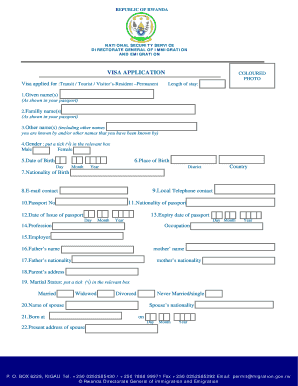
Filling out the Rwanda Immigration Office PDF forms online can seem daunting, but with clear instructions, you can navigate the process smoothly. This guide provides step-by-step support to help you complete your visa application efficiently.
Follow the steps to fill out your visa application
- Click 'Get Form' button to obtain the form and open it in the editor.
- Begin by entering your given name(s) as shown in your passport in the specified field for this information.
- Input your family name(s) exactly as they appear in your passport.
- Provide any other names you are known by or have been known by in the section for other names.
- Indicate your gender by placing a tick (√) in the appropriate box for male or female.
- Fill in your date of birth, specifying the day, month, and year.
- Enter your place of birth in the designated field, followed by your country and district.
- List your nationality at birth in the given section.
- Provide your local telephone contact in the appropriate field.
- Input your email contact in the designated area.
- Enter your nationality as stated in your passport.
- Fill in your passport number accurately.
- Provide the expiry date of your passport in the specified format.
- Indicate the date of issue of your passport by specifying day, month, and year.
- State your profession in the relevant field.
- Provide the name of your employer, if applicable.
- Input your father’s name and mother’s name in the respective fields.
- Enter your father’s nationality and your mother’s nationality in the provided spaces.
- Add your parents' address in the designated section.
- Indicate your marital status by ticking the relevant box for married, widowed, divorced, or never married/single.
- If applicable, provide the name of your spouse.
- Specify where your spouse was born, including date of birth in the assigned fields.
- Fill in your spouse's present address accurately.
- Describe any former visits or stays in Rwanda, including the duration of each stay.
- List any former stays in Africa, mentioning places and dates.
- Explain the reason for your visa application clearly.
- Provide the names and addresses of the persons you intend to visit.
- If you are accompanied by children, list their names and dates of birth, ticking the appropriate boxes for gender.
- Carefully read the declaration statement and certify that all information is complete and correct by signing in the designated area.
- Finally, ensure that you have filled out all required sections, then save your changes, download, print, or share the form as needed.
Ready to complete your documents online? Start filling out your forms today!
When writing to the immigration office, ensure that you include your personal details, the date, and the office's address. Clearly articulate your request or question, making sure to reference any necessary documents or Bhutan Immigration Office Pdf Forms. A well-structured letter enhances your chances of receiving a prompt and helpful response.