Loading

Open form follow the instructions

Easily sign the form with your finger

Send filled & signed form or save
How to fill out the Fillable Resume online
Creating a professional resume is essential for your job search. This guide will walk you through the steps to fill out the Fillable Resume online, ensuring you provide the necessary information clearly and effectively.
Follow the steps to complete your Fillable Resume successfully
- Click ‘Get Form’ button to access the Fillable Resume and launch it in the editor.
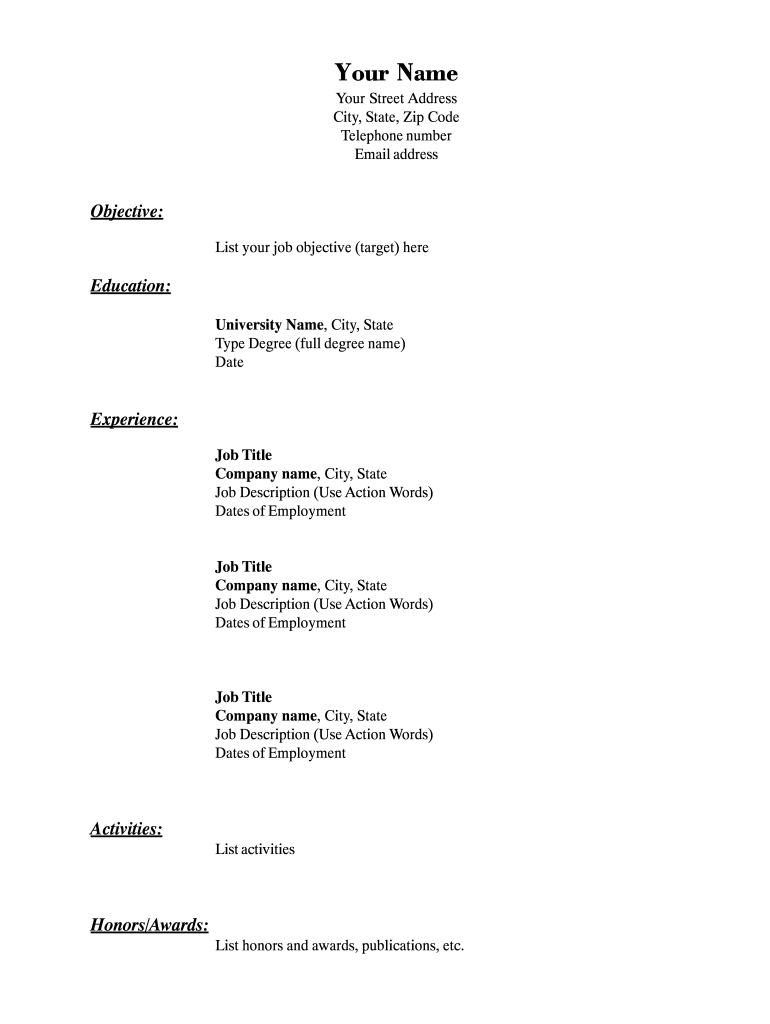
- Begin by entering your name, followed by your street address, city, state, and zip code. Ensure that your contact information, including your telephone number and email address, is accurate and up to date.
- In the objective section, clearly state your job objective. This should reflect the type of position you are targeting and what you aim to achieve in your career.
- For the education section, input the name of your university, location (city and state), the type of degree obtained, and the date you graduated.
- In the experience section, list your job titles, the names of the companies you worked for, their locations, and a brief description of your roles using action words. Include the dates of your employment for each position.
- If applicable, continue adding more job experiences following the same format for each position to provide a comprehensive overview of your work history.
- List any activities that are relevant to your career, including volunteer work, involvement in professional associations, or other pertinent extracurricular engagement.
- In the honors/awards section, enumerate any accolades you've received, such as scholarships, certificates, or publications that highlight your achievements.
- Once you have completed all sections, save your changes. You can download your finished resume, print it directly, or share it as needed.
Begin your employment journey by completing your Fillable Resume online today.
Experience a faster way to fill out and sign forms on the web. Access the most extensive library of templates available.
Related content
Complete each section as you want this information to appear on your resume itself. Be...
Word (.docx) version. Accessible Word (.docx) version. Google Docs version. Use this...
FAA Form 8710-1 is used to determine eligibility for airman ratings and to evaluate...
Get answers to your most pressing questions about US Legal Forms API.
Can ChatGPT write a CV?
While ChatGPT can help generate content and provide suggestions for your CV, a fillable resume from our platform offers a more structured approach. Using our tool, you can customize your resume layout, format, and content, ensuring it meets professional standards and showcases your skills effectively. Combine the power of AI with our user-friendly templates to create a standout CV.
Can I get a resume template in Word?
Yes, you can get a resume template in Word format. Our platform offers various fillable resume templates that can be easily exported to different formats, including Word. Simply create your resume and select the Word format option before downloading, ensuring versatility in your application process.
How to download resume format PDF?
Downloading a resume format PDF is straightforward. After you fill out your resume with our fillable resume tool, you will see an option to export or download your resume. Click on that option, and choose the PDF format to instantly get a well-formatted PDF file, ready for your job applications.
How do I get a PDF resume?
To get a PDF resume, start by creating your fillable resume using our platform. Once you have completed your resume, simply select the option to download it as a PDF. This ensures your format remains consistent across all devices, making it easy to share your resume with potential employers.
How can I turn my Pages resume into a PDF?
To turn your Pages resume into a PDF, open your document in Apple Pages. Click on 'File' and select 'Export To,' then choose 'PDF.' This option enables you to create a fillable resume that can be easily shared and viewed by anyone, regardless of the software they use.
How do I convert my resume to a PDF?
Converting your resume to PDF is easy. Open your resume in the program used to create it and click on 'File.' From there, select 'Save As' or 'Export,' and choose 'PDF' as the file type. This conversion creates a fillable resume that preserves your formatting, making it user-friendly for hiring managers.
How to write a CV form in PDF?
Writing a CV in PDF format begins with drafting your content in a word processing tool. Structure your CV with clear sections: personal information, education, experience, and skills. After finalizing your document, save it as a PDF to create a professional fillable resume, ready for distribution.
Is it better to create a resume on Word or Google Docs?
Using Microsoft Word or Google Docs for creating your resume each has its advantages. Word offers more intricate formatting options, while Google Docs allows for easy sharing and collaboration. Whichever platform you choose, ensure that your fillable resume is saved in PDF format before sending it to potential employers for the best results.
How do I put my resume in PDF format?
To place your resume in PDF format, open the file in your preferred document editor. Navigate to 'File' and then 'Export' or 'Save As.' Select 'PDF' as the output format, which will create a fillable resume that retains its layout and formatting across different devices and platforms.
How do I type up a resume in Microsoft Word?
To type up a resume in Microsoft Word, begin by opening a new document and selecting a template or starting from scratch. Use clear headings for sections like 'Objective,' 'Education,' and 'Experience' to enhance readability. After drafting your fillable resume, consider saving a copy as a PDF for consistent formatting when sharing with employers.
Use professional pre-built templates to fill in and sign documents online faster. Get access to thousands of forms.
If you believe that this page should be taken down, please follow our DMCA take down process here.