Loading
Get Plan De Vuelo 2020-2026
How it works
-

Open form follow the instructions
-

Easily sign the form with your finger
-

Send filled & signed form or save
How to fill out the PLAN DE VUELO online
The PLAN DE VUELO is an essential document used in aviation to communicate important flight details. This guide provides clear, step-by-step instructions for users to accurately fill out the form online, ensuring a smooth submission process.
Follow the steps to successfully complete the PLAN DE VUELO form online.
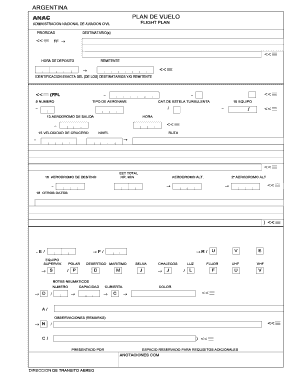
- Click ‘Get Form’ button to access the PLAN DE VUELO and open it in your preferred format for editing.
- Begin by entering the priority level of your flight in the designated field labeled ‘PRIORIDAD’.
- In the ‘DESTINATARIO(s)’ section, specify the addressees who will receive the flight plan.
- Enter the ‘HORA DE DEPOSITO’ to indicate the filing time of the flight plan.
- Provide your details in the ‘REMITENTE’ section, specifying the originator of the form.
- Fill in the ‘IDENTIFICACION EXACTA DEL (DE LOS) DESTINATARIOS Y/O REMITENTE’ field to ensure clear identification.
- Select the appropriate ‘TIPO DE MENSAJE’ to categorize the type of message being sent.
- In the ‘IDENTIFICACION AERONAVE’, enter the specific details about the aircraft being used.
- Complete the ‘TIPO DE AERONAVE’ field with the aircraft type and ‘NUMERO’ with its registration number.
- Indicate the ‘CAT.DE ESTELA TURBULENTA’ for wake turbulence category.
- Fill in the ‘EQUIPO’ section with details of the equipment on board.
- Specify the ‘AERODROMO DE SALIDA’ with the departure aerodrome and its time.
- In the ‘RUTA’ section, document the intended flight route.
- Complete the ‘VELOCIDAD DE CRUCERO’ section with your cruising speed.
- Indicate the ‘AERODROMO DE DESTINO’ as the destination aerodrome.
- If applicable, specify alternate aerodromes in the provided sections.
- Enter ‘OTROS DATOS’ for any additional relevant information.
- In the ‘INFORMACION SUPLEMENTARIA’, include supplementary data if necessary but note it should not be transmitted in FPL messages.
- Complete the ‘AUTONOMIA’ field to specify fuel endurance.
- Fill in the number of ‘PERSONAS A BORDO’ along with details of emergency equipment.
- Ensure to provide the ‘COLOR Y MARCAS DE LA AERONAVE’ for identification.
- Include any remarks in the ‘OBSERVACIONES’ section.
- Identify the ‘COMANDANTE DE LA AERONAVE’ as the pilot in command.
- Once all fields are completed, save your changes, download the form, print, or share as necessary.
Start filling out your PLAN DE VUELO form online for a seamless flight planning experience.
You should file your PLAN DE VUELO at least 1 hour in advance. This gives air traffic control adequate time to review and coordinate your flight path. Some procedures may allow for shorter notice, but early filing is wise. Always use platforms like uslegalforms to streamline the filing process and ensure compliance.