Open form follow the instructions
Easily sign the form with your finger
Send filled & signed form or save
How to fill out the Ford Roadside Assistance Claim Form online
Filing a claim using the Ford Roadside Assistance Claim Form online can be a straightforward process when you understand the necessary steps. This guide will help you through each section to ensure you provide the complete and accurate information needed for your claim.
Follow the steps to fill out the Ford Roadside Assistance Claim Form effectively
- Click ‘Get Form’ button to obtain the form and open it in the editor.
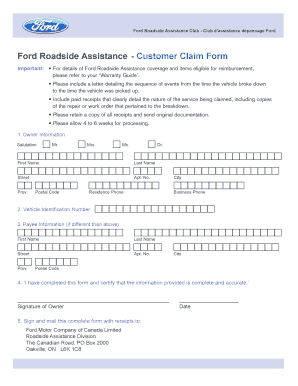
- Begin by filling out the Owner Information section. You will need to select your salutation, then input your first name, last name, street address, apartment number, city, province, postal code, and residence phone number.
- Next, locate the Vehicle Identification Number (VIN) section. Enter your vehicle's VIN accurately as it is crucial for identifying your vehicle.
- If the payee information differs from the owner information, fill out the Payee Information section with the necessary details, including their first name, last name, street address, apartment number, city, province, and postal code.
- In the certification section, assure the provided information is complete and accurate by signing the document as the owner.
- Add the date of signing to specify when the form was completed.
- Finally, mail the completed form along with any necessary receipts to the specified address, which is Ford Motor Company of Canada Limited, Roadside Assistance Division, The Canadian Road, PO Box 2000, Oakville, ON L6K 1C8.
Complete your Ford Roadside Assistance Claim Form online today to ensure timely processing of your claim.
Experience a faster way to fill out and sign forms on the web. Access the most extensive library of templates available.
Related content
Aug 12, 2025 — Call the GSA Maintenance Control Center at 866-400-0411, option 1 during...
Download a FREE electronic copy or order one FREE printed copy of the most up-to-date...
For future quick reference, enter your vehicle information on the back of your. Roadside...
Get answers to your most pressing questions about US Legal Forms API.
How to make a claim against Ford?
Making a claim against Ford is straightforward when you have the right information on hand. Start by gathering your vehicle details, incident description, and any relevant documentation. To initiate the process, complete the Ford Roadside Assistance Claim Form, which simplifies the claim submission and helps you receive assistance promptly.
What can a Ford assistant do?
A Ford assistant can help you in various ways, especially during emergencies. They provide services such as towing, fuel delivery, and battery jump-starts to ensure you are back on the road quickly. When you need to access the Ford Roadside Assistance Claim Form, your assistant can guide you through the process, ensuring you get the support you need without hassle.
What is the Ford customer satisfaction program?
The Ford customer satisfaction program is designed to enhance customer experience and address any concerns regarding your vehicle. This program typically includes benefits such as warranty extensions and special offers for service. If you believe you are eligible for assistance through this program, you may need to complete specific documentation, including the Ford Roadside Assistance Claim Form in some instances.
How long does a Ford recall reimbursement take?
Typically, reimbursement for a Ford recall can take several weeks. After submitting your request for reimbursement, it undergoes processing with Ford's customer service team. To expedite this process, make sure you complete the necessary forms accurately, including the Ford Roadside Assistance Claim Form if applicable. Keeping thorough documentation will also help speed up your reimbursement.
Does Ford do insurance?
Ford does not directly provide insurance options. Instead, they often partner with insurance companies to offer coverage plans that suit their vehicles. If you have questions about insurance or coverage related to your Ford, you can refer to your dealership or check the Ford website for guidance on available options. Remember, filing a claim with your insurance can often require a Ford Roadside Assistance Claim Form.
What is Ford Hotline?
The Ford Hotline serves as a key resource for customers needing assistance or information about their vehicles. Whether you have questions about your Ford or need help with a roadside emergency, the hotline is ready to assist. By keeping the Ford Roadside Assistance Claim Form accessible, you can easily utilize the hotline for efficient support in any situation.
What are Ford calls?
Ford calls refer to the services provided by Ford's roadside assistance team. These services include navigating emergencies like flat tires or running out of gas, ensuring you receive the help you need. Make sure to have the Ford Roadside Assistance Claim Form so you can easily access these services when you need them most.
Can I call Ford to unlock my car?
Yes, you can call Ford for assistance if you are locked out of your vehicle. Their roadside assistance team is ready to help you regain access. Additionally, having the Ford Roadside Assistance Claim Form on hand can streamline the process, ensuring you receive prompt and efficient service.
Is Ford emergency assistance set to off?
Ford SYNC Emergency Assistance can be turned off by the driver. If it is turned off, it remains off but the driver is informed at the start of a journey that the system is not active. The system will not work if the driver's mobile phone is not connected via Bluetooth.
What is the phone number for Ford Assist UK?
Telephone Number: 0345 712 5490 Tooltip. Opening hours Monday to Friday 9.00am to 5.15pm and Saturdays 9.00am - 1.00pm.
Use professional pre-built templates to fill in and sign documents online faster. Get access to thousands of forms.
If you believe that this page should be taken down, please follow our DMCA take down process here.
This form is available in several versions. Select the version you need from the drop-down list below.