Loading
Form preview
  • US Legal Forms
  • Other Templates
  • More Forms
  • More Uncategorized Forms
  • Contract Rider

Get Contract Rider

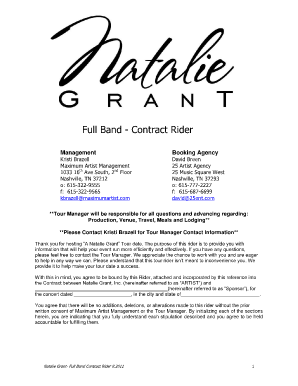
Natalie Grant- Full Band Contract Rider 8.2011. 1. Full Band - Contract Rider. ** Tour Manager will be responsible for all questions and advancing regarding: .

How it works

  1. Open form

    Open form follow the instructions

  2. Easily sign form

    Easily sign the form with your finger

  3. Share form

    Send filled & signed form or save

How to fill out the Contract Rider online

The Contract Rider serves as a crucial document in ensuring that all aspects of the event are clearly outlined and agreed upon. This comprehensive guide will assist users in filling out the Contract Rider online, providing step-by-step instructions for each component.

Follow the steps to complete the Contract Rider effectively.

  1. Click ‘Get Form’ button to obtain the Contract Rider and open it in the editor.
  2. Fill in the section for the Artist's name and the Sponsor's name. This is a critical identification step that binds the Contract Rider to the individuals or entities involved.
  3. Specify the concert date and its location in the designated fields. Ensure that the venue city and state are accurate for effective planning.
  4. Review SECTION 1 - VENUE REQUIREMENTS and mark each required item, indicating your agreement with the stipulations for stage, dressing rooms, and other essential facilities.
  5. Proceed to SECTION 2 - TIME REQUIREMENTS and confirm that the access times for the venue meet the needs outlined for both the Artists and crew.
  6. Move on to SECTION 3 - LABOR REQUIREMENTS to indicate the number of crew members needed for load in, show setup, and load out. Confirm the qualifications of the individuals outlined.
  7. In SECTION 4 - ELECTRICAL REQUIREMENTS, note any requirements for electrical power and confirm that your venue can meet these needs.
  8. Continue to fill out SECTION 5 - TOUR PERSONNEL/LODGING, ensuring that adequate lodging is arranged for the artists as per the detailed requirements.
  9. Complete SECTION 6 - HOSPITALITY REQUIREMENTS by providing details on meals, catering, and beverage options that fit the artist's preferences.
  10. Finalize the document by carefully reviewing all filled sections for accuracy and clarity. After ensuring everything is correct, you can save your changes or print the document for distribution.

Complete your Contract Rider online to facilitate a successful event!

Get form

Experience a faster way to fill out and sign forms on the web. Access the most extensive library of templates available.
Get form

Related content

Contract Rider Forms 515 and 773
Contract Rider Forms 515 and 773. Main File upload. UTP_ContractRiderForms515-773.pdf...
Learn more
rider | Wex | US Law | LII / Legal Information...
An ancillary document that amends or supplements the primary document is known as a rider...
Learn more
Contract (Kamen Rider Ryuki)
Nov 5, 2025 — The contracted rider must periodically supply the monster with the energy...
Learn more

Related links form

Homdap Form Homeeducation Hcsb K12 Fl Us 2014 - 2015 Verification Worksheet ... - Angelina College - Angelina Nj Superior Court Answer Form

Questions & Answers

Get answers to your most pressing questions about US Legal Forms API.

Contact support

Creating a contract rider involves a few key steps. First, identify the specific contract you are modifying and outline the changes in detail. Next, draft the rider, ensuring it is clear and legally sound. Tools available on the US Legal Forms platform can aid in crafting a comprehensive and effective contract rider. This resource can streamline the process and ensure you cover all necessary points.

To add a rider means to include additional provisions or requirements to an existing contract. This process allows you to modify or clarify specific aspects of the agreement while ensuring all parties remain on the same page. Adding a rider can enhance the functionality of the original contract without the need for extensive changes. By utilizing a contract rider, you maintain flexibility in your agreements.

To write a contract rider, begin by clearly identifying the original contract and its terms. Next, specify the changes or additions you wish to include, using precise language to avoid ambiguity. It's essential to ensure that the rider is consistent with the overall intent of the original agreement. You might find the tools and resources on the US Legal Forms platform helpful for drafting a professional contract rider.

In a performance contract, a rider specifies additional conditions that are required for the performance. This can include technical requirements, staging, or artist hospitality needs. Including a rider in such contracts ensures all parties agree on critical elements that may not be detailed in the main contract. This level of specificity can enhance the overall quality and success of the performance.

The primary difference between a rider and an addendum is their function in a contract. While both documents serve to modify an existing contract, a rider directly alters the existing terms, whereas an addendum typically adds new information without changing prior terms. Understanding this distinction is crucial in contract drafting. With a contract rider, you can ensure your modifications are effectively integrated into the existing framework.

The purpose of a rider is to add clarity or to modify specific aspects of a contract. By incorporating a rider, parties can address unique situations or legal requirements without the complexity of drafting a new contract. This added flexibility enhances understanding and compliance. A well-drafted contract rider can protect the interests of all parties and reduce potential disputes.

A rider in a contract is an additional provision that alters the terms of the original agreement. It is typically used to add conditions or details that were not included initially. By using a contract rider, parties can incorporate more specific requirements without needing to rewrite the entire document. This makes the contract more tailored and clear for all involved.

Yes, a rider is indeed a legal document. It modifies, adds to, or clarifies terms in an existing contract. Riders serve to address specific issues that the primary contract may not cover. Utilizing a contract rider can help ensure that all parties understand their responsibilities and rights clearly.

A rider typically refers to an individual who is named in a rider section of a contract, often indicating someone with specific rights or responsibilities. In the context of performance contracts, a rider may refer to a performer or contractor. Understanding the role of each rider is important for managing expectations and obligations.

To fill out a contract, start by clearly stating the agreement's purpose and ensuring all parties understand their roles. Include relevant details like terms, conditions, and any riders that modify the main contract. Platforms like uslegalforms offer easy templates to help you fill out contracts correctly, ensuring no vital details are missed.

Get This Form Now!

Use professional pre-built templates to fill in and sign documents online faster. Get access to thousands of forms.
Get form
If you believe that this page should be taken down, please follow our DMCA take down processhere.
Get Contract Rider
Get form
  • Adoption
  • Bankruptcy
  • Contractors
  • Divorce
  • Home Sales
  • Employment
  • Identity Theft
  • Incorporation
  • Landlord Tenant
  • Living Trust
  • Name Change
  • Personal Planning
  • Small Business
  • Wills & Estates
  • Packages A-Z
  • Affidavits
  • Bankruptcy
  • Bill of Sale
  • Corporate - LLC
  • Divorce
  • Employment
  • Identity Theft
  • Internet Technology
  • Landlord Tenant
  • Living Wills
  • Name Change
  • Power of Attorney
  • Real Estate
  • Small Estates
  • Wills
  • All Forms
  • Forms A-Z
  • Other Templates
  • Legal Hub
  • About Us
  • Help Portal
  • Legal Resources
  • Blog
  • Affiliates
  • Contact Us
  • Delete My Account
  • Site Map
  • Industries
  • Forms in Spanish
  • Localized Forms
  • State-specific Forms
  • Forms Kit
  • Real Estate Handbook
  • All Guides
  • Notarize
  • Incorporation services
  • For Consumers
  • For Small Business
  • For Attorneys
  • USLegal
  • FormsPass
  • pdfFiller
  • signNow
  • altaFlow
  • DocHub
  • Instapage
Form Packages
  • Adoption
  • Bankruptcy
  • Contractors
  • Divorce
  • Home Sales
  • Employment
  • Identity Theft
  • Incorporation
  • Landlord Tenant
  • Living Trust
  • Name Change
  • Personal Planning
  • Small Business
  • Wills & Estates
  • Packages A-Z
Form Categories
  • Affidavits
  • Bankruptcy
  • Bill of Sale
  • Corporate - LLC
  • Divorce
  • Employment
  • Identity Theft
  • Internet Technology
  • Landlord Tenant
  • Living Wills
  • Name Change
  • Power of Attorney
  • Real Estate
  • Small Estates
  • Wills
  • All Forms
  • Forms A-Z
  • Other Templates
Customer Service
  • Legal Hub
  • About Us
  • Help Portal
  • Legal Resources
  • Blog
  • Affiliates
  • Contact Us
  • Delete My Account
  • Site Map
  • Industries
  • Forms in Spanish
  • Localized Forms
  • State-specific Forms
  • Forms Kit
Legal Guides
  • Real Estate Handbook
  • All Guides
Prepared for you
  • Notarize
  • Incorporation services
Our Customers
  • For Consumers
  • For Small Business
  • For Attorneys
Our Sites
  • USLegal
  • FormsPass
  • pdfFiller
  • signNow
  • altaFlow
  • DocHub
  • Instapage
Social Media
Call us now toll free:
+1 833 426 79 33
As seen in:
© Copyright 1999-2026 airSlate Legal Forms, Inc. 17 Station Street, Ste. 203, Brookline, MA 02445
  • Your Privacy Choices
  • Terms of Service
  • Privacy Notice
  • Content Takedown Policy
  • Bug Bounty Program