We use cookies to improve security, personalize the user experience, enhance our marketing activities (including cooperating with our marketing partners) and for other business use.
Click "here" to read our Cookie Policy. By clicking "Accept" you agree to the use of cookies. Read less
Read more
Accept
Loading
Form preview
  • US Legal Forms
  • Form Library
  • More Forms
  • More Uncategorized Forms
  • Permission Slips For Water Activities

Get Permission Slips For Water Activities

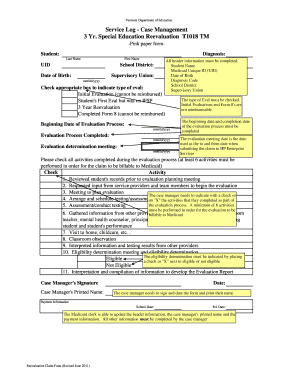
Vermont Department of Education Service Log - Case Management 3 Yr. Special Education Reevaluation T1018 TM -Pink paper formStudent: Last Name First Name Diagnosis: School District: Supervisory Union:.

How it works

  1. Open form

    Open form follow the instructions

  2. Easily sign form

    Easily sign the form with your finger

  3. Share form

    Send filled & signed form or save

How to fill out the Permission Slips For Water Activities online

This guide provides a comprehensive overview of how to complete the Permission Slips For Water Activities online. We aim to ensure that every user, regardless of their experience with digital forms, can navigate the process with ease and confidence.

Follow the steps to fill out the Permission Slips For Water Activities online effectively.

  1. To begin the process, click the ‘Get Form’ button to access the Permission Slips For Water Activities form. This will allow you to open the form in your preferred editing tool.
  2. Fill in the necessary student information, including their last name, first name, and date of birth. Ensure that all header information is complete and accurate.
  3. Provide the school district and supervisory union details. This is important for the record-keeping requirements of the permission slip.
  4. Check the appropriate box to indicate the type of evaluation. Ensure that the information you select correlates with the event for which permission is being granted.
  5. Include the beginning date of the evaluation process as well as the evaluation determination meeting date. These dates must be formatted as mm/dd/yyyy.
  6. Indicate the activities completed during the evaluation process by marking at least six relevant activities on the form to ensure compliance for billing.
  7. Complete the eligibility determination section by checking either 'Eligible' or 'Not Eligible' as determined by the evaluation process.
  8. Lastly, add the case manager’s signature, printed name, and date to validate the document. Ensure that this information is accurate to avoid issues.
  9. After reviewing all entries for accuracy, you can save changes, download, print, or share the form according to your needs.

Start filling out your Permission Slips For Water Activities online today!

Get form

Experience a faster way to fill out and sign forms on the web. Access the most extensive library of templates available.
Get form

Related content

Water Activities Authorization Form
followed. 1. Water Activities Authorization Form. My child has permission* to participate...
Learn more
Camp Routine Permission - Lakeland
Yes. No. Are water activities planned in water that is 18 inches or more in depth. Yes...
Learn more
Youth Sailing Camp Manual
• Appropriate layered clothing for active water sports. • Closed toed tennis shoes or...
Learn more

Related links form

Remanufactured Instrument Cluster Order Form Napa Ironclad Engines Reviews Forward Lift Warranty Registration 996 Industrial Drive ... **** MATERIAL SAFETY DATA SHEET **** 22214 - STABIL Fuel Stabilizer SEC SEC SEC SEC SEC SEC SEC SEC

Questions & Answers

Get answers to your most pressing questions about US Legal Forms API.

Contact support

Creating a permission slip in Google Forms is straightforward. Start by selecting a template or blank form, and include fields for participant information and specific details related to Permission Slips For Water Activities. Remember to configure the settings to capture responses efficiently.

Writing a good consent form means clarity is key. Clearly document the activity details related to Permission Slips For Water Activities, outline the risks involved, and provide sections for participant and guardian signatures. Always aim for transparency to build trust and understanding.

Filling out a letter of permission requires clear articulation of the permission being given. Specify the context, for instance, Permission Slips For Water Activities, and ensure to add the names of the involved parties. Lastly, include space for signatures to formalize the agreement.

To fill out a permission slip, begin by providing personal information such as the participant's name and contact details. Ensure you specify the activity linked to Permission Slips For Water Activities, and request the necessary signatures from a parent or guardian to validate consent.

Making your own consent form starts with outlining the purpose, especially for activities like Permission Slips For Water Activities. Clearly state the activity, any hazards, and include sections for signatures from parents or guardians. Utilize templates available through services like USLegalForms for assistance.

To fill out a permission slip, write down the name of the participant, the activity details related to Permission Slips For Water Activities, and any potential risks. Include the parent's or guardian's name and signature at the bottom, ensuring all information is legible and complete.

Filling out a downloaded application form requires a careful approach. Start by reading through the entire document to understand the requirements, especially concerning Permission Slips For Water Activities. Ensure you provide accurate information and sign where required.

To create a Google consent form, open Google Forms and select a blank template. Add the necessary questions and format the form to reflect the details of Permission Slips For Water Activities. Make sure to set response collection options to gather all participant information effectively.

Creating a permission form involves specifying the activity, such as Permission Slips For Water Activities. You should clearly outline any risks involved, and require a signature from a parent or guardian. For ease, consider using templates available on platforms like USLegalForms.

To make a consent slip, start by clearly stating the purpose of the slip related to Permission Slips For Water Activities. Include spaces for the participant's name, parent or guardian's signature, and specific details about the activity. Don't forget to add any necessary liability waivers and emergency contacts for safety.

Get This Form Now!

Use professional pre-built templates to fill in and sign documents online faster. Get access to thousands of forms.
Get form
If you believe that this page should be taken down, please follow our DMCA take down processhere.

Industry-leading security and compliance

US Legal Forms protects your data by complying with industry-specific security standards.
  • In businnes since 1997
    25+ years providing professional legal documents.
  • Accredited business
    Guarantees that a business meets BBB accreditation standards in the US and Canada.
  • Secured by Braintree
    Validated Level 1 PCI DSS compliant payment gateway that accepts most major credit and debit card brands from across the globe.
Get Permission Slips For Water Activities
Get form
Form Packages
Adoption
Bankruptcy
Contractors
Divorce
Home Sales
Employment
Identity Theft
Incorporation
Landlord Tenant
Living Trust
Name Change
Personal Planning
Small Business
Wills & Estates
Packages A-Z
Form Categories
Affidavits
Bankruptcy
Bill of Sale
Corporate - LLC
Divorce
Employment
Identity Theft
Internet Technology
Landlord Tenant
Living Wills
Name Change
Power of Attorney
Real Estate
Small Estates
Wills
All Forms
Forms A-Z
Form Library
Customer Service
Terms of Service
Privacy Notice
Legal Hub
Content Takedown Policy
Bug Bounty Program
About Us
Blog
Affiliates
Contact Us
Delete My Account
Site Map
Industries
Forms in Spanish
Localized Forms
State-specific Forms
Forms Kit
Legal Guides
Real Estate Handbook
All Guides
Prepared for You
Notarize
Incorporation services
Our Customers
For Consumers
For Small Business
For Attorneys
Our Sites
US Legal Forms
USLegal
FormsPass
pdfFiller
signNow
airSlate WorkFlow
DocHub
Instapage
Social Media
Call us now toll free:
+1 833 426 79 33
As seen in:
  • USA Today logo picture
  • CBC News logo picture
  • LA Times logo picture
  • The Washington Post logo picture
  • AP logo picture
  • Forbes logo picture
© Copyright 1997-2025
airSlate Legal Forms, Inc.
3720 Flowood Dr, Flowood, Mississippi 39232
Form Packages
Adoption
Bankruptcy
Contractors
Divorce
Home Sales
Employment
Identity Theft
Incorporation
Landlord Tenant
Living Trust
Name Change
Personal Planning
Small Business
Wills & Estates
Packages A-Z
Form Categories
Affidavits
Bankruptcy
Bill of Sale
Corporate - LLC
Divorce
Employment
Identity Theft
Internet Technology
Landlord Tenant
Living Wills
Name Change
Power of Attorney
Real Estate
Small Estates
Wills
All Forms
Forms A-Z
Form Library
Customer Service
Terms of Service
Privacy Notice
Legal Hub
Content Takedown Policy
Bug Bounty Program
About Us
Blog
Affiliates
Contact Us
Delete My Account
Site Map
Industries
Forms in Spanish
Localized Forms
State-specific Forms
Forms Kit
Legal Guides
Real Estate Handbook
All Guides
Prepared for You
Notarize
Incorporation services
Our Customers
For Consumers
For Small Business
For Attorneys
Our Sites
US Legal Forms
USLegal
FormsPass
pdfFiller
signNow
airSlate WorkFlow
DocHub
Instapage
Social Media
Call us now toll free:
+1 833 426 79 33
As seen in:
  • USA Today logo picture
  • CBC News logo picture
  • LA Times logo picture
  • The Washington Post logo picture
  • AP logo picture
  • Forbes logo picture
© Copyright 1997-2025
airSlate Legal Forms, Inc.
3720 Flowood Dr, Flowood, Mississippi 39232