Loading
Form preview
  • US Legal Forms
  • Other Templates
  • More Forms
  • More Multi-State Forms
  • Electronic Funds Transfer (eft) Form - New Zealand. Electronic Funds Transfer (eft) Form - New 2020

Get Electronic Funds Transfer (eft) Form - New Zealand. Electronic Funds Transfer (eft) Form - New 2020-2026

How it works

  1. Open form

    Open form follow the instructions

  2. Easily sign form

    Easily sign the form with your finger

  3. Share form

    Send filled & signed form or save

How to fill out the Electronic Funds Transfer (EFT) Form - New Zealand online

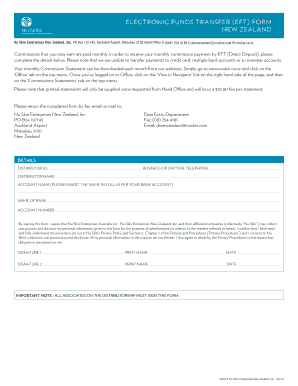
Filling out the Electronic Funds Transfer (EFT) Form is a crucial step for users who wish to receive their monthly commission payments through direct deposit. This guide provides clear, step-by-step instructions to ensure that you complete the form accurately and efficiently.

Follow the steps to complete your EFT form

  1. Click ‘Get Form’ button to obtain the form and open it in the editor.
  2. Enter your Distributor ID in the designated field. This unique identification number is essential for processing your commission payments.
  3. Provide your business or daytime telephone number. This contact information is necessary in case there are queries regarding your form.
  4. Fill in your complete name as the Distributor. Ensure that it matches the name associated with your account.
  5. In the 'Account name' field, insert the name exactly as it appears on your bank account. Accuracy is vital for accurate deposits.
  6. Specify the name of your bank in the provided section. This should be the institution where your account is held.
  7. Enter your bank account number carefully. Double-check this information to avoid any potential payment issues.
  8. Review the consent statement regarding personal information usage and ensure you understand the privacy policy mentioned. By signing, you agree to the terms outlined in this section.
  9. Sign the form in the designated areas for Signature 1 and Signature 2. Each associate on the distributorship must provide their signature.
  10. Print your name and date next to each signature. This helps verify that all signatories consent to the information provided.
  11. Ensure all sections are thoroughly completed before submitting the form. Save any changes, download, print, or share it as necessary.

Complete your Electronic Funds Transfer (EFT) Form online today to secure your monthly commission payments.

Get form

Experience a faster way to fill out and sign forms on the web. Access the most extensive library of templates available.
Get form

Related content

Instructions for Form 8802 (10/2024)
Sep 9, 2024 — If you pay by check, it will be converted into an electronic funds...
Learn more
The dreams of the cashless society: A study of...
by E Dunwoodie · Cited by 2 — This study examines how the idea of a cashless society...
Learn more
ACCOUNTS PAYABLE GUIDE Australia & New Zealand
• Payments will be made by Electronic Funds Transfer (EFT) at the end of the settlement...
Learn more

Related links form

Death Certificate Information - Mountain High Funeral Home Of ... Reservation Form The Euromoney Thailand Invesment Foru M 2010 Hotel Booking Form 08.doc Projektligji Per Veteranet E Ushtris Lirimtare T Kosovs

Questions & Answers

Get answers to your most pressing questions about US Legal Forms API.

Contact support

The EFT format outlines how payment data is organized and transmitted between banks. In New Zealand, this includes sequential record types for payments, along with necessary identifiers. Knowing the EFT format helps ensure that your transactions are processed reliably and efficiently.

To complete an Electronic Funds Transfer (EFT), you must begin by accessing your bank’s online platform or app. Follow the prompts to enter payment details, including the amount and recipient's information. Confirm the transaction details before finalizing the transfer, ensuring everything is accurate to prevent errors.

A common example of an Electronic Funds Transfer (EFT) is direct deposit, where employers send salaries directly to employees' bank accounts. Another example includes online transactions for purchasing goods or services. These methods illustrate how EFTs streamline everyday financial activities.

To fill an Electronic Funds Transfer (EFT) form, start by entering your personal information, including your name and contact details. Then, provide accurate bank account information for both the sender and recipient. Finally, review the form for errors before submission, ensuring all details comply with New Zealand’s regulations.

The Electronic Funds Transfer (EFT) file format is a specific structure required for transmitting payment instructions electronically. This format ensures that details like account numbers and transaction amounts are accurately captured and understood by financial institutions. Understanding this format is crucial for smooth processing and compliance.

Completing an Electronic Funds Transfer (EFT) involves filling out the necessary transfer form and ensuring you have all correct details ready. After providing your information and the recipient's details, double-check everything, and submit the form through your bank's specified channel. If you encounter any issues, uslegalforms can provide the necessary support and resources to assist you.

To make an Electronic Funds Transfer (EFT), start by accessing your bank's online platform or mobile app. Enter the details required, such as the recipient's bank information and transfer amount. Once confirmed, submit the transfer, and keep a record of the transaction for future reference. If you find the process daunting, consider our services at uslegalforms for easy templates and detailed instructions.

Filling out an Electronic Funds Transfer (EFT) Form - New Zealand requires specific information. Begin by entering your bank details, including account number and routing number. Next, include the amount to transfer and specify the date of the transaction. If you need assistance completing the form, our platform at uslegalforms can guide you through the process with easy-to-follow instructions.

The EFT form serves as a critical tool in initiating an Electronic Funds Transfer (EFT). It collects essential information, including sender and recipient details, ensuring the right accounts are credited. The form is crucial for processing payments swiftly and securely.

To request an Electronic Funds Transfer (EFT), you will need to complete the EFT Form - New Zealand with the appropriate payment details. Make sure to include your account information and the recipient's details. After filling out the form, submit it to your bank, either electronically or in person, depending on their available options.

Get This Form Now!

Use professional pre-built templates to fill in and sign documents online faster. Get access to thousands of forms.
Get form
If you believe that this page should be taken down, please follow our DMCA take down processhere.
Get Electronic Funds Transfer (EFT) Form - New Zealand. Electronic Funds Transfer (EFT) Form - New
Get form
  • Adoption
  • Bankruptcy
  • Contractors
  • Divorce
  • Home Sales
  • Employment
  • Identity Theft
  • Incorporation
  • Landlord Tenant
  • Living Trust
  • Name Change
  • Personal Planning
  • Small Business
  • Wills & Estates
  • Packages A-Z
  • Affidavits
  • Bankruptcy
  • Bill of Sale
  • Corporate - LLC
  • Divorce
  • Employment
  • Identity Theft
  • Internet Technology
  • Landlord Tenant
  • Living Wills
  • Name Change
  • Power of Attorney
  • Real Estate
  • Small Estates
  • Wills
  • All Forms
  • Forms A-Z
  • Other Templates
  • Legal Hub
  • About Us
  • Help Portal
  • Legal Resources
  • Blog
  • Affiliates
  • Contact Us
  • Delete My Account
  • Site Map
  • Industries
  • Forms in Spanish
  • Localized Forms
  • State-specific Forms
  • Forms Kit
  • Real Estate Handbook
  • All Guides
  • Notarize
  • Incorporation services
  • For Consumers
  • For Small Business
  • For Attorneys
  • USLegal
  • FormsPass
  • pdfFiller
  • signNow
  • altaFlow
  • DocHub
  • Instapage
Form Packages
  • Adoption
  • Bankruptcy
  • Contractors
  • Divorce
  • Home Sales
  • Employment
  • Identity Theft
  • Incorporation
  • Landlord Tenant
  • Living Trust
  • Name Change
  • Personal Planning
  • Small Business
  • Wills & Estates
  • Packages A-Z
Form Categories
  • Affidavits
  • Bankruptcy
  • Bill of Sale
  • Corporate - LLC
  • Divorce
  • Employment
  • Identity Theft
  • Internet Technology
  • Landlord Tenant
  • Living Wills
  • Name Change
  • Power of Attorney
  • Real Estate
  • Small Estates
  • Wills
  • All Forms
  • Forms A-Z
  • Other Templates
Customer Service
  • Legal Hub
  • About Us
  • Help Portal
  • Legal Resources
  • Blog
  • Affiliates
  • Contact Us
  • Delete My Account
  • Site Map
  • Industries
  • Forms in Spanish
  • Localized Forms
  • State-specific Forms
  • Forms Kit
Legal Guides
  • Real Estate Handbook
  • All Guides
Prepared for you
  • Notarize
  • Incorporation services
Our Customers
  • For Consumers
  • For Small Business
  • For Attorneys
Our Sites
  • USLegal
  • FormsPass
  • pdfFiller
  • signNow
  • altaFlow
  • DocHub
  • Instapage
Social Media
Call us now toll free:
+1 833 426 79 33
As seen in:
© Copyright 1999-2026 airSlate Legal Forms, Inc. 17 Station Street, Ste. 203, Brookline, MA 02445
  • Your Privacy Choices
  • Terms of Service
  • Privacy Notice
  • Content Takedown Policy
  • Bug Bounty Program