Loading
Form preview
  • US Legal Forms
  • Other Templates
  • More Forms
  • More Multi-State Forms
  • Sled Concealed Weapon Permit (cwp) Instructor Renewal Application 2020

Get Sled Concealed Weapon Permit (cwp) Instructor Renewal Application 2020-2026

How it works

  1. Open form

    Open form follow the instructions

  2. Easily sign form

    Easily sign the form with your finger

  3. Share form

    Send filled & signed form or save

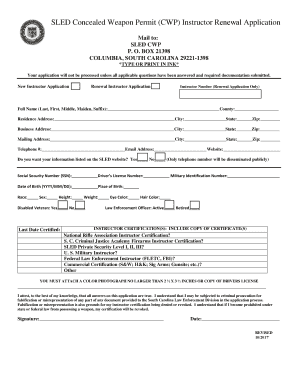
How to fill out the SLED Concealed Weapon Permit (CWP) Instructor Renewal Application online

This guide provides clear and concise instructions on how to complete the SLED Concealed Weapon Permit (CWP) Instructor Renewal Application online. Whether you are renewing your certification or are a new applicant, this step-by-step approach will ensure you successfully navigate the process.

Follow the steps to complete your instructor renewal application

  1. Press the ‘Get Form’ button to access the application form and open it for editing.
  2. Begin by entering your full name in the designated section. This includes your last name, first name, middle name, maiden name (if applicable), and any suffix.
  3. Fill out the county of residence where you currently live. Make sure to provide your complete residential address, including city, state, and zip code.
  4. Next, provide your business address if applicable. Be sure to include the city, state, and zip code for this address as well.
  5. Complete your mailing address with the necessary city, state, and zip code to ensure proper correspondence regarding your application.
  6. Input your telephone number and email address. You may also provide a website if you have one.
  7. Indicate whether you wish for your information to be listed on the SLED website by checking ‘Yes’ or ‘No’. Please note that only your telephone number will be shared publicly.
  8. Fill in your Social Security Number (SSN), Driver’s License Number, and Military Identification Number, if applicable.
  9. Next, provide your date of birth in the format YYYY/MM/DD, and indicate your place of birth.
  10. Provide demographics such as race, sex, height, weight, eye color, and hair color.
  11. If applicable, indicate whether you are a disabled veteran.
  12. State the last date you were certified and if you are an active or retired law enforcement officer.
  13. List all instructor certifications you hold. Ensure to attach copies of the relevant certificates.
  14. You will need to attach a recent color photograph (not larger than 2 ½ x 3 ½ inches) or a copy of your driver’s license.
  15. Affirm the accuracy of the information provided by signing and dating the application. Be sure to understand the statement about potential consequences of falsification.
  16. Finally, save your changes. You can download a copy, print the form for physical submission, or share it as needed.

Complete your application online today to ensure timely renewal of your instructor certification.

Get form

Experience a faster way to fill out and sign forms on the web. Access the most extensive library of templates available.
Get form

Related content

CWP Instructor Renewals
SLED also asks for you to include the total number of classes you have conducted along...
Learn more
S.C. Code Regs. § 73-300 - Course and Instructor...
Any person desiring to conduct training of concealable weapons permit (CWP) applicants...
Learn more

Related links form

Pc 602 O Application For Public Housing (NOT SECTION 8) - Haslo Sanmateocountytaxcollector (ACCESS) Application - 4Cs Of San Mateo County - Sanmateo4cs

Questions & Answers

Get answers to your most pressing questions about US Legal Forms API.

Contact support

Yes, renewing your SC CWP online is possible and highly recommended for its convenience. By using the SLED Concealed Weapon Permit (CWP) Instructor Renewal Application online, you can complete the process from the comfort of your home. Ensure that you have all necessary documents and information ready to make your renewal smooth. Check the SLED website regularly to stay updated on any changes or requirements for the online renewal process.

Once your SLED Concealed Weapon Permit (CWP) Instructor Renewal Application is approved, the return of your permit typically takes about 90 days. Various factors can influence this timeframe, including the volume of applications being processed by SLED. To avoid any delays, ensure your application is complete and accurate upon submission. You can track your application status online through the SLED system for added peace of mind.

No, you cannot carry a concealed firearm without a permit in South Carolina. To legally conceal carry, you must obtain the SLED Concealed Weapon Permit (CWP) Instructor Renewal Application. Having this permit demonstrates your commitment to firearm safety and responsible ownership. Remember, adhering to the state law is crucial for your safety and the safety of others.

In South Carolina, you can carry a firearm in your vehicle without a concealed weapons permit, provided the firearm is not concealed on your person. However, having the SLED Concealed Weapon Permit (CWP) Instructor Renewal Application allows for more flexibility in carrying your firearm. It's important to familiarize yourself with the specific laws surrounding firearm transportation to ensure compliance and avoid legal issues. When in doubt, consult with local law enforcement or legal resources.

Yes, you can renew your South Carolina concealed weapons permit online through the SLED website using the SLED Concealed Weapon Permit (CWP) Instructor Renewal Application. This online process simplifies your renewal, making it more convenient and efficient. Ensure that you have all the required documentation ready before starting the online application to expedite the process. Utilizing this option saves you time and allows for easier tracking of your application.

The renewal process for the SLED Concealed Weapon Permit (CWP) Instructor Renewal Application typically takes about 90 days, although times may vary based on the volume of applications received. To ensure a smooth application process, consider submitting your renewal well in advance of your permit's expiration date. This way, you can avoid any potential gaps in your permit status. Always check the South Carolina Law Enforcement Division (SLED) website for the latest updates regarding renewal times.

South Carolina does not provide a formal grace period for CWP renewal. Once your permit expires, you cannot legally carry concealed until you have renewed it. Using the SLED Concealed Weapon Permit (CWP) Instructor Renewal Application can help streamline the renewal process, keeping you compliant with state regulations.

To renew your concealed carry permit in South Carolina, you must complete the SLED Concealed Weapon Permit (CWP) Instructor Renewal Application. Ensure you meet all eligibility requirements, such as undergoing a background check. It's important to submit your renewal application well before the expiration date to prevent any lapse in your permit.

The new CWP law in South Carolina modifies the requirements for obtaining and renewing the SLED Concealed Weapon Permit (CWP). This law emphasizes the need for training and certification from approved instructors. Understanding these changes is crucial, especially for those looking to apply or renew their permits through the SLED Concealed Weapon Permit (CWP) Instructor Renewal Application process.

Yes, you can renew your SLED Concealed Weapon Permit (CWP) online, which makes the process more convenient. Online renewal allows you to submit necessary documents quickly and efficiently. It is crucial to follow all guidelines provided during the online application process. For added assistance, USLegalForms offers resources tailored for online CWP renewals.

Get This Form Now!

Use professional pre-built templates to fill in and sign documents online faster. Get access to thousands of forms.
Get form
If you believe that this page should be taken down, please follow our DMCA take down processhere.
Get SLED Concealed Weapon Permit (CWP) Instructor Renewal Application
Get form
  • Adoption
  • Bankruptcy
  • Contractors
  • Divorce
  • Home Sales
  • Employment
  • Identity Theft
  • Incorporation
  • Landlord Tenant
  • Living Trust
  • Name Change
  • Personal Planning
  • Small Business
  • Wills & Estates
  • Packages A-Z
  • Affidavits
  • Bankruptcy
  • Bill of Sale
  • Corporate - LLC
  • Divorce
  • Employment
  • Identity Theft
  • Internet Technology
  • Landlord Tenant
  • Living Wills
  • Name Change
  • Power of Attorney
  • Real Estate
  • Small Estates
  • Wills
  • All Forms
  • Forms A-Z
  • Other Templates
  • Legal Hub
  • About Us
  • Help Portal
  • Legal Resources
  • Blog
  • Affiliates
  • Contact Us
  • Delete My Account
  • Site Map
  • Industries
  • Forms in Spanish
  • Localized Forms
  • State-specific Forms
  • Forms Kit
  • Real Estate Handbook
  • All Guides
  • Notarize
  • Incorporation services
  • For Consumers
  • For Small Business
  • For Attorneys
  • USLegal
  • FormsPass
  • pdfFiller
  • signNow
  • altaFlow
  • DocHub
  • Instapage
Form Packages
  • Adoption
  • Bankruptcy
  • Contractors
  • Divorce
  • Home Sales
  • Employment
  • Identity Theft
  • Incorporation
  • Landlord Tenant
  • Living Trust
  • Name Change
  • Personal Planning
  • Small Business
  • Wills & Estates
  • Packages A-Z
Form Categories
  • Affidavits
  • Bankruptcy
  • Bill of Sale
  • Corporate - LLC
  • Divorce
  • Employment
  • Identity Theft
  • Internet Technology
  • Landlord Tenant
  • Living Wills
  • Name Change
  • Power of Attorney
  • Real Estate
  • Small Estates
  • Wills
  • All Forms
  • Forms A-Z
  • Other Templates
Customer Service
  • Legal Hub
  • About Us
  • Help Portal
  • Legal Resources
  • Blog
  • Affiliates
  • Contact Us
  • Delete My Account
  • Site Map
  • Industries
  • Forms in Spanish
  • Localized Forms
  • State-specific Forms
  • Forms Kit
Legal Guides
  • Real Estate Handbook
  • All Guides
Prepared for you
  • Notarize
  • Incorporation services
Our Customers
  • For Consumers
  • For Small Business
  • For Attorneys
Our Sites
  • USLegal
  • FormsPass
  • pdfFiller
  • signNow
  • altaFlow
  • DocHub
  • Instapage
Social Media
Call us now toll free:
+1 833 426 79 33
As seen in:
© Copyright 1999-2026 airSlate Legal Forms, Inc. 17 Station Street, Suite 303, Brookline, MA 02445
  • Your Privacy Choices
  • Terms of Service
  • Privacy Notice
  • Content Takedown Policy
  • Bug Bounty Program