Loading
Get Boston Reed College Transcripts
How it works
-

Open form follow the instructions
-

Easily sign the form with your finger
-

Send filled & signed form or save
How to fill out the Boston Reed College Transcripts online
Filling out the Boston Reed College Transcripts is a straightforward process that allows users to request important academic documents easily. This guide will help you navigate through each step with clarity and confidence.
Follow the steps to complete your transcript request.
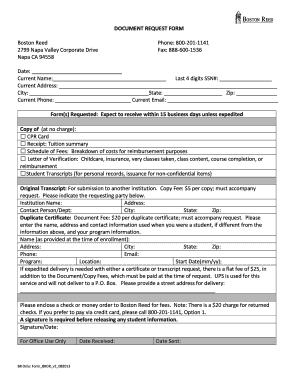
- Press the ‘Get Form’ button to access the document request form and open it for editing.
- Enter the date of your request at the top of the form. Use the format that clearly reflects the day, month, and year.
- Fill in your current name in the designated field. Ensure this matches your formal identification.
- Provide the last four digits of your Social Security Number in the respective box for identification purposes.
- Complete your current address information including street, city, state, and zip code. Make sure this information is accurate to avoid delivery issues.
- Input your current phone number and email address in the stated sections to remain reachable for any follow-up communications.
- Select the specific forms you are requesting from the list provided. Check all that apply to your needs.
- If requesting an original transcript, indicate the institution’s name, address, and contact person's information where the transcript will be sent.
- For duplicate certificates, fill in the name, address, and contact information as used during your enrollment, along with your program details.
- If you need expedited delivery for any documents, specify a street address for delivery. Note that a fee applies.
- Prepare the payment as either a check or money order and include it with your form. Alternatively, contact Boston Reed for credit card payments.
- Sign and date the form at the bottom. A signature is mandatory for releasing any student information.
- Review all the information for accuracy before submitting your request.
Complete your transcript request online today and secure your academic documents efficiently.
If you need to convert a transcript to PDF format, you can use scanning software or online tools designed for document conversion. First, ensure that you have a clear, printed copy of your Boston Reed College Transcripts. Then, scan the document using a scanner, and save it as a PDF file. This is useful for sharing your transcript in a digital format, but remember that it should not replace the official document.