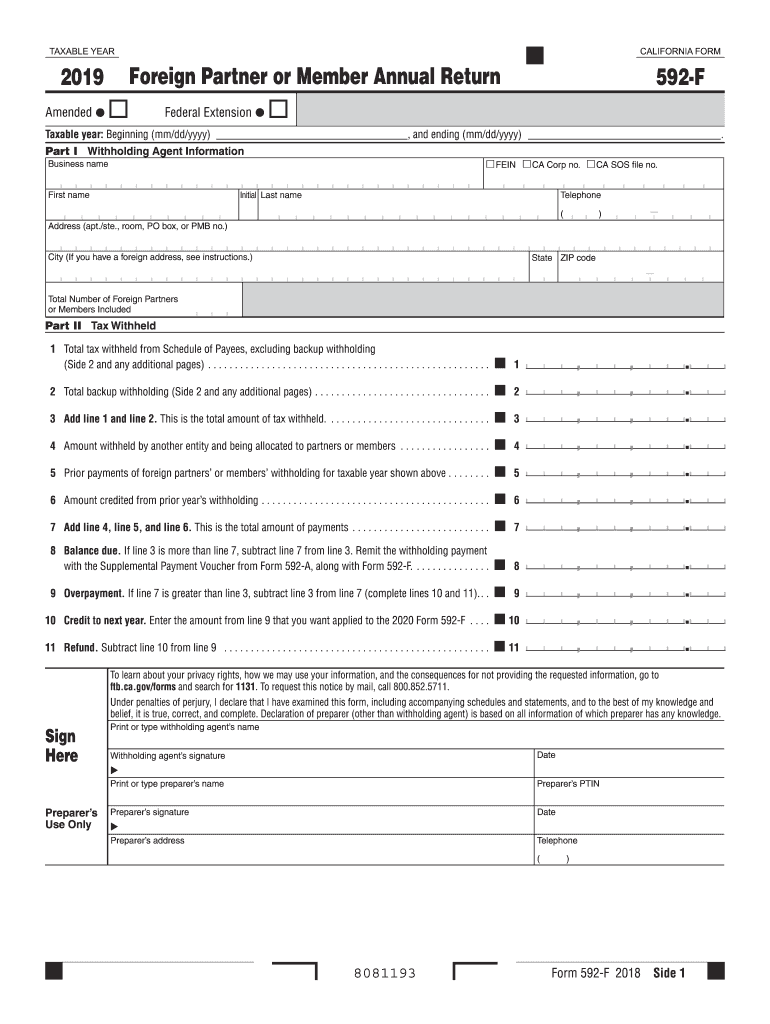
Holding Agent Information FEIN CA Corp no. CA SOS file no. Business name First name . Initial Last name Telephone ( ) Address (apt./ste., room, PO box, or PMB no.) City (If you have a foreign address, see instructions.) State ZIP code Total Number of Foreign Partners or Members Included Part II Tax Withheld 1 Total tax withheld from Schedule of Payees, excluding backup withholding (Side 2 and any additional pages) . . . . . . . . . .
Loading

Open form follow the instructions

Easily sign the form with your finger

Send filled & signed form or save
How to fill out the CA FTB 592-F online
Filling out the CA FTB 592-F form online can streamline your process significantly. This guide will walk you through each section of the form, ensuring that you provide the necessary information accurately and efficiently.
Follow the steps to successfully complete the CA FTB 592-F form online.
- Click ‘Get Form’ button to obtain the CA FTB 592-F form and open it in your online editor.
- Enter the 'Taxable Year' by specifying the beginning and ending dates in the format mm/dd/yyyy.
- In Part I, provide the withholding agent information including the FEIN, California Corporation number, or CA SOS file number. Enter the business name, and the first and last name of the contact person. Fill in the telephone number, address, city, state, and ZIP code.
- Indicate the total number of foreign partners or members included in the filing.
- In Part II, begin with line 1. Enter the total tax withheld from the Schedule of Payees, excluding any backup withholding.
- On line 2, report the total backup withholding from the same schedule.
- Add the amounts from line 1 and line 2 and enter this total on line 3.
- On line 4, report the amount withheld by another entity that is being allocated to partners or members.
- Line 5 should contain prior payments of the foreign partners' or members' withholding for the taxable year shown.
- Enter any amount credited from the prior year’s withholding on line 6.
- Add the amounts on lines 4, 5, and 6 for the total payments, which will be entered on line 7.
- Evaluate if there is a balance due by subtracting the total payments (line 7) from the total tax withheld (line 3) on line 8.
- If there is an overpayment, it should be calculated on line 9 and the subsequent lines 10 and 11 help determine whether you wish to credit that overpayment to next year or receive a refund.
- Proceed to the declaration section where the withholding agent or preparer will sign and date the form. If applicable, the preparer’s information must also be completed.
- Finally, review all the information entered for accuracy, then save changes, download, print, or share the completed CA FTB 592-F form as needed.
Complete your CA FTB 592-F form online today for a streamlined and efficient filing experience.
Experience a faster way to fill out and sign forms on the web. Access the most extensive library of templates available.
Related content
Use Form 592-F to report the total withholding for the year on foreign partners or members...
Jul 31, 2013 — Form 592-F, Foreign Partner or Member Annual. Return, is used by...
Analog Devices, Inc. reserves the right to change this product without prior notice...
Get answers to your most pressing questions about US Legal Forms API.
Can Form 1120 F be filed electronically?
Yes, Form 1120 F can be filed electronically, providing a fast and efficient method for submitting your tax information. E-filing helps reduce the risk of errors associated with manual submissions. For those looking for a user-friendly experience, uslegalforms offers solutions tailored to enhance your electronic filing process. Always confirm you meet the eligibility criteria for electronic submission.
Can 592 PTE be e-filed?
Yes, the 592 PTE form can indeed be e-filed, facilitating a more straightforward submission process. By opting for e-filing, you minimize paperwork and expedite processing time. Services like uslegalforms provide the tools necessary for a seamless e-filing experience. Just be sure to verify that all information is accurate before submission.
What is the difference between 592 and 592-PTE?
The CA FTB 592 form is used by pass-through entities to report distributions made to nonresidents, while the 592-PTE specifically targets withholding for partnerships, LLCs, and S corporations. Understanding this distinction helps determine which form applies to your specific situation. Using the correct form ensures compliance with California tax laws. Resources like uslegalforms can help clarify which form you should use.
Who needs to fill out a California form 590 withholding?
Individuals who receive income from California sources and do not classify as residents need to fill out California form 590 withholding. This includes nonresidents earning income, such as rent or royalties, from California. The proper completion of this form ensures correct tax withholding. For further guidance, platforms like uslegalforms can assist you.
Can form 592-F be filed electronically?
Yes, you can file form 592-F electronically. The California Franchise Tax Board allows this option to enhance the filing experience. Utilizing platforms like uslegalforms helps ensure you correctly navigate the filing process. This choice saves time and reduces the likelihood of errors.
Can California returns be electronically filed?
Absolutely, California returns can be electronically filed, including the CA FTB 592-F form. E-filing provides a quicker and more secure way to submit your tax returns compared to traditional mail. Many online platforms streamline this process, ensuring you remain compliant with California's tax laws. Just remember to choose a reliable service provider to guide you through your filing.
Can 592-PTE be e-filed?
Yes, the CA FTB 592-PTE form can be e-filed. This electronic filing option makes submitting your tax return more convenient and efficient. Using trusted platforms like uslegalforms can simplify the e-filing process for the CA FTB 592-F. Ensure that you meet the necessary requirements before submitting electronically.
What is the form 592 annual return?
The CA FTB 592-F is an annual return used by pass-through entities to report income allocated to nonresidents. It ensures the correct taxes are withheld for income earned in California. Understanding this form helps you comply with state tax regulations effectively. Taxpayers should complete this return by adhering to the guidelines set by the California Franchise Tax Board.
Do I use 592 or 592-PTE?
Choosing between using form 592 and form 592-PTE depends on your entity’s structure and the nature of your income. If you are a pass-through entity, then the 592-PTE is the appropriate choice. For other cases involving nonresidents, the standard 592 form may suffice, ensuring proper adherence to California tax laws.
What is the difference between 592-A and 592 V?
The 592-A and 592 V forms serve different purposes in the withholding process. The 592-A is used for reporting withholding amounts on nonresidents, while the 592 V is an optional payment voucher for remitting taxes. Knowing when to use each form can simplify your reporting obligations and enhance your overall compliance.
Use professional pre-built templates to fill in and sign documents online faster. Get access to thousands of forms.
If you believe that this page should be taken down, please follow our DMCA take down process here.
This form is available in several versions. Select the version you need from the drop-down list below.