Loading
Get Sc Dor Sc4868 2018
How it works
-

Open form follow the instructions
-

Easily sign the form with your finger
-

Send filled & signed form or save
How to fill out the SC DoR SC4868 online
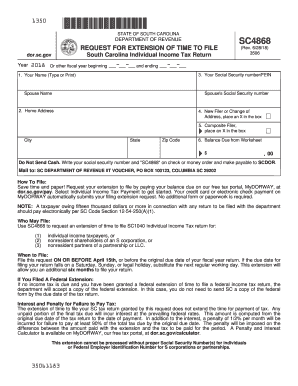
The SC DoR SC4868 form is a crucial document for requesting an extension of time to file your South Carolina individual income tax return. This guide provides step-by-step instructions to help you fill out the form accurately and efficiently, ensuring a smooth online filing process.
Follow the steps to complete your SC DoR SC4868 online.
- Click ‘Get Form’ button to obtain the form and open it in the editor.
- Begin by entering your name in the designated field. It is important to type or print clearly to ensure legibility.
- Provide your home address, including the city, state, and zip code. Ensure that this information is accurate as it will be used for correspondence.
- Enter your Social Security number and, if applicable, your spouse's Social Security number in the appropriate fields. If you are filling this out as a composite filer, use the Federal Employer Identification Number (FEIN) instead.
- If this is your first time filing a tax return in South Carolina or if your address has changed, mark the box by placing an X in it.
- For composite filers, indicate your status by placing an X in the appropriate box.
- Complete the Tax Computation Worksheet to calculate your balance due. Enter the calculated amount on Line 6 of the SC4868 form.
- Review all entered information for accuracy before finalizing your submission.
- Once you are satisfied with the information entered, you can save changes, download, print, or share the completed form as needed.
Prepare and complete your SC DoR SC4868 online for a hassle-free filing experience.
Get form
Experience a faster way to fill out and sign forms on the web. Access the most extensive library of templates available.
Pensions in South Carolina may be subject to state income tax, but the specific amount can vary based on individual circumstances. Typically, the first $10,000 of retirement income is exempt for taxpayers aged 65 and older. To fully understand your tax obligations, consider consulting resources or services, like uslegalforms, that clarify pension taxation under state laws.
Get This Form Now!
Use professional pre-built templates to fill in and sign documents online faster. Get access to thousands of forms.