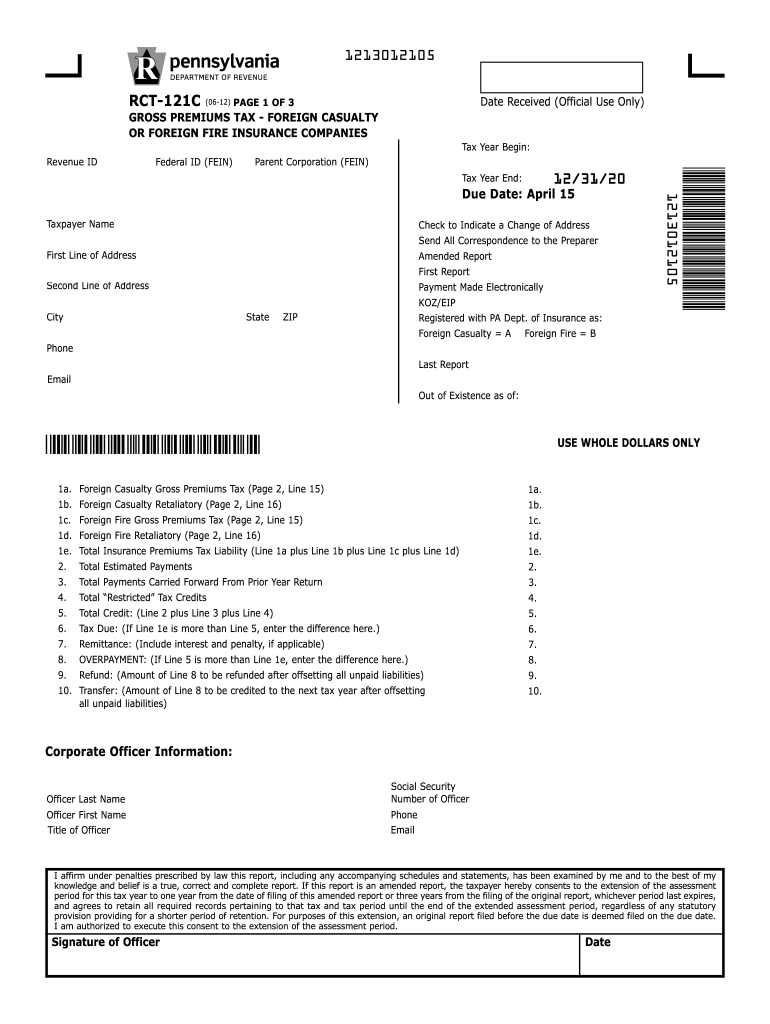
Spondence to the Preparer Amended Report First Report Payment Made Electronically KOZ/EIP Registered with PA Dept. of Insurance as: Foreign Casualty A Foreign Fire B First Line of Address Second Line of Address State City ZIP 1213012105 12/31/20 Due Date: April 15 *1 21 301 21 05* Federal ID (FEIN) Phone Last Report Email Out of Existence as of: *1 21 301 21 05* 1a. 1b. 1c. 1d. 1e. 2. 3. 4. 5. 6. 7. 8. 9. 10. USE WHOLE DOLLARS ONLY Foreign Casualty Gross Premiums Tax (Page.
Loading

Open form follow the instructions

Easily sign the form with your finger

Send filled & signed form or save
How to fill out the PA DoR RCT-121C online
This guide will provide you with a comprehensive overview of how to effectively fill out the PA DoR RCT-121C form online. Whether you are an experienced user or new to the form, these step-by-step instructions will assist you in completing it accurately and efficiently.
Follow the steps to successfully complete the form.
- Press the ‘Get Form’ button to access the form and open it in your preferred editing tool.
- Input the revenue ID in the designated field. Ensure that you do not use dashes or slashes in this field.
- Fill in the tax year start and end dates, remembering to avoid using any non-numeric symbols.
- Select the appropriate letter from the dropdown menu indicating whether the registered entity is a Foreign Casualty or Foreign Fire insurance company.
- Provide the taxpayer name without including any unnecessary characters or formats.
- Indicate any address changes by checking the corresponding checkbox and complete the address sections as necessary.
- Complete the corporate officer information section, including the officer's name, title, phone number, and email.
- Enter the amounts for gross premiums tax and any applicable retaliatory taxes as instructed in the form.
- Finalize the form by reviewing all entries for accuracy and ensuring you have filled out all compulsory fields.
- Once all information is complete and reviewed, you can save changes, download, print, or share the completed form as required.
Complete your PA DoR RCT-121C form online today to ensure timely filing.
Experience a faster way to fill out and sign forms on the web. Access the most extensive library of templates available.
Related content
RCT-121C, Foreign Casualty or Foreign Fire Insurance Companies Gross Premiums Tax...
by DJ Zheng · 2024 · Cited by 6 — While many top-performing ORR cath- ode catalysts...
Get answers to your most pressing questions about US Legal Forms API.
Who needs to file a PA corporate tax return?
Any corporation operating or doing business in Pennsylvania must file a PA corporate tax return. This includes both domestic and foreign corporations that have earned income taxable in Pennsylvania. Compliance with filing is essential to avoid penalties and to ensure adherence to regulations outlined in the PA DoR RCT-121C.
How do I get a Pennsylvania revenue ID?
You can obtain a Pennsylvania revenue ID by following the application process set by the Pennsylvania Department of Revenue. This involves filling out online forms regarding your business structure and activities. Having a Pennsylvania revenue ID is vital for various tax filings, particularly for compliance with the PA DoR RCT-121C.
What qualifies you for tax forgiveness in PA?
Qualifying for tax forgiveness in PA typically depends on your income level and other specific criteria outlined by the Pennsylvania Department of Revenue. Generally, individuals with lower incomes may qualify, which can significantly reduce or eliminate certain tax liabilities, including those outlined in the PA DoR RCT-121C. Ensure to review the guidelines carefully or consult a tax professional for assistance.
How do I get PA registration?
PA registration can be conducted online through the Pennsylvania Department of Revenue's portal. You must provide accurate information about your business and its operations. Once registered, you'll be able to efficiently manage your tax responsibilities, including those associated with the PA DoR RCT-121C.
How do I get a PA withholding account number?
To acquire a PA withholding account number, visit the Pennsylvania Department of Revenue's official website. Complete the registration process by following the guidelines provided for employers. This number is vital for reporting and paying employee withholdings as part of your obligations related to the PA DoR RCT-121C.
How do I get a PA number?
Getting a PA number involves accessing the Pennsylvania Department of Revenue's online portal. You will be required to fill out specific forms based on your business type and activities. This number is crucial for various tax filings and compliance, especially when dealing with the PA DoR RCT-121C.
How do I get my PA ID number?
To obtain your PA ID number, start by visiting the Pennsylvania Department of Revenue's website. You'll need to complete the appropriate registration forms and provide required identification details. Once your application is processed, you will receive your PA ID number, which is essential for tax purposes, including the PA DoR RCT-121C.
Can I file my amended return electronically?
Yes, you can file your amended return electronically if you are using approved tax preparation software. Ensure that your software supports the PA DoR RCT-121C form for electronic filing. This can simplify the process and speed up the processing time for your amendment.
How do I amend my PA tax return on TurboTax?
To amend your PA tax return on TurboTax, you will need to open your original tax return within the software. Select the option to amend, and follow the prompts to complete the PA DoR RCT-121C form. TurboTax will guide you through the process, helping to ensure your amendments are accurate.
Can you amend just a state return?
Yes, you can amend just a state return, including your PA tax return using the PA DoR RCT-121C form. This allows you to adjust specific items without impacting your federal return. Make sure to clearly outline the changes and provide a clear explanation to avoid complications.
Use professional pre-built templates to fill in and sign documents online faster. Get access to thousands of forms.
If you believe that this page should be taken down, please follow our DMCA take down process here.
This form is available in several versions. Select the version you need from the drop-down list below.