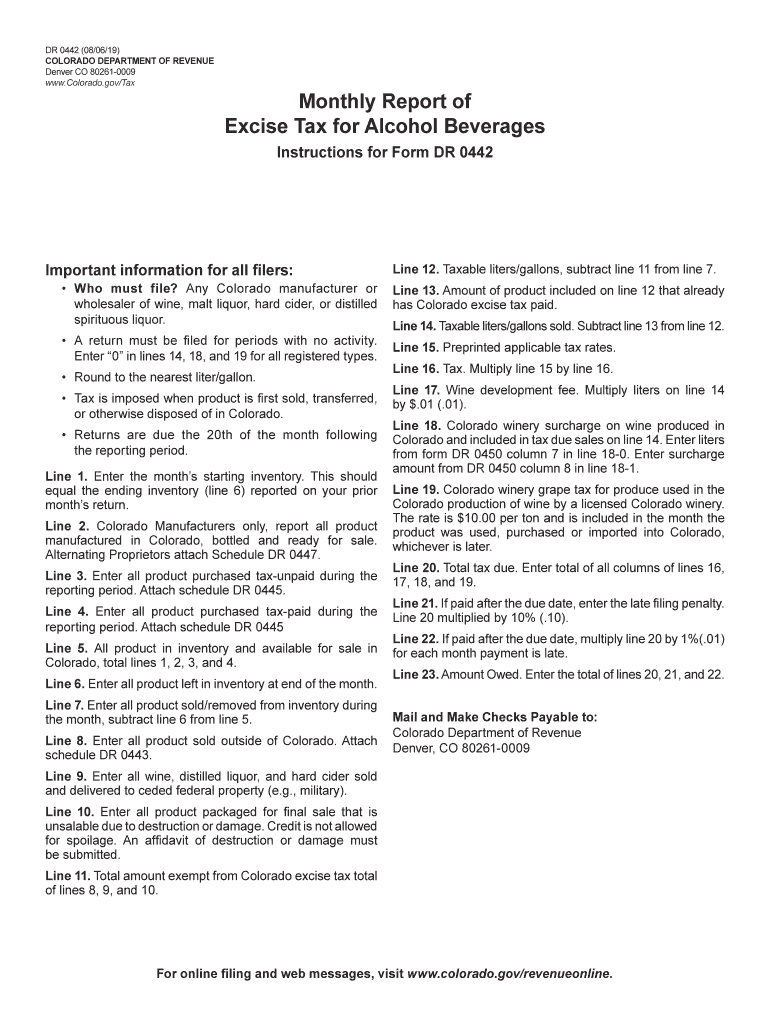
N for all filers: Line 12. Taxable liters/gallons, subtract line 11 from line 7. Who must file? Any Colorado manufacturer or wholesaler of wine, malt liquor, hard cider, or distilled spirituous liquor. Line 13. Amount of product included on line 12 that already has Colorado excise tax paid. A return must be filed for periods with no activity. Enter 0 in lines 14, 18, and 19 for all registered types. Line 15. Preprinted applicable tax rates. Round to the nearest liter/g.
Loading

Open form follow the instructions

Easily sign the form with your finger

Send filled & signed form or save
How to fill out the CO DR 0442 online
Filling out the CO DR 0442 form online can streamline your reporting process for excise tax on alcohol beverages. This guide provides clear steps to help you complete the form accurately and effectively.
Follow the steps to complete the CO DR 0442 online
- Click ‘Get Form’ button to obtain the form and open it in the editor.
- Begin with line 1: Enter the month’s starting inventory, ensuring it matches the ending inventory reported on your prior month’s return.
- For line 2, if you are a Colorado manufacturer, report all products manufactured in Colorado that are bottled and ready for sale.
- On line 3, input the total of all products purchased tax-unpaid during the reporting period. Remember to attach schedule DR 0445.
- For line 4, enter all products purchased tax-paid during the reporting period, also attaching schedule DR 0445.
- Calculate line 5 by adding lines 1, 2, 3, and 4 to find the total inventory available for sale in Colorado.
- Record line 6, the amount of product left in inventory at the end of the month.
- For line 7, input the total of all products sold or removed from inventory during the month by subtracting line 6 from line 5.
- Enter on line 8 all products sold outside of Colorado and ensure to attach schedule DR 0443.
- Calculate line 11 by adding lines 8, 9, and 10 to find the total amount exempt from Colorado excise tax.
- For line 12, calculate the taxable liters/gallons by subtracting line 11 from line 7.
- On line 15, refer to the preprinted applicable tax rates and round your liters/gallons to the nearest whole number.
- Multiply line 14 by line 15 on line 16 to determine the excise tax due.
- Complete line 17 by multiplying the liters on line 14 by $.01 to find the wine development fee.
- For line 18, if applicable, enter the liters from form DR 0450 in 18-0 and the surcharge amount from DR 0450 in 18-1.
- On line 20, add up all tax values from lines 16, 17, 18, and 19 to determine the total tax due.
- If applicable, add penalties for late payment on line 21 and interest charges on line 22.
- Finally, sum the totals from lines 20, 21, and 22 for the amount owed on line 23.
- Once you have filled in all required fields, review your form for accuracy and completeness before saving, downloading, printing, or sharing.
Complete your CO DR 0442 online today for a smooth filing experience.
Experience a faster way to fill out and sign forms on the web. Access the most extensive library of templates available.
Related content
Who must file? Any Colorado manufacturer or wholesaler of wine, malt liquor, hard cider...
DR 452: May 4, 2006. Senate Katrina Report Blames Officials/Systems, Calls for New Agency...
This is the safety alert symbol. It is used to alert you to potential personal injury...
Get answers to your most pressing questions about US Legal Forms API.
How to fill out an employee withholding exemption?
To fill out an employee withholding exemption, begin by entering your basic information and state the reason for your exemption. It is important to ensure that all statements are accurate and reflect your current financial situation to avoid tax issues. Familiarize yourself with the requirements of CO DR 0442 to guarantee compliance. For expert guidance, turning to USLegalForms can make this process smoother.
Is there a 60% tax on alcohol?
There is no uniform 60% tax on alcohol in Colorado; however, different types of alcohol can have varying tax rates. These rates are determined by state and local laws, so it's vital to reference the specific legislation such as the CO DR 0442. If you are unsure about the rates, USLegalForms provides resources to help clarify alcohol taxation in your area.
How do I fill out a withholding certificate?
Filling out a withholding certificate involves providing your personal information, including your name and Social Security number. Additionally, you need to calculate any deductions and credits to determine the appropriate amount of tax to withhold. Understanding the implications of the CO DR 0442 can help you make informed decisions. For a more guided approach, USLegalForms is an excellent platform to consider.
How much is alcohol taxed in Colorado?
In Colorado, the tax on alcohol varies based on the type of beverage and its volume. Generally, beer is taxed at a lower rate than spirits and wines. Knowing the exact tax rate ensures you remain compliant with local laws, like those outlined in CO DR 0442. For deeper insights into these regulations, explore resources from USLegalForms for clarity and support.
How to fill out employee withholding tax exemption certificate?
To fill out an employee withholding tax exemption certificate, start by completing your personal details, including your name and address. You will then indicate your reason for the exemption clearly. It’s crucial to understand the specific criteria under your state laws, including the CO DR 0442 requirements. For assistance, USLegalForms can offer valuable tools to navigate this process efficiently.
How to fill out a certificate of exemption?
Filling out a certificate of exemption requires you to provide specific information about your business and the reason for claiming exemption. Generally, you will include your name, address, and the nature of your business. Make sure to review the guidelines relevant to your state, particularly the CO DR 0442, to ensure compliance with local laws. Don't hesitate to consult USLegalForms for templates and guidance.
Do I claim 0 or 1 on my W4?
When deciding whether to claim 0 or 1 on your W4, think about your overall tax situation. Claiming 0 means more taxes are withheld from your paycheck, which may result in a refund at tax time. On the other hand, claiming 1 allows slightly less withholding but may increase your tax bill. Understanding your personal finances and future plans can help you align your claim with the CO DR 0442 requirements.
How to fill out business income Schedule C?
To fill out the business income Schedule C, start by providing your business information at the top of the form. Next, report your income from all business sources, including gross receipts and any other income you earned. Deduct eligible expenses directly related to your business operations. If you need assistance, consider using resources from USLegalForms, especially related to CO DR 0442, to simplify the process.
Is 60% alcohol legal?
Yes, a beverage with 60% alcohol by volume is legal in most circumstances in Colorado, provided it is produced and sold in compliance with state laws. However, such high alcohol content comes with specific regulations outlined in documents like CO DR 0442. Be sure to familiarize yourself with these regulations to make safe and responsible purchasing decisions. Always prioritize understanding the legality of high-proof alcohol.
What is the alcohol excise tax in Colorado?
The alcohol excise tax in Colorado varies based on the type of alcoholic beverage. For instance, the rates are structured differently for beer, wine, and spirits, clearly detailed under CO DR 0442. Understanding the excise tax rates can ensure you are well-acquainted with what you are paying. Use reliable resources like uslegalforms to access this information easily.
Use professional pre-built templates to fill in and sign documents online faster. Get access to thousands of forms.
If you believe that this page should be taken down, please follow our DMCA take down process here.