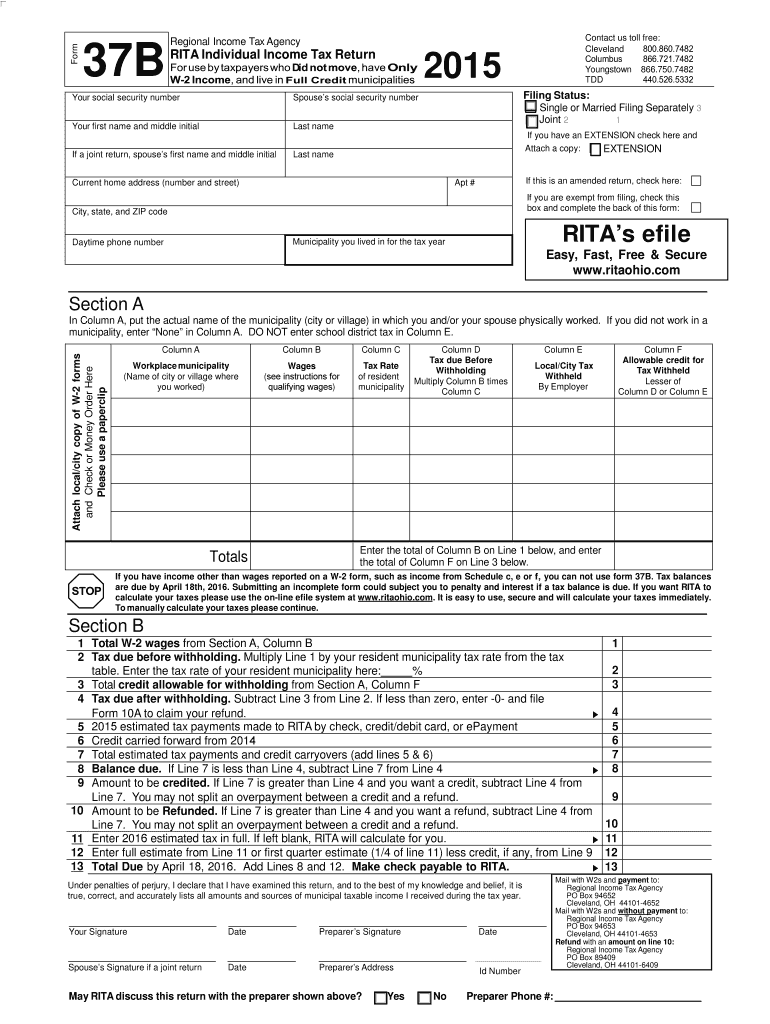
Ial security number Your first name and middle initial Last name If a joint return, spouse s first name and middle initial Youngstown TDD 866.750.7482 Filing Status: Single or Married Filing Separately 3 Joint 2 1 If you have an EXTENSION check here and Attach a copy: EXTENSION Last name Current home address (number and street) If this is an amended return, check here: Apt # If you are exempt from filing, check this box and complete the back of this form: City, state, and ZIP code.
Loading

Open form follow the instructions

Easily sign the form with your finger

Send filled & signed form or save
How to fill out the OH RITA 37 online
The OH RITA 37 form is essential for individuals filing their local income taxes in Ohio. This online guide provides clear instructions for each section of the form, ensuring that users can complete it accurately and efficiently.
Follow the steps to successfully complete the OH RITA 37 form online.
- Click the 'Get Form' button to obtain the OH RITA 37 form and open it in your preferred editor.
- Input your social security number in the designated field. If filing jointly, include your partner's social security number as well.
- Enter your first name and middle initial, followed by your last name. If this is a joint return, also include your partner's first name and middle initial.
- Select your filing status by checking either 'Single or Married Filing Separately' or 'Joint.' If you have an extension, check the corresponding box and attach a copy.
- Fill in your current home address, including the number and street, apartment number (if applicable), city, state, and ZIP code.
- If applicable, mark the box for an amended return. If you are exempt from filing, check that box and complete the back of the form.
- Complete Section A by attaching the local/city copies of your W-2 forms and any required check or money order securely with a paperclip.
- In Column A of Section A, enter the name of the municipality where you and/or your partner worked. If you did not work in any municipality, enter 'None.'
- In Columns B and C, input your wages and the tax rate of your resident municipality, respectively. Follow the instructions for qualifying wages.
- Calculate the tax due before withholding by multiplying the figures in Column B and Column C, and record the result in Column D.
- Record the allowable credit for tax withheld in Column F, which is the lesser of Column D or the tax withheld by your employer in Column E.
- Transfer the total from Column B to Line 1, and the total from Column F to Line 3 of Section B.
- Complete the remaining calculations on Section B, including lines for estimated tax payments and balances due.
- Sign and date the form at the bottom. If filing jointly, ensure your partner also signs the form.
- Once all entries are made, review your form for accuracy. You can save changes, download, print, or share the completed form as needed.
Start your online tax filing process by completing the OH RITA 37 form today.
Experience a faster way to fill out and sign forms on the web. Access the most extensive library of templates available.
Related content
Jan 1, 2022 — If you want RITA to calculate your taxes, please use the online eFile...
Yes. Filing is mandatory for most residents: see “Filing Requirements” on page 1 of...
Edge, SiteLink, SonoCalc, SonoHD2, SonoMB, SonoMBe, SonoSite e o logotipo SonoSite são...
Get answers to your most pressing questions about US Legal Forms API.
What happens if you forget to file city taxes in Ohio?
If you forget to file city taxes in Ohio, including those associated with OH RITA 37, penalties may apply. The Regional Income Tax Agency usually assesses late fees and interest on unpaid amounts. For resolution, consider using resources from UsLegalForms to guide you through the filing process effectively.
Do you have to file RITA taxes in Ohio?
Yes, if you live or work in areas covered by OH RITA 37, you are required to file RITA taxes. This requirement applies to both residents and non-residents earning income in the taxable regions. Timely filing ensures you meet local tax obligations and supports your community.
What is form 37 in Mexico?
Form 37 in Mexico is actually unrelated to the OH RITA 37. It pertains to different tax regulations specific to Mexico. It’s vital to ensure that you are referencing the correct form for your needs to avoid confusion, especially when dealing with international tax issues.
What is the point of RITA?
The primary purpose of OH RITA 37 is to collect income taxes from residents and businesses in the region. These funds are crucial for local infrastructure, public services, and community improvements. Understanding RITA helps you fulfill your tax obligations and contribute to your community's growth.
What happens if you don't file RITA?
Failing to file your OH RITA 37 can lead to unwanted consequences. The Regional Income Tax Agency may assess estimated taxes against you, possibly resulting in a larger bill than necessary. It’s essential to file your taxes on time to maintain compliance and avoid financial surprises.
What happens if you ignore RITA?
If you ignore OH RITA 37, you could face serious consequences including penalties and fines. The Regional Income Tax Agency may take further action, such as garnishing wages or placing liens on your property. It’s crucial to address any RITA-related issues promptly to avoid escalating problems.
How do I file Rita taxes on TurboTax?
To file Rita taxes using TurboTax, select the option to enter your state and local forms, including the OH RITA 37. Follow the prompts to input your information accurately, ensuring all required fields are completed. If you encounter any challenges, our platform offers resources that can simplify the process.
How to file form 37?
Filing the OH RITA 37 form requires you to carefully gather your tax documents and fill out the form completely. You can find detailed instructions and resources on our website to guide you through each step. After completing the form, ensure proper submission to avoid any issues.
How do I file a Rita claim?
To file a Rita claim, you will need to fill out the OH RITA 37 form accurately. Make sure your information is complete and check for any required documentation that supports your claim. Utilizing our platform ensures you meet all filing requirements easily and efficiently.
How do I send my tax forms by mail?
To send your tax forms by mail, print the completed documents and package them securely. You should send your OH RITA 37 forms to the appropriate address as listed on the form's instructions. Consider using a trackable mailing service to confirm delivery.
Use professional pre-built templates to fill in and sign documents online faster. Get access to thousands of forms.
If you believe that this page should be taken down, please follow our DMCA take down process here.
This form is available in several versions. Select the version you need from the drop-down list below.