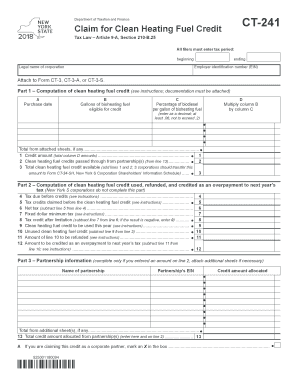
Er identification number (EIN) Attach to Form CT-3, CT-3-A, or CT-3-S. Part 1 Computation of clean heating fuel credit (see instructions; documentation must be attached) A Purchase date B Gallons of bioheating fuel eligible for credit C Percentage of biodiesel per gallon of bioheating fuel (enter as a decimal; at least .06, not to exceed .2) D Multiply column B by column C Total from attached sheets, if any.
Open form follow the instructions
Easily sign the form with your finger
Send filled & signed form or save
How to fill out the NY DTF CT-241 online
This guide provides a clear and comprehensive explanation for individuals looking to fill out the NY DTF CT-241 form online. The steps outlined will help users efficiently navigate each section of the form, ensuring accuracy and completeness.
Follow the steps to successfully complete the NY DTF CT-241 form.
- Press the ‘Get Form’ button to access the form online and open it in your preferred editor.
- Enter the tax period by filling in the 'beginning' and 'ending' dates. This section is crucial as it identifies the timeframe for which you are claiming the credit.
- Input the 'Legal name of corporation' and 'Employer identification number (EIN)' in the corresponding fields to establish your entity's identity.
- In Part 1, begin the computation of the clean heating fuel credit. For section A, enter the 'Purchase date' of the bioheating fuel. This date is necessary for your records and future reference.
- In section B, specify the 'Gallons of bioheating fuel eligible for credit'. Ensure this number reflects the precise amount purchased eligible for the claim.
- Input the 'Percentage of biodiesel per gallon of bioheating fuel' in section C. This should be expressed as a decimal. Remember that this value must be no less than .06 and no more than .2.
- Calculate the amount in Part 1, column D by multiplying the values from column B by column C. This step is important as it helps determine the total credit amount.
- Enter the total from column D in line 1 in Part 1. If there are any additional sheets, include their totals as well.
- In line 2 of Part 1, record any clean heating fuel credits that have been passed through from partnership(s), if applicable.
- Calculate the total clean heating fuel credit available by adding the amounts from lines 1 and 2 and recording this in line 3.
- Proceed to Part 2, where you will determine the clean heating fuel credit used. Start by recording the 'Tax due before credits' in line 4.
- In line 5, document the total of any tax credits claimed prior to the clean heating fuel credit.
- Calculate the 'Net tax' by subtracting line 5 from line 4 and indicate this result in line 6.
- Enter the 'Fixed dollar minimum tax' in line 7 as specified in the instructions.
- Calculate the 'Tax credit after limitation' by subtracting line 7 from line 6 in line 8. If this amount is negative, enter 0.
- In line 9, indicate the 'Clean heating fuel credit to be used this year' following the instructions provided.
- Calculate the 'Unused clean heating fuel credit' in line 10 by subtracting line 9 from line 3.
- Record the amount to be refunded in line 11 and the overpayment credit for next year in line 12.
- If applicable, fill out Part 3 with partnership information by entering the 'Name of partnership', 'Partnership’s EIN', and the 'Credit amount allocated'. Ensure accuracy.
- After completing all fields, review the form for any errors, then save your changes, download, print, or share the completed form as needed.
Complete your NY DTF CT-241 form online today for efficient processing.
Experience a faster way to fill out and sign forms on the web. Access the most extensive library of templates available.
Related content
Dec 15, 2024 — Credit claim forms for corporations (current year) ; CT-241 · CT-241-I...
Oct 1, 2009 — The new law defines the ways in which tax fraud can be committed and is...
Column B — Enter the amount from Form CT-241, line 11. Column C — Enter the amount...
Get answers to your most pressing questions about US Legal Forms API.
What is form CT2?
Form CT2 is a tax return used by businesses in Connecticut to report income, deductions, and other financial information necessary for taxation. Familiarizing yourself with this form helps ensure that your business meets compliance requirements. Understanding how this relates to New York forms, such as the NY DTF CT-241, is essential for managing your overall tax strategy.
How to fill out NY ST 120 form?
Filling out the NY ST 120 form requires you to provide specific details concerning your business and the items purchased tax-exempt. Make sure to double-check all entries for accuracy to avoid potential issues later. If questions arise as you fill out this form or others like the NY DTF CT-241, our platform can provide helpful tools and resources.
Who must file NYC 2?
Any partnership doing business in New York City must file the NYC 2 form to report its income and comply with local tax laws. This form captures critical information on the partnership's financial activities over the tax year. If you're also navigating the NY DTF CT-241 for state obligations, it's important to handle both filings accurately.
How do I become exempt from sales tax in NY?
Becoming exempt from sales tax in New York involves completing the appropriate exemption certificate and providing a valid reason for the exemption. This could include being a non-profit organization or purchasing goods for resale. Ensure you keep all documentation up-to-date to facilitate any processes involving forms like the NY DTF CT-241.
What form do I use to change my address on my New York State income tax?
To change your address on your New York State income tax, you can use the IT-201 form or the IT-203 if you are a non-resident. Make sure to clearly indicate your new address and any other required information. Keeping your address updated is crucial for all your tax filings, including your NY DTF CT-241 submissions.
How to fill out a sales tax exemption certificate?
Filling out a sales tax exemption certificate requires providing accurate information about your business and the reason for the exemption. Be sure to include your sales tax ID number and other pertinent details. For guidance on completing the certificate correctly and working with forms like NY DTF CT-241, check out our resources.
What is New York Form CT 2?
New York Form CT 2 is a tax reporting form specifically for corporations and partners to compute their tax liabilities. This form helps entities track their financial performance and fulfill tax obligations in New York effectively. If you are managing such compliance, consider how it relates to submissions, including the NY DTF CT-241.
How long is ST 120 good for?
The ST 120 form, a sales tax exemption certificate, is valid for as long as the purchaser continues to qualify for the exemption purposes listed. However, it is wise to review the certificate regularly to ensure continued eligibility. When preparing your tax filings, such as the NY DTF CT-241, keeping accurate and updated documentation is essential.
Where to file CT-2?
To file the CT-2 form, you should send it to the designated address provided by the Connecticut Department of Revenue Services. Ensure you include all required information to avoid processing delays. Additionally, if you need assistance with the filing process or related forms like the NY DTF CT-241, consider utilizing our platform for guidance.
What is CT UC 2 form?
The CT UC 2 form is used by employers in Connecticut to report wages and employee information for unemployment compensation. This document plays a vital role in ensuring compliance with state regulations regarding unemployment insurance. Understanding how to accurately complete and submit this form, in conjunction with the NY DTF CT-241, is crucial for maintaining your business's good standing.
Use professional pre-built templates to fill in and sign documents online faster. Get access to thousands of forms.
If you believe that this page should be taken down, please follow our DMCA take down process here.
This form is available in several versions. Select the version you need from the drop-down list below.