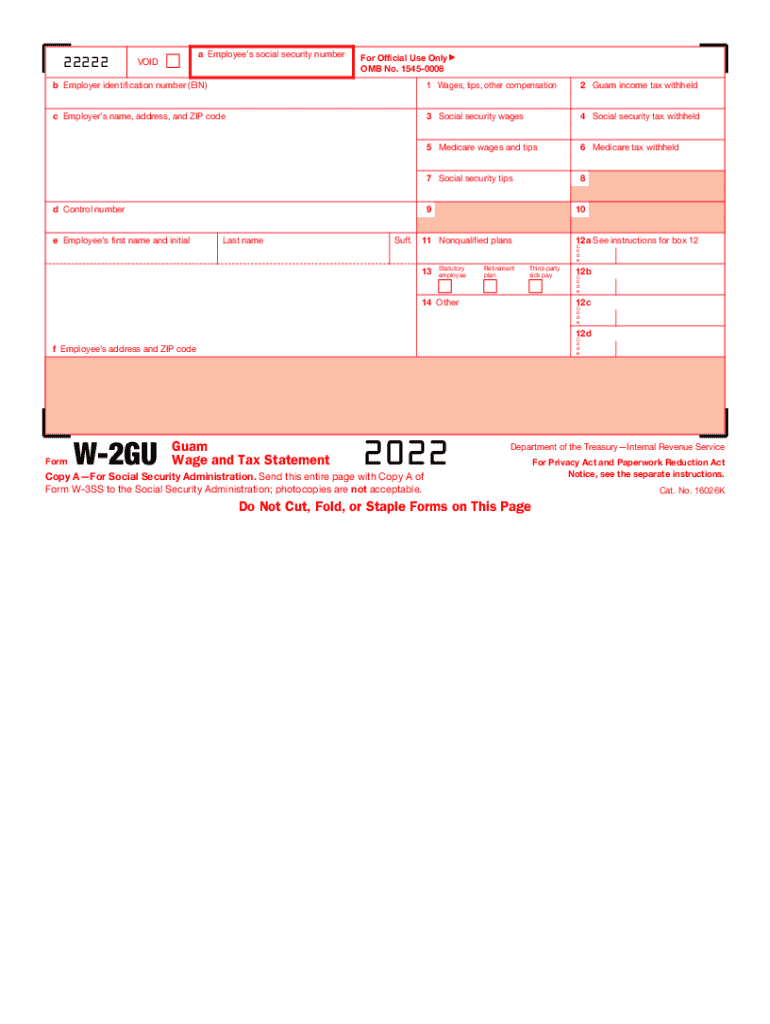
Attention: You may file Forms W2 and W3 electronically on the SSAS Employer W2 Filing Instructions and Information web page, which is also accessible at www.socialsecurity.gov/employer. You can create.
Loading

Open form follow the instructions

Easily sign the form with your finger

Send filled & signed form or save
How to fill out the IRS W-2GU online
Filling out the IRS W-2GU form is an essential step for employers reporting the wages and taxes of employees in Guam. This guide provides a clear, step-by-step approach to completing the form online, ensuring accuracy and compliance.
Follow the steps to fill out the IRS W-2GU form online.
- Click ‘Get Form’ button to obtain the W-2GU form and open it in your editing interface.
- Enter the employee's social security number in box a. This is crucial for accurate identification.
- Provide the employer identification number (EIN) in box b to associate the form with your business.
- Fill in the employer's name, address, and ZIP code in box c. This identifies the source of the report.
- Record the total wages, tips, and other compensation in box 1, ensuring accuracy in reporting income.
- Indicate any Guam income tax withheld in box 2, as it is necessary for employee tax returns.
- Report social security wages in box 3, which helps determine the employee's contributions.
- Include social security tax withheld in box 4 to reflect the employer's obligations.
- Document Medicare wages and tips in box 5, and enter the Medicare tax withheld in box 6.
- Provide any information on social security tips in box 7, if applicable.
- Complete additional fields such as the control number in box d, the employee's first name and initial, last name, and suffix in box e, and address in box f.
- In box 12, include any relevant codes for additional information, such as retirement plans or nonqualified plans.
- Confirm that all fields are accurately filled before proceeding.
- Once finished, you can save changes, download, print, or share the form as necessary.
Complete your IRS W-2GU form online today for a seamless reporting experience.
Experience a faster way to fill out and sign forms on the web. Access the most extensive library of templates available.
Related content
Employers file this form to report Guam wages. Do not use this form to report wages...
Returns on magnetic media must be made in accordance with applicable revenue ... other...
?????????? Revenue Service ( IRS ) ????????? ????? ???????? ?????? ... ????? 1040 ????? 20...
Get answers to your most pressing questions about US Legal Forms API.
Is HSA contribution tax deductible in 2018?
Health Savings Account Change In 2018 Could Trip Up Some Consumers. Money deposited in a health savings account is tax-deductible, grows tax-free and can be used to pay for medical expenses. The annual maximum allowable contribution to an HSA is slightly lower for some people this year.
How does a Health Savings Account affect my taxes?
The money deposited into the HSA is not subject to federal income tax at the time of the deposit is made. Additionally, HSA funds will accumulate year-to-year if the money is not spent. HSA funds may be used to pay for qualified medical expenses at any time. ... The interest earned on the account is tax-free.
Do HSA contributions reduce your taxable income?
Hsa Contributions Reduce Your Taxable Income Contributions to a health savings account are considered an above the line deduction. As a result, this can help lower your adjusted gross income (AGI) and could even help you qualify for other deductions and credits that are dependent on your AGI.
Do you pay taxes on HSA contributions?
Contributions to an HSA are tax deductible on your Form 1040 tax return as an adjustment to income. ... According to the IRS, "Contributions to your HSA made by your employer (including contributions made through a cafeteria plan) may be excluded from your gross income."
Do I have to include HSA on my taxes?
If you have contributions to the HSA or distributions from the HSA and you do not have the 8889 on your return, then your contributions and/or distributions are considered taxable.
Does employer contribution to HSA count towards limit 2019?
For 2019, the Internal Revenue Service raised the maximum contribution to HSAs by $50 to $3,500 for individuals and $100 to $7,000 for families. ... Together, your combined contributions to the HSA plans, including any contributions by your employer, can't exceed the IRS-set HSA contribution limits for 2019.
Does maximum HSA contribution include employer?
A Yes, you can contribute to your employees' HSAs. Plus, you save on payroll and FICA taxes through tax- deductible contributions. Keep in mind, total combined employer and employee contributions to an employee's HSA can't exceed the annual limit set by the IRS.
Where should Employer HSA contributions be on w2?
While employer contributions to an HSA may be excluded from the employee's income, all employer contributions, including those made by the employee through a cafeteria plan, must be reported in box 12 of the employee's W-2.
Should employer HSA contributions be on w2?
While employer contributions to an HSA may be excluded from the employee's income, all employer contributions, including those made by the employee through a cafeteria plan, must be reported in box 12 of the employee's W-2.
Do I have to report HSA contributions on my tax return?
You must always file a Form 8889 in any year you or an employer contributes money to your HSA or you make withdrawals from the account. The deduction you calculate on Form 8889 is taken on the first page of your income tax return.
Use professional pre-built templates to fill in and sign documents online faster. Get access to thousands of forms.
If you believe that this page should be taken down, please follow our DMCA take down process here.