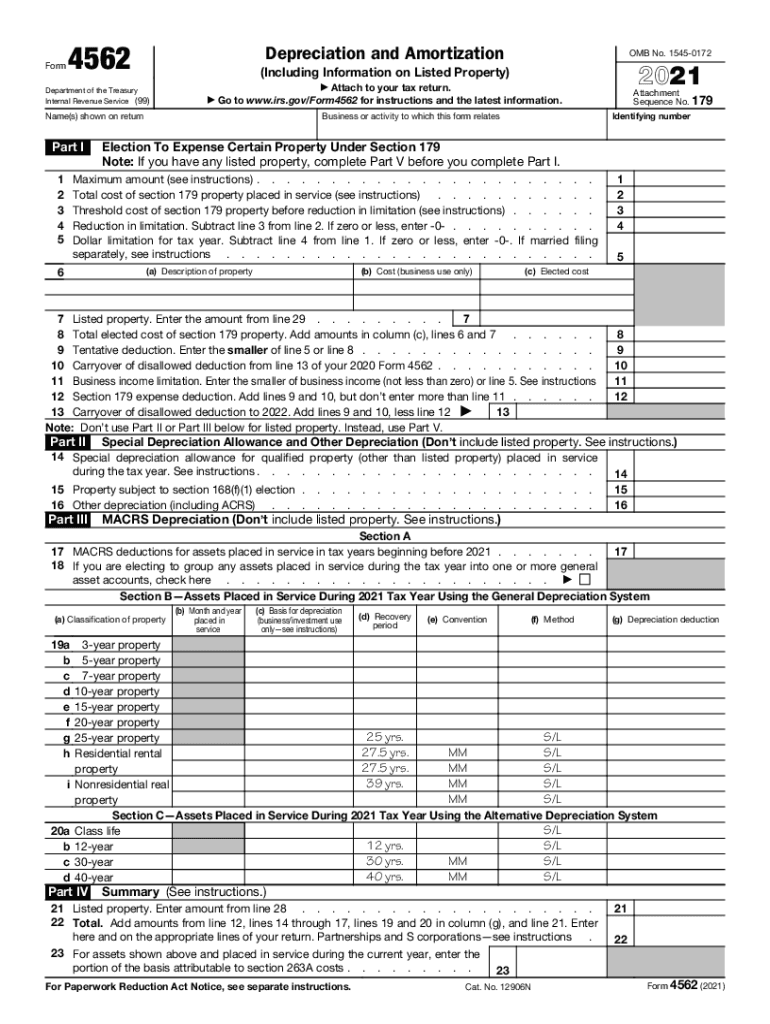
Form4562Depreciation and Amortization Attach Got your tax return. To www.irs.gov/Form4562 for instructions and the latest information. Name(s) shown on return1 2 3 4 5Attachment Sequence No. 179 Identifying.
Loading

Open form follow the instructions

Easily sign the form with your finger

Send filled & signed form or save
How to fill out the IRS 4562 online
The IRS 4562 form is used for reporting depreciation and amortization of assets. Completing this form online can be straightforward with the right guidance, ensuring you accurately report your expenses and deductions.
Follow the steps to fill out the IRS 4562 online.
- Click ‘Get Form’ button to access the form and open it in the editor.
- Enter your name or business name as it appears on your tax return in the designated fields. This information is crucial for an accurate identification of your tax records.
- In the section labeled 'Election To Expense Certain Property Under Section 179', review the maximum amount you can claim. Fill in the total cost of section 179 property placed in service during the tax year.
- Complete Part I by detailing the description of each asset, its cost, and any elected costs. This includes listing the business use percentage if applicable.
- Move to Part II to report any special depreciation allowances that apply to your qualified property. This section is important for capturing additional deductions.
- Continue to Part III, where you will fill out the MACRS depreciation for assets placed in service during the tax year. Check the appropriate boxes for the type of property and record the recovery period.
- In Part IV, summarize your depreciation and amortization by adding up the relevant amounts, and be sure to report them on the appropriate lines of your tax return.
- Finally, review all entered information for accuracy. Once completed, save your changes, and then download or print the form as needed for your records or submission.
Complete your IRS 4562 form online today to ensure accurate tax reporting and take advantage of available deductions.
Experience a faster way to fill out and sign forms on the web. Access the most extensive library of templates available.
Related content
Except as otherwise noted, complete and file Form 4562 if you are claiming any of the...
(a) In general. Under section 179(b)(3)(B), a taxpayer may carry forward for an unlimited...
Publication 4163 Modernized e-File (MeF) Information for Authorized IRS e-File Providers...
Get answers to your most pressing questions about US Legal Forms API.
Is furniture considered listed property?
Personal property is all other property owned by a business, including equipment, furniture and fixtures, and vehicles. Listed property is a specific type of personal property of a business that comes under increased scrutiny by the IRS.
What Listed Property?
Listed property refers to certain types of property that may be used for personal and business purposes.
What is listed property on Form 4562?
Form 4562 Part III A single entry on line 17 is used to report deductions for assets placed in service before 2017 (refer to your prior tax returns or any worksheets you may have retained to determine the amount to enter here). Details about assets placed in service in 2017 are entered on lines 19a through 19i.
How many years do you depreciate a driveway?
A patio and driveway are considered land improvements that are normally depreciated over 15 years.
Is Macrs depreciation mandatory?
MACRS Required for Most Property. For most business property placed in service after 1986, you must depreciate the asset using a method called the Modified Accelerated Cost Recovery Method (MACRS).
Do I need Form 4562?
Attach Form 4562 to your tax return for the current tax year if you are claiming any of the following items. ... Depreciation or amortization on any asset on a corporate income tax return (other than Form 1120S, U.S. Income Tax Return for an S Corporation) regardless of when it was placed in service.
Who should file Form 4562?
File Form 4562 with your individual or business tax return for any year you are claiming a depreciation deduction or making a Section 179 election.
What Is Listed Property Form 4562?
Purpose of Form Use Form 4562 to: Claim your deduction for depreciation and amortization, Make the election under section 179 to expense certain property, and. Provide information on the business/investment use of automobiles and other listed property.
Who must file Form 4562?
Except as otherwise noted, complete and file Form 4562 if you are claiming any of the following. Depreciation for property placed in service during the [current] tax year. A section 179 expense deduction (which may include a carryover from a previous year).
Why do I need Form 4562?
Attach Form 4562 to your tax return for the current tax year if you are claiming any of the following items. ... Depreciation or amortization on any asset on a corporate income tax return (other than Form 1120S, U.S. Income Tax Return for an S Corporation) regardless of when it was placed in service.
Use professional pre-built templates to fill in and sign documents online faster. Get access to thousands of forms.
If you believe that this page should be taken down, please follow our DMCA take down process here.