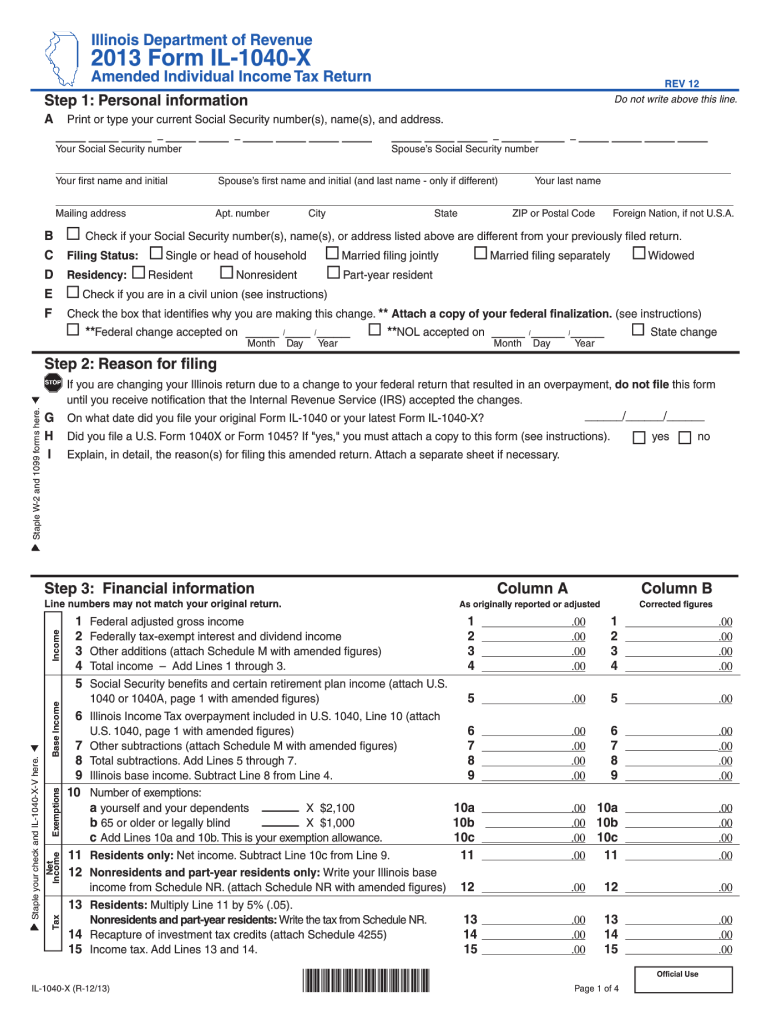
Sidents only: Net income. Subtract Line 10c from Line 9. 11 12 Nonresidents and part-year residents only: Write your Illinois base income from Schedule NR. (attach Schedule NR with amended figures) 12 13 Residents: Multiply Line 11 by 5% (.05). Nonresidents and part-year residents: Write the tax from Schedule NR. 13 14 Recapture of investment tax credits (attach Schedule 4255) 14 15 Income tax. Add Lines 13 and 14. 15 Base Income 1 2 3 4 5.
Loading

Open form follow the instructions

Easily sign the form with your finger

Send filled & signed form or save
How to fill out the IL DoR IL-1040-X online
Filling out the IL DoR IL-1040-X form is an important step for users needing to amend their individual income tax return. This guide provides a clear, step-by-step approach to help you complete the form accurately and efficiently online.
Follow the steps to fill out your IL DoR IL-1040-X accurately.
- Click ‘Get Form’ button to obtain the form and open it in the editor.
- In Step 1, enter your personal information, including your Social Security number(s), name(s), and mailing address. Ensure that the details are current and accurate.
- Check the appropriate box if any of your Social Security number(s), name(s), or address have changed since your last return. Choose your filing status, indicating whether you are single, married filing jointly, or another status.
- Indicate your residency status by marking the appropriate checkbox for resident, nonresident, or part-year resident.
- If applicable, check the box for same-sex civil union returns. State the reason for making this amendment by selecting the box related to your case and attach any necessary federal documents.
- In Step 2, state the date on which you initially filed your original Form IL-1040 and answer whether you have filed a U.S. Form 1040X or 1045, attaching a copy if applicable. Provide an explanation for the reasons behind your amendment.
- Moving to Step 3, provide financial information including your federal adjusted gross income, any exemptions, and tax figures. Be diligent in checking the boxes and providing correct amounts according to the original return.
- Continue filling in the respective lines for total income, subtractions, and credits as necessary. Ensure you are thorough with calculations and supporting documents where specified.
- In Step 4, you will calculate your refund or balance due based on the differences in your new calculations compared to previous filings. Enter any pertinent details regarding underpayments or overpayments.
- Finally, complete Step 5 by signing and dating your return. Include details for any paid preparer if applicable, and provide contact information for a third-party designee if you choose to authorize someone to discuss your return.
- After completing the form, ensure all necessary documents are attached, then save your changes, download for records, or share as required.
Begin completing your IL DoR IL-1040-X online today to ensure all corrections are accurately filed.
Experience a faster way to fill out and sign forms on the web. Access the most extensive library of templates available.
Related content
If you are changing your Illinois return due to a change to your federal return that...
Aug 8, 2022 — Form IL-1040-PTR has a processing time of 6 to 8 weeks and another 5 to 10...
A entrada e saída devem ter válvulas gaveta que isolam a serpentina para executar...
Get answers to your most pressing questions about US Legal Forms API.
Where do I mail my Illinois 1040 tax return?
Mail your Illinois 1040 tax return to the address specified on the instruction sheet associated with the form. The mailing address typically depends on whether you are expecting a refund or if you owe taxes. Ensure you include all required forms and signatures. For assistance, consider using uslegalforms, which can guide you through the mailing process.
Where to mail it 201x?
When mailing your IL-1040-X for the 201x tax year, refer to the Department of Revenue's official guidelines for the correct mailing address. This may vary based on whether you are submitting a refund or a payment. It's crucial to package your documents properly to avoid any delays. Platforms like uslegalforms provide resources to ensure you have the right information.
How do I file an amended tax return in Illinois?
To file an amended tax return in Illinois, complete the IL-1040-X form carefully. Ensure that you include all relevant information and sign the form before mailing it. It is important to check for any additional forms that might be required due to changes in your initial return. Using uslegalforms can simplify this process by providing easy-to-follow instructions.
Where to send 1040x in Illinois?
In Illinois, where you send your 1040-X depends on whether you are due a refund or owe additional taxes. The mailing addresses for each situation are provided on the Illinois Department of Revenue's website. Using uslegalforms can help you identify the correct address based on your specific scenario, ensuring accurate submission.
How do I submit my 1040X to the IRS?
To submit your 1040-X to the IRS, you need to print and mail the completed form. Unfortunately, the IRS does not currently accept the 1040-X for electronic filing. Ensure that you follow all instructions on the form and include any necessary attachments. For a clear process and specific details, consider using uslegalforms for guidance.
Where to file Illinois 1040X?
You should file your Illinois 1040-X with the Illinois Department of Revenue (DoR). Make sure to send your amended return to the address specified for your situation. Different addresses may apply depending on whether you owe tax or are expecting a refund. If you use uslegalforms, you can easily find the correct filing instructions.
What do I need to mail with my amended tax return?
When mailing your IL 1040-X, include any necessary supporting documents, such as a copy of your original tax return and any forms or schedules that are affected. It’s important to ensure that all information is accurate and complete to avoid delays. Additionally, any payment for taxes owed should also be included. If you're unsure, platforms like uslegalforms can help clarify these requirements.
Can IL 1040-X be filed electronically?
Yes, you can file your IL 1040-X electronically, which helps streamline the process. Many taxpayers find this option convenient and efficient. Using e-filing can ensure quicker processing times and faster refunds. You can utilize platforms like uslegalforms to assist you with electronic submissions.
Can I check the status of my 1040x online?
Absolutely, you can check the status of your IL-1040-X online. The IL DoR offers a convenient online service for tracking the progress of your amended return. Simply visit their official site and follow the prompts to access your status information.
Where do I mail my 1040x in Illinois?
For mailing your IL-1040-X in Illinois, refer to the most recent mailing address provided by the IL DoR. Typically, returns are sent to the Illinois Department of Revenue, PO Box 19044, Springfield, IL 62794-9044. Always confirm the address before sending to avoid any delays.
Use professional pre-built templates to fill in and sign documents online faster. Get access to thousands of forms.
If you believe that this page should be taken down, please follow our DMCA take down process here.
This form is available in several versions. Select the version you need from the drop-down list below.