Loading
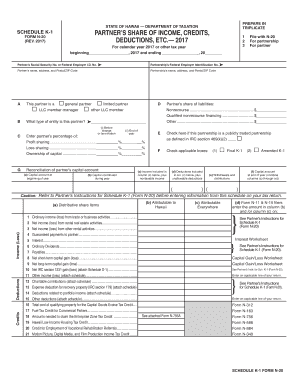
Get Hi Dot N-20 - Schedule K-1 2017
How it works
-

Open form follow the instructions
-

Easily sign the form with your finger
-

Send filled & signed form or save
How to fill out the HI DoT N-20 - Schedule K-1 online
This guide provides clear instructions to assist users in filling out the HI DoT N-20 - Schedule K-1 form online. By following the steps outlined, users can ensure accurate completion of each section to meet filing requirements effectively.
Follow the steps to fill out the HI DoT N-20 - Schedule K-1 form online
- Press the ‘Get Form’ button to access the HI DoT N-20 - Schedule K-1 form and open it in your preferred editor.
- Begin by entering the tax year at the top of the form, specifying the calendar year 2017 or another applicable tax year. This ensures clarity regarding the period the form pertains to.
- Fill in the partner's Social Security Number or Federal Employer Identification Number, which is essential for identifying the partner within the partnership.
- Provide the partnership's Federal Employer Identification Number to ensure accurate association with the correct entity.
- Complete the partner's name, address, and Postal/ZIP Code to verify the individual's details are correctly stated.
- Input the partnership's name, address, and Postal/ZIP Code to confirm the correct partnership is referenced in the document.
- Indicate the type of partner by checking the appropriate box — either general partner, limited partner, LLC member-manager, or other LLC member.
- Detail the percentage of profit sharing, loss sharing, and ownership of capital. Provide this information for both the start and end of the year as required.
- Include the reconciliation of the partner's capital account by entering the beginning capital account, any contributions made during the year, and the withdrawals or distributions received.
- Provide the partner's share of liabilities, outlining nonrecourse, qualified nonrecourse financing, and other liabilities as applicable.
- Check the box if the partnership is classified as a publicly traded partnership according to the relevant IRC definition.
- Fill in the sections for credits, deductions, and income (loss), making sure to enter amounts as indicated for each category.
- Review the completed form for accuracy and completeness, ensuring all required fields are filled correctly.
- Once finished, you can save your changes, download a copy of the form, print it, or share it as necessary.
Start filling out your HI DoT N-20 - Schedule K-1 online today for efficient document management.
Get form
Experience a faster way to fill out and sign forms on the web. Access the most extensive library of templates available.
Related links form
To obtain a copy of your Schedule 1, access your tax records through your tax preparer or the software you used to file your taxes. If you cannot find it, you may also request a copy from the IRS using Form 4506-T. Remember, keeping your documents organized can prevent hassles in the future. Platforms like US Legal Forms can assist you with document management.
Get This Form Now!
Use professional pre-built templates to fill in and sign documents online faster. Get access to thousands of forms.