Loading
Form preview
  • US Legal Forms
  • Other Templates
  • Tax Forms
  • Hawaii Tax Forms
  • Hi Dot G-17 2016

Get Hi Dot G-17 2016-2026

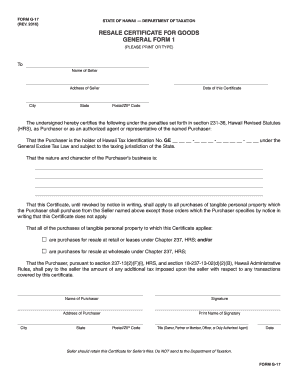
PE) To Name of Seller Address of Seller City State Date of this Certificate Postal/ZIP Code The undersigned hereby certifies the following under the penalties set forth in section 231-36, Hawaii Revised Statutes (HRS), as Purchaser or as an authorized agent or representative of the named Purchaser: That the Purchaser is the holder of Hawaii Tax Identification No. GE - - - under the General Excise Tax Law and subject to the taxing jurisdiction of the State.

How it works

  1. Open form

    Open form follow the instructions

  2. Easily sign form

    Easily sign the form with your finger

  3. Share form

    Send filled & signed form or save

How to fill out the HI DoT G-17 online

Filling out the HI DoT G-17 form online can seem daunting, but with a clear understanding of each section, the process will be straightforward. This guide provides step-by-step instructions to help users navigate the form effectively.

Follow the steps to complete the HI DoT G-17 form online.

  1. Click ‘Get Form’ button to obtain the form and open it in the editor.
  2. Fill in the name of the seller in the designated field. This should include the full legal name as recognized in business records.
  3. Enter the seller's address, which includes the street address, city, state, and postal/ZIP code.
  4. Indicate the date on which you are completing this certificate. This should reflect the current date.
  5. As the purchaser or authorized representative, certify your Hawaii Tax Identification No. This number is essential for taxation purposes and must be entered accurately.
  6. Describe the nature and character of your business in the provided field. Provide enough detail to clearly convey the context of your business operations.
  7. Confirm whether this certificate applies to all purchases of tangible personal property from the seller. You may do this by selecting the appropriate options regarding resale at retail or wholesale.
  8. Sign the certificate in the designated signature area, indicating your agreement and acknowledgment of the information provided.
  9. Enter the name, address, and postal/ZIP code of the purchaser. Ensure that this information matches the official business records.
  10. Complete the title of the individual signing the form, ensuring it reflects your role within the organization (e.g., owner, partner, officer).
  11. Finally, review all the entered information for accuracy before saving your changes. Once you are satisfied, you can download, print, or share the completed form as needed.

Complete your HI DoT G-17 form online today for a streamlined process!

Get form

Experience a faster way to fill out and sign forms on the web. Access the most extensive library of templates available.
Get form

Related content

General Excise and Use Tax - Hawaii Department of...
Mar 19, 2025 — G-17, Resale Certificate General Form 1 ; G-18, Resale Certificate...
Learn more
Glock 17 Light - Empowering Veterans Support...
The Glock 17 Light finds its niche in a variety of real-world applications. Its...
Learn more
Catálogo Lâmpadas Automotivas
Apr 3, 2016 — A HELLA do Brasil Automotive Ltda., estabelecida na cidade de São Paulo...
Learn more

Related links form

CA JV-505 S 2008 CA JV-510 2012 CA JV-520 2007 CA JV-520 S 2007

Questions & Answers

Get answers to your most pressing questions about US Legal Forms API.

Contact support

In Hawaii, certain vehicles may be exempt from excise tax, including those used for specific non-profit activities and government vehicles. These exemptions are defined under the HI DoT G-17 legislation. If you believe your vehicle qualifies, it's essential to verify the criteria set forth by the state. The uslegalforms platform can aid you in finding the relevant information and documentation needed to claim your vehicle's tax-exempt status.

If you engage in business activities in Hawaii, you typically need to obtain a general excise (GE) license. This applies to most operations earning income within the state, as outlined by HI DoT G-17 regulations. Having this license ensures that you comply with state tax laws and can operate your business legally. The uslegalforms platform can assist you in applying for a GE license by providing necessary forms and instructions.

Filing an amended Hawaii tax return involves using the designated forms provided by the state, ensuring you indicate the changes clearly. It is necessary to reference the original submission and include any supporting documentation needed. Following the steps laid out under the HI DoT G-17 will help you navigate this process smoothly. The uslegalforms platform can provide the necessary forms and guidance for filing your amended return efficiently.

The G17 form is specifically designed for reporting general excise tax in Hawaii. It facilitates the calculation of tax owed based on business gross income, adhering to the regulations under the HI DoT G-17 framework. Understanding how to utilize this form can simplify your tax filing process, ensuring compliance with state requirements. Remember, the uslegalforms platform offers templates that can guide you through completing the G17 form accurately.

The FBI utilizes various sighting systems, including night sights and red dot sights, tailored to specific operations and conditions. These enhancements provide agents with the necessary tools for effective engagement during critical situations. If you are interested in similar enhancements for your HI DoT G-17, you might explore the options available to personal firearms.

Yes, the FBI has increasingly adopted red dot sights as they provide significant advantages in tactical situations. These sights allow for greater speed and accuracy when engaging targets. If you're upgrading your HI DoT G-17, consider adding a red dot sight to enhance your shooting capabilities.

FBI agents primarily use the Glock 17, specifically the HI DoT G-17 model, which provides a balance of reliability, capacity, and accuracy. This firearm is a trusted choice for law enforcement due to its proven performance under pressure. If you are considering a Glock for personal defense or law enforcement, the HI DoT G-17 should be on your radar.

Yes, the HI DoT G-17 can accommodate a red dot sight, adding versatility and precision to your shooting experience. Many users prefer red dot sights for competition and self-defense due to their ease of use and fast target acquisition. Make sure to select a mounting system compatible with your Glock to ensure proper fit and performance.

The FBI commonly uses night sights that provide advantages in low-light settings, helping agents quickly identify and respond to threats. These sights often feature a luminous element for easy visibility. If you're considering modifications for your HI DoT G-17, researching the FBI's choices can guide you toward enhancing your own performance.

Choosing the best sight for your HI DoT G-17 ultimately depends on your specific shooting needs. Many enthusiasts recommend fiber optic sights or tritium night sights for quick target acquisition and accuracy. If you plan to use your Glock for self-defense or competition, ensure that the sights can meet your required standards.

Get This Form Now!

Use professional pre-built templates to fill in and sign documents online faster. Get access to thousands of forms.
Get form
If you believe that this page should be taken down, please follow our DMCA take down processhere.
Get HI DoT G-17
Get form
  • Adoption
  • Bankruptcy
  • Contractors
  • Divorce
  • Home Sales
  • Employment
  • Identity Theft
  • Incorporation
  • Landlord Tenant
  • Living Trust
  • Name Change
  • Personal Planning
  • Small Business
  • Wills & Estates
  • Packages A-Z
  • Affidavits
  • Bankruptcy
  • Bill of Sale
  • Corporate - LLC
  • Divorce
  • Employment
  • Identity Theft
  • Internet Technology
  • Landlord Tenant
  • Living Wills
  • Name Change
  • Power of Attorney
  • Real Estate
  • Small Estates
  • Wills
  • All Forms
  • Forms A-Z
  • Other Templates
  • Legal Hub
  • About Us
  • Help Portal
  • Legal Resources
  • Blog
  • Affiliates
  • Contact Us
  • Delete My Account
  • Site Map
  • Industries
  • Forms in Spanish
  • Localized Forms
  • State-specific Forms
  • Forms Kit
  • Real Estate Handbook
  • All Guides
  • Notarize
  • Incorporation services
  • For Consumers
  • For Small Business
  • For Attorneys
  • USLegal
  • FormsPass
  • pdfFiller
  • signNow
  • altaFlow
  • DocHub
  • Instapage
Form Packages
  • Adoption
  • Bankruptcy
  • Contractors
  • Divorce
  • Home Sales
  • Employment
  • Identity Theft
  • Incorporation
  • Landlord Tenant
  • Living Trust
  • Name Change
  • Personal Planning
  • Small Business
  • Wills & Estates
  • Packages A-Z
Form Categories
  • Affidavits
  • Bankruptcy
  • Bill of Sale
  • Corporate - LLC
  • Divorce
  • Employment
  • Identity Theft
  • Internet Technology
  • Landlord Tenant
  • Living Wills
  • Name Change
  • Power of Attorney
  • Real Estate
  • Small Estates
  • Wills
  • All Forms
  • Forms A-Z
  • Other Templates
Customer Service
  • Legal Hub
  • About Us
  • Help Portal
  • Legal Resources
  • Blog
  • Affiliates
  • Contact Us
  • Delete My Account
  • Site Map
  • Industries
  • Forms in Spanish
  • Localized Forms
  • State-specific Forms
  • Forms Kit
Legal Guides
  • Real Estate Handbook
  • All Guides
Prepared for you
  • Notarize
  • Incorporation services
Our Customers
  • For Consumers
  • For Small Business
  • For Attorneys
Our Sites
  • USLegal
  • FormsPass
  • pdfFiller
  • signNow
  • altaFlow
  • DocHub
  • Instapage
Social Media
Call us now toll free:
+1 833 426 79 33
As seen in:
© Copyright 1999-2026 airSlate Legal Forms, Inc. 17 Station Street, Suite 303, Brookline, MA 02445
  • Your Privacy Choices
  • Terms of Service
  • Privacy Notice
  • Content Takedown Policy
  • Bug Bounty Program