Rd the Taxable State Sales (Total State Sales LESS sales of energy to manufacturers, and all other tax exempt sales). Multiply this amount by the applicable state tax rate and record the Sales Tax Amount for the State. 2 Record ONLY Taxable State Sales of energy sold to manufacturers. Multiply this amount by the applicable state tax rate (for energy sold to manufacturers) and record the Sales Tax Amount. 3 Record Taxable Sales for the City of Atlanta (Total sales made within the City of Atlanta.
Loading

Open form follow the instructions

Easily sign the form with your finger

Send filled & signed form or save
How to fill out the GA DoR ST-3 online
The GA DoR ST-3 is a vital document for reporting sales and use tax in Georgia. This guide will provide you with clear instructions to successfully navigate and complete the form online, ensuring compliance with state tax regulations.
Follow the steps to fill out the GA DoR ST-3 online efficiently.
- Click ‘Get Form’ button to access the GA DoR ST-3 and open it in your preferred document editor.
- Record your Sales and Use Tax Number (STN), along with your name and address as the registered taxpayer. Ensure that the information is accurate to avoid issues later.
- Input the Period Ending date by selecting the appropriate end date (mm/dd/yy) of the reporting period you are filing for.
- Check the Amended Return box if you are correcting a previously filed return for the same period. If no taxable sales occurred, select the No Tax Due box instead.
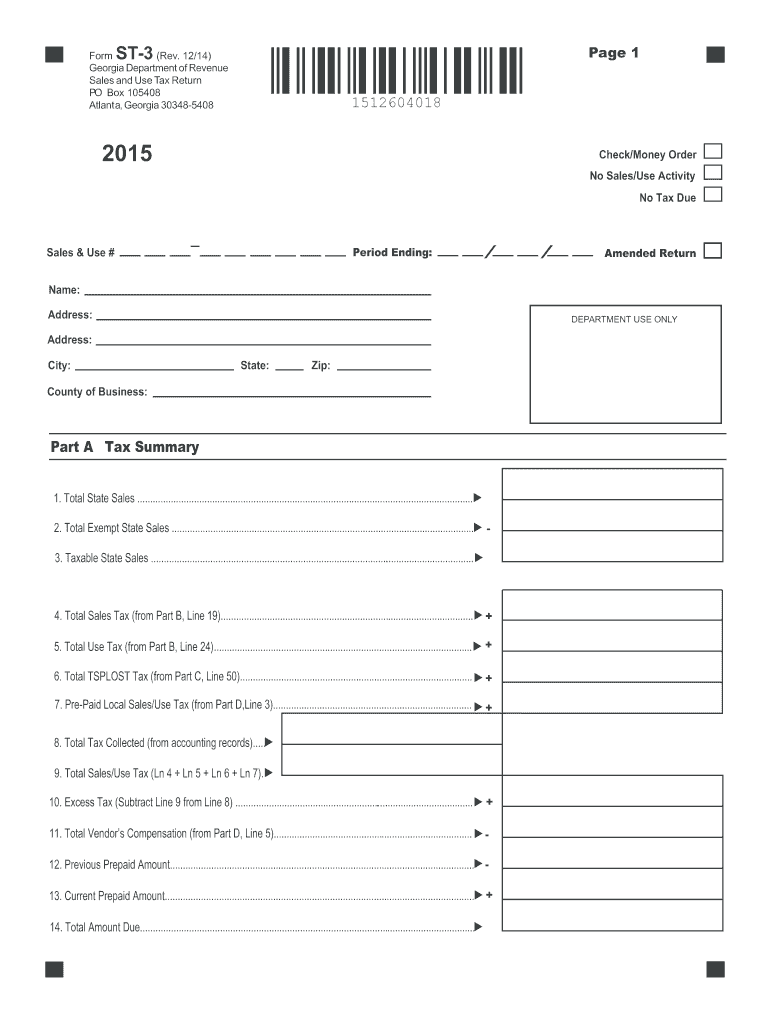
- In Part A - Tax Summary, begin recording the Total State Sales on line 1. This includes all sales and rentals where title or possession transfers within Georgia.
- On line 2, document the Total Exempt State Sales. This should cover both fully and partially exempt sales.
- Calculate Taxable State Sales by subtracting the Total Exempt State Sales (line 2) from Total State Sales (line 1) and record it on line 3.
- Enter the Total Sales Tax Amount on line 4, which can be gathered from Part B, line 19. Record the Total Use Tax Amount on line 5, sourced from Part B, line 24.
- Proceed to document the Total TSPLOST Tax from Part C, line 50 on line 6.
- Capture the Pre-Paid Local Sales/Use Tax for on-road motor fuel (if applicable) on line 7 from Part D, line 3.
- Input the Total Tax Collected from your accounting records on line 8, and then sum lines 4 to 7 for line 9.
- For line 10, subtract the Total Sales/Use Tax amount (line 9) from Total Tax Collected (line 8). This is your Excess Tax.
- Complete line 11 with the Total Vendor’s Compensation from Part D, line 5, and lines 12 and 13 with any previous and current Prepaid Amounts, respectively.
- To determine the Total Amount Due, add Lines 9 and 10, subtract Lines 11 and 12, and add Line 13 before noting the result on line 14.
- Continue to fill out Parts B, C, and D with applicable tax distributions based on your sales activities, ensuring to follow the detailed instructions provided for each section.
- Once the form is completely filled out, review all entries for accuracy, and then save your changes, download, print, or share the completed form as needed.
Complete your documents online efficiently by following this guide.
Experience a faster way to fill out and sign forms on the web. Access the most extensive library of templates available.
Related content
ST-3 Sales and Use Tax Return Effective for Sales from April 1, 2018 through September 30...
Jul 3, 2019 — Institutional sales that are subject to state of Georgia sales tax must be...
Você pode utilizar o controle remoto fornecido. RM-AAU058 para operar o receiver e para...
Get answers to your most pressing questions about US Legal Forms API.
Who qualifies for sales tax exemption in Georgia?
In Georgia, sales tax exemption is typically granted to non-profit organizations, government entities, and specific business purchases that meet the standards defined by state law. To confirm your eligibility, you should review the criteria outlined in the GA DoR ST-3. This will give you a clear understanding of who can benefit from exemptions and how to apply.
What is a Georgia Schedule 3 form?
The Georgia Schedule 3 form is used for reporting specific items, including sales tax-related information for non-residents. This form helps streamline the filing process for individuals engaged in transactions subject to Georgia's tax laws. It is important to understand how to correctly fill out the GA DoR ST-3 to ensure compliance and accuracy in your tax submissions.
How to get a sales tax exemption?
Obtaining a sales tax exemption involves applying through the Georgia Department of Revenue. You will need to submit a completed application form that includes any required supporting documents. Familiarizing yourself with the GA DoR ST-3 can guide you through the process, ensuring that you submit everything necessary for approval.
How do you qualify for tax exemption?
To qualify for a tax exemption in Georgia, you must meet specific criteria established by the Georgia Department of Revenue. This often involves providing proof of eligibility, such as a certificate or documentation that substantiates your claim. For more details on the application process, you can explore the information provided in the GA DoR ST-3.
How to file Georgia sales tax online?
Filing Georgia sales tax online is a convenient process that can be completed through the Georgia Department of Revenue's official website. You will need to create an account, gather your sales records, and follow the prompts for the GA DoR ST-3 submission. This online filing system provides clarity and efficiency, making it easier for you to manage your tax obligations.
Who is exempt from Georgia sales tax?
Certain entities and transactions in Georgia qualify for sales tax exemption. For example, non-profits, government agencies, and specific types of educational purchases may be exempt. If you believe you might qualify for an exemption, consult the GA DoR ST-3 to determine your status and proceed with the necessary documentation.
How do I get my exemption certificate?
Getting your exemption certificate involves verifying your organization’s eligibility for tax exemption and filling out the relevant forms. After completing the necessary paperwork, submit your application to your state’s revenue department. For Georgia, ensure you utilize the GA DoR ST-3 form to facilitate your tax exemption application.
How to get a sales tax exemption certificate?
To secure a sales tax exemption certificate, you must first verify your eligibility based on your state's criteria. Once you confirm eligibility, complete the necessary application forms, and provide required documentation. Utilizing the USLegalForms platform can guide you through this process, helping you obtain your GA DoR ST-3 efficiently.
How to get a GA sales tax ID number?
To obtain a GA sales tax ID number, businesses must register with the Georgia Department of Revenue. This registration can typically be completed online, providing all necessary business information. Once registered, you can proceed to utilize forms such as the GA DoR ST-3 for tax-exempt purchases.
Does Alabama have a sales tax exemption form?
Yes, Alabama provides a sales tax exemption form, allowing certain entities to apply for exemptions. Organizations such as charities, schools, and government agencies can utilize this form to avoid sales tax on applicable purchases. Familiarizing yourself with the process of using the GA DoR ST-3 in Georgia may help improve your understanding of similar forms.
Use professional pre-built templates to fill in and sign documents online faster. Get access to thousands of forms.
If you believe that this page should be taken down, please follow our DMCA take down process here.
This form is available in several versions. Select the version you need from the drop-down list below.