Loading
Get Ma M-8736 2020-2026
How it works
-

Open form follow the instructions
-

Easily sign the form with your finger
-

Send filled & signed form or save
How to fill out the MA M-8736 online
The MA M-8736 form is essential for fiduciary taxpayers in Massachusetts who need to submit an extension payment for their tax returns. This guide outlines a clear process for completing the form accurately online.
Follow the steps to successfully fill out the MA M-8736 online.
- Click 'Get Form' button to access the MA M-8736 document and open it in your preferred editing tool.
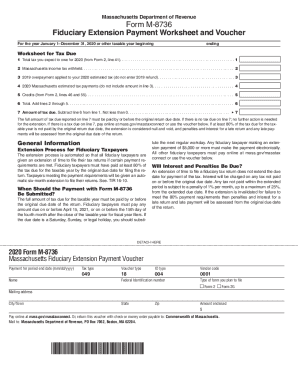
- Start with worksheet section, where you will calculate your expected tax liability. Enter the total tax you anticipate owing for the year on line 1. This figure should be derived from your previous filings.
- On line 2, list all Massachusetts income tax that has been withheld. This amount reduces your total tax due.
- Move to line 3, where you will input the overpayment from your previous year's return that you intend to apply towards your 2020 estimated tax. Do not include any refund amount in this section.
- On line 4, enter your estimated tax payments made for 2020. Ensure not to include the amount listed on line 3 here.
- For line 5, add any credits from Form 2 lines 46 and 55 that can be applied to your tax obligation.
- Calculate the total amount by adding lines 2 through 5 and enter this sum on line 6.
- On line 7, determine the amount of tax due by subtracting line 6 from line 1. Ensure this amount is not less than zero.
- Review all entries for accuracy. If there is a tax due on line 7, make your payment online using the specified methods, or prepare to submit the voucher.
- Once completed, you can save your changes, download the form, print it, or share it as necessary.
Start completing your documents online today for a seamless submission experience.