Loading
Get Ok 538-s 2020-2026
How it works
-

Open form follow the instructions
-

Easily sign the form with your finger
-

Send filled & signed form or save
How to fill out the OK 538-S online
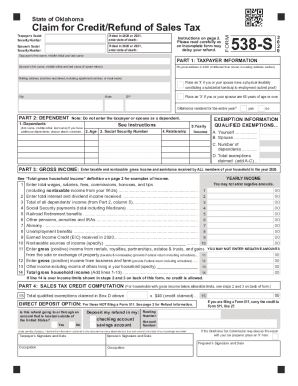
The OK 538-S is a form used to claim a credit or refund for sales tax paid in the state of Oklahoma. This guide provides a clear and detailed step-by-step process to help users complete the form correctly online, ensuring that all necessary information is included to avoid delays in processing your refund.
Follow the steps to successfully complete the OK 538-S form online.
- To start, locate the 'Get Form' button and press it to download the OK 538-S form. This will open the form in your online editor for filling out.
- Begin by entering the taxpayer's Social Security Number in the designated field. If the taxpayer or spouse passed away in 2020 or 2021, include the date of death in the specified section.
- Fill in the names of the taxpayer and spouse, if applicable. Ensure you include their first names, middle initials, and last names in the appropriate fields.
- Provide the physical address where the taxpayer lived in 2020, if it differs from the mailing address. Otherwise, confirm the mailing address includes all necessary information such as apartment number or rural route.
- Indicate whether you or your spouse have a physical disability by placing an ‘X’ in the corresponding checkbox. If applicable, submit proof of the disability.
- Mark the checkbox if you or your spouse are 65 years of age or older. This information may affect eligibility for credits.
- Confirm if the taxpayer was an Oklahoma resident for the entire year by placing an ‘X’ in the appropriate checkbox.
- In Part 2, enter the names of your dependents. Do not include the taxpayer or spouse in this section.
- Proceed to Part 3 and enter the gross income details from all members of your household. This includes wages, Social Security payments, pensions, unemployment benefits, and other income streams. Ensure that all amounts are positive, as negative amounts are not allowed.
- Complete Part 4 by calculating the total qualified exemptions claimed and proceed to indicate whether you would prefer direct deposit for your refund.
- Finally, confirm the accuracy of the information provided, then save your changes. You can download, print, or share the completed OK 538-S form with relevant parties.
Complete your OK 538-S form online today to ensure your sales tax credit or refund is processed promptly.